MacBook Fit and Finish

Why do I give myself the impression that as an Apple FanBoy I am sooooo fussy about the fit and finish of my Apple products that it spoils the enjoyment of them.
A year or so ago, a friend of mine pointed out that a PC user buys an iPod, takes it out of the box, charges it, uses it, chucks it in his/her pocket and gets many hours of enjoyment out of said product, whereas a Mac user buys the iPod, then keeps it hidden away, wrapped in cotton wool until the armour plated case arrives, then spends hours polishing and covering it in plastic, without even realising that it was bought to actually listen to some music (or watch a video).

Now, my point in this post is that I have gone through quite a few MacBooks, all returned for some sort of cosmetic damage. Marks on the case, screen, running hot, etc etc. My latest MacBook was unboxed, with the enjoyment of opening replaced with a tension you could cut with a knife. I knew, just knew there would be something wrong. Low and behold there was a blank mark on the lid, which I polished off and it is almost gone. Opened up and there is a grease mark on the trackpad, again almost, but not 100% removed.

Onto the screen, wow, bright, crisp, no dead pixels, but what do I find, a piece of plastic in the corner of the screen. I am too scared to take a scalpel to it, so there it will stay... for now. Closing the lid reveals yet another problem, it shuts slightly wonky, not enough for a NORMAL person to notice, but about 1mm out and it bugs the hell out of me. I was looking around the back to see if there we any adjustment screws and yes, you guessed it, another problem, the vents have one hole blocked by plastic shaving that has not been milled out correctly.

So what do I do? I can still enjoy the MacBook, I am posting this article using it right now, so do I overlook these small problems and get on with using it, or do I send it back yet again. My point is that I shouldn't let these small things spoil my enjoyment, but why should I spend my time trying to troubleshoot the problems that Apple quality control should have sorted out before sending the unit out to a customer.

Rant over... on a more positive note, the plastic on the trackpad of this week 29 MacBook is different. A lot smoother and a big improvement on the previous ones. I have asked Apple if they have changed the material used and will report back as soon as I have an answer.

Segway comes to the UK

Now I for one loved the idea of the Segway, shame it was so expensive and only available in the USA. For those who are not in the know, the Segway is a two-wheeled scooter for nipping you around at 12.5mph with a unique way of controlling movement. You lean forwards to go forward, left and right to steer, and if you are brave enough, I am pretty sure you can also go backwards.

Three models are available starting at £3,399... yes very expensive, but I think once they come down in price as the technology becomes cheaper to produce I sure they will win out. Under £1,000 and they might get me, but in the meantime I will keep checking ebay for a Sinclair C5.

Segway-UK website.


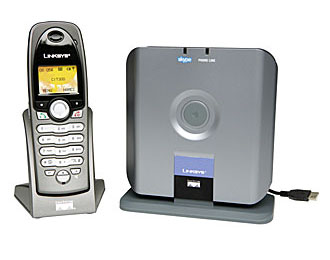
Gizmodo UK have published a nice look of the Linksys CIT300 Dual-Mode Skype/Landline phone. I have wanted one of these for a long time and I might just give one a try. Imagine a handset that I can use to call through Skype without having to start-up my Mac.
The full review can be found here.

Geekanoids - First Year Fun !

Just a quick post to celebrate the fact that Geekanoids has been around for one whole year. A busy, interesting, yet rewarding year, with lots more to come in 2006.

Post count is up and it is my intention to develop the site with more articles, full reviews and maybe even a podcast popping up later in the year.

I do need more support to do this, but will continue to develop Geekanoids as much as I can, to deliver interesting content to our readers.

Before I sign off, a big thank you to all who visit and read the site and for your kind emails and donations. Many many thanks.

Amber MacArthur and Torrent

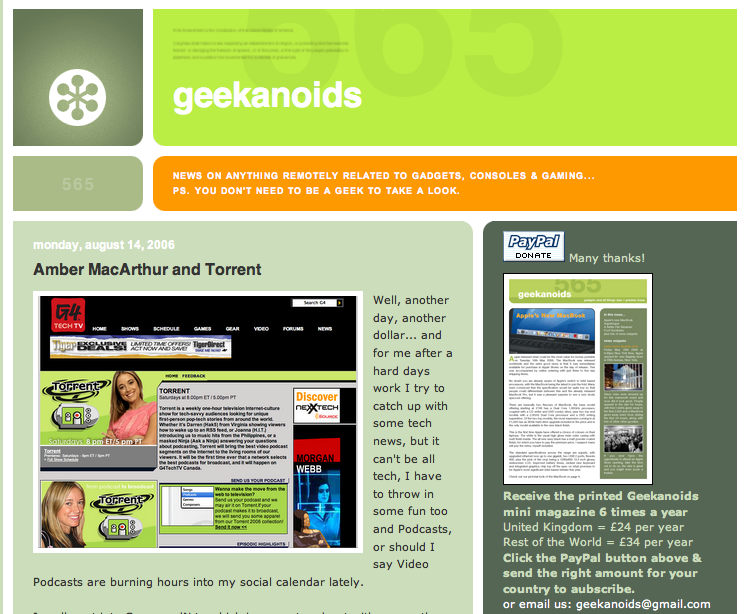
Well, another day, another dollar... and for me after a hard days work I try to catch up with some tech news, but it can't be all tech, I have to throw in some fun too and Podcasts, or should I say Video Podcasts are burning hours into my social calendar lately.

I really got into CommandN.tv which is a great podcast with a smooth delivery and great news, webpicks, tech tips and other special features. Each weekly episode runs to about 15-20 minutes and is nice a refreshing.

This lead me to search a bit deeper and I came across the g4techtv website and their tv show called 'Torrent'. A description from their website hits the nail on the head.

"Torrent is a weekly one-hour television Internet-culture show for tech-savvy audiences looking for unique first-person pop-tech stories from around the world."

Remember Etch-A-Sketch, well check out episode 7 for how to control this classic device with your computer.

Trouble is, being in the UK I cannot get this programme direct, but soon learnt that all episodes are available on GoogleVideo.

Both these programmes are hosted or co-hosted by Amber MacArthur, who delivers the news and articles with the sort of fluency that one could only ever dream of. I urge you to check out the links below.

CommandN.tv
G4TechTV
GoogleVideo

Upgrade to QuarkXPress 7.01 for Intel-based Macs


Quark today announced the free update for Intel support for QuarkXpress 7, now that was quick !
QuarkXPress® 7 is the first page-layout application designed to run natively on Intel®-based Macs. Now run amazing new features in QuarkXPress 7 — such as transparency, direct PDF creation, and Composition Zones™ and Job Jackets™ technologies — at peak performance when you upgrade to QuarkXPress 7.01.

Download it here.

My take on Apple's WWDC 2006

Well, a lot to take in this evening, but first off I think I should get the one big disappointment out of the way... What happened to Steve's "One more thing!" we all waited and waited for the infamous words, but things just seemed to be cut short. The important announcements out of the way very quickly, with the Mac Pro and the sneak preview of Leopard, ho hum.

That is not to say that I was disappointed with what we got. The new Mac Pro is stunning performance-wise and completes Apple's transition to Intel processors. They have done this in swarve sophistication, with very little you could even call a hiccup, so well done Apple on that front.

And Leopard, well what can one say, they have teased us with some stunning features, such as Time Machine, Spaces and Core Animation to name just a few, but left us knowing that there is a lot more to come between now and its' Spring 2007 release. I would not have expected them to reveal all, otherwise Microsoft may well have been listening, or er, recording, or er videoing, ahem, enough said.

So roll on the new few weeks when Mac Pros start hitting peoples desks, and roll on next spring when my most anticipated OS release will be landing on my doormat, promising to be my earliest OS pre-order as soon as it shows on the Apple Store website.

Apple Previews Mac OS X Leopard


Time Machine, Spaces, Plus Enhanced Mail & iChat Extend Apple’s Leadership in Software Innovation

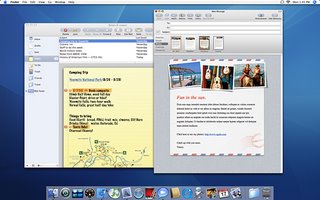
WWDC 2006, SAN FRANCISCO—AUGUST 7, 2006—Apple® today previewed Mac OS® X version 10.5 Leopard, the sixth major version of Mac OS X, to its third party developers. Leopard, scheduled to ship in spring 2007, extends Apple’s leadership in software innovation with groundbreaking new features, including Time Machine, a revolutionary new way to automatically back up and restore everything on your Mac®, and Spaces, an entirely new way to instantly switch between groups of applications required for various tasks. Leopard also includes industry-first advancements in Mail and iChat, including Stationery, Notes and To Dos in Mail; and Photo Booth™-style effects, the ability to “place” yourself in any photo or video as the backdrop for your chat, and live presentations of iPhoto® slideshows, Keynote™ presentations and videos in iChat.

“Breakthrough features like Time Machine and Spaces are good examples of how Mac OS X leads the industry in operating system innovation,” said Steve Jobs, Apple’s CEO. “While Microsoft tries to copy the version of OS X we shipped a few years ago, we’re leaping ahead again with Leopard.”

With its unique ability to let users travel back in time to find deleted files, applications, photos or other digital media, Time Machine is a revolutionary way to protect a consumer’s digital life. Time Machine automatically backs up everything on the Mac to an external hard drive or Mac OS X Server. In the event a file is lost, users can search back through time using an intuitive time-based visual display to find and then instantly restore the file. With one click, Time Machine can restore anything from a single file or photo to everything on a Mac.

Spaces is an intuitive new way to group applications required for a given task into a “space,” then instantly switch between different spaces to bring up the specific applications required for that given task. Users can get a bird’s eye view of all their Spaces and choose where they want to go next with just one keystroke or click of a mouse.

With Leopard’s iChat, Apple takes communicating with friends, family and colleagues to an entirely new level. iChat now makes video chats more fun with the ability to use Photo Booth effects and put images and videos in the background. iChat Screen Sharing enables users to share their desktops with others to work together in real time on an activity, such as editing an iPhoto book, or helping a buddy get the most out of their Mac. With iChat Theater, users can share an iPhoto slide show, a QuickTime® movie or a Keynote presentation within an iChat window.

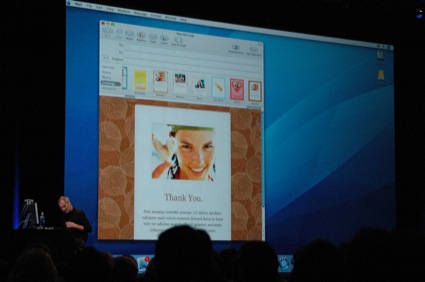
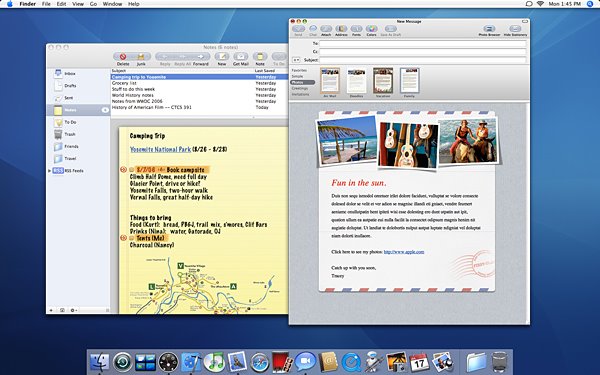
Leopard’s Mail includes breakthrough new features that have never been seen before in a Mail application. Mail Stationery includes more than 30 customisable stationery designs to create stunning emails enriched with beautiful photos and graphics. Templates include photo collections, invitations, birthday cards and other greetings that look great when received on either a Mac or a PC. With Mail Notes, users can quickly jot down thoughts and ideas, add graphics and attachments and use the familiar Mail application to manage them like an email message. In addition, To Dos can be created from any email message or note and viewed in iCal® or sent to friends and colleagues. RSS news feeds now appear in Mail, allowing users to receive news in their inboxes, receive notifications when new stories appear and use Smart Mailboxes to organize news about the same topic in one place.

Additional features in Leopard include:
• full native 64-bit support that allows applications to take complete advantage of 64-bit processing while maintaining full performance and compatibility for existing 32-bit Mac OS X applications and drivers;
• enhancements to Boot Camp, Apple’s innovative technology that was previewed as a public beta in April 2006, making it possible to run Windows natively on Intel-based Macs;
• Front Row™, now available with all new Macs to play back digital content, including video Podcasts using the simple Apple remote*;
• Photo Booth, Apple’s fun-to-use application that lets users take quick snapshots with an iSight™ video camera, add entertaining visual effects with the touch of a button, and share them via email;
• iCal 3 with group calendaring capabilities, event drop box, and standards-based CalDAV support;
• improved Spotlight™ searching that’s even faster, provides richer previews, and lets users search across network mounted folders on other machines;
• a new Movies Dashboard widget for movie times and Web Clip for clipping any part of a web page as a live widget;
• new parental controls including curfews, time limits and remote administration;
• Core Animation, a new graphics technology that makes it easy to create stunning visual effects and animations;
• major enhancements in Universal Access, including improvements in VoiceOver, Apple’s built-in screen reader;
• security enhancements including anti-phishing protection in Mail and Safari™, and an automatic firewall that limits network resources available to an application; and
• new development tools, including Xcode® 3 with full 64-bit support, DashCode™, an easy way to create new Dashboard widgets without writing a line of code, and Xray, for optimizing application performance.

Apple Unveils New Mac Pro Featuring Quad 64-bit Xeon Processors


New Mac Pro Completes Apple’s Intel Transition

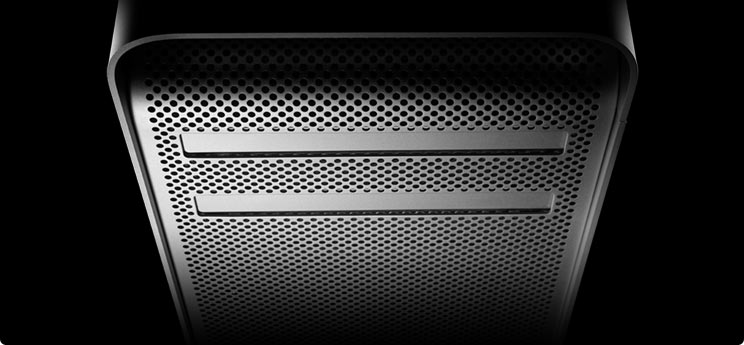
WWDC 2006, SAN FRANCISCO—August 7, 2006—Apple® today unveiled the new Mac® Pro, a quad Xeon, 64-bit desktop workstation featuring two new Dual-Core Intel Xeon processors running up to 3.0 GHz and a new system architecture that delivers up to twice the performance of the Power Mac® G5 Quad*. With advanced performance, greater expansion, higher performance graphics options and unprecedented customisation, the newly designed Mac Pro is the ideal system for the most demanding user. The introduction of the Mac Pro marks the completion of a rapid and seamless transition for Apple, with the entire Mac family now using Intel’s latest processors.

“Apple has successfully completed the transition to using Intel processors in just seven months—210 days to be exact,” said Steve Jobs, Apple’s CEO. “And what better product to complete it with than the new Mac Pro, the workstation Mac users have been dreaming about.”

The new Mac Pro features the new Dual-Core Intel Xeon 5100 series processor based on the revolutionary Intel Core microarchitecture, delivering breakthrough performance and power efficiency. The new Mac Pro is up to twice as fast as the Power Mac G5 Quad running industry standard benchmarks and features two Dual-Core Intel Xeon processors running up to 3.0 GHz, each with 4MB of shared L2 cache and independent 1.33 GHz front-side buses. With 667 MHz DDR2 fully-buffered memory, the Mac Pro also boasts a 256-bit wide memory architecture for amazing bandwidth.

With more than 4.9 million possible configurations, the Mac Pro delivers unprecedented customisation to meet even the most demanding performance, expansion and storage needs. The newly redesigned Mac Pro features an all new, direct attach storage solution for cable free, snap in installation of up to four 500GB Serial ATA hard drives for a total of 2TB of internal storage—the most ever on a Mac—and support for two optical drives to simultaneously read and/or write to CDs and DVDs. Every Mac Pro includes three full-length PCI Express expansion slots and one double-wide PCI Express graphics slot to support high-powered, double-wide graphics cards without sacrificing multiple slots. Providing quick and convenient access to connect the most popular external devices, the front panel of the Mac Pro includes a FireWire® 800 port, a FireWire 400 port and two USB 2.0 ports with additional FireWire 800, FireWire 400 and three USB 2.0 ports on the back panel. Mac Pro also includes dual Gigabit Ethernet ports, optical digital input and output, analogue audio input and output, and optional built-in support for AirPort® Extreme and Bluetooth 2.0+EDR.

Every Mac Pro comes standard with the NVIDIA GeForce 7300 GT with 256MB of video memory, providing built-in support for dual-displays and Apple’s 30-inch Cinema HD Display. The ATI Radeon X1900 XT and the NVIDIA Quadro FX 4500, both with 512MB of video memory, are available as build to order options and provide built-in support for up to two 30-inch Apple Cinema HD Displays. The Quadro FX 4500 also includes a stereo 3D port to connect goggles for stereo-in-a-window applications and is ideal for the most demanding animation, special effects and scientific visualisation applications. The Mac Pro supports up to four PCI Express graphics cards to drive up to eight displays at once for advanced visualisation and large display walls.

Which NAS for Macintosh?

Having recently listened to the latest MacCast (www.maccast.com) I was very interested in the discussion that Adam took us on about various NAS options of Mac users.

For those not in the know, NAS stands for Network Attached Storage and offers various solutions to having a standalone hard drive (or combination of hard drives) attached to your ethernet or wireless network that you can then use to centrally store files or to use for backup purposes. I suppose the main use would be to store media files (all your music and movies) that you can then access via other computers or devices throughout your house.

Now, I am looking for some help. It seems that some manufacturers tell us their devices support Mac OS and others don't, or in some cases the manufacturers do not tell us that in fact their NAS will work fine in the Mac OS. This is where you come in...

...I want to compile a NAS Matrix that will be easy to use and follow, that will show what works with the Mac OS, what type of hard drives it supports, what type of file sharing, if it allows the user to save, manipulate files and set permissions on the NAS device in exactly the same way as on a local hard drive. If you can help, please email your set-up and findings to geekanoids@gmail.com

Coca-Cola & Apple Team Up on Major Music Promotions


Promotion Includes Give Away of 70 Million Songs from iTunes Music Store in the UK & Thousands of iPods in Germany

LONDON—August 2, 2006—Coca-Cola and Apple® today announced a music partnership in Europe that includes major promotions in the UK and Germany and the launch of a new Coke branded music website across Europe, including the UK, Germany, Austria and Switzerland. As part of the promotion, Coke and Apple will be giving away 70 million free songs from the iTunes® Music Store in the UK and thousands of iPods in Germany.

The new www.Coca-Cola.com/music website is a Coke branded music destination launching next week that features iTunes integration throughout, providing fans with links to music and information focused on giving fresh talent new exposure. In the UK, Germany, Austria and Switzerland unsigned artists will have a venue to upload songs, giving them potential for broad exposure on the site through artist highlights, European podcasts available on iTunes, and invitations to play at Coke sponsored European festivals.

To kick-off the partnership, live concerts will be held in the UK, Germany, Austria and Switzerland, with selected live songs and video podcasts from the performances available on iTunes and www.Coca-Cola.com/music.

“We’re excited to announce this partnership with Apple,” said Dominique Reiniche, president of Coca-Cola European Union Group. “Together we are creating a unique and exciting platform that gives young people a voice and allows them to refresh their music experience every day.”