Highs & Lows in Apple Land 2006

With 2006 drawing to a close very soon, I thought it would be nice to share with you my thoughts on the Highs and Lows in the world of Apple over the past year.

There has been so many positive things for us all to enjoy, that I think I will get the few 'Lows' out of the way first, starting with Microsoft's Media Player for Mac. I know a lot of users hated it, but at least if Microsoft had kept developing it may have turned into something worthwhile. Flip4Mac has filled the gap with support for playing Windows Media files from within Quicktime, so all is not lost.

The stock options fiasco for many companies, found its way over to Apple, with them doing their own investigation. This has since come to the news pages again, with the Financial Times reporting that Steve Jobs himself "was handed 7.5m stock options in 2001 without the required authorisation from the company’s board of directors, according to people familiar with the matter." Let us hope that Apple sort things out and get back on the straight and narrow for 2007.

The PowerPC is no more and whilst many are singing praise of the new Intel based Macs, many were raged at the end of the PowerPC chips. I suppose this can be put down to a comfort-zone, where we became so at-one with the G5 and G4 range of Macs that change scared a lot of people (myself included).

On a more positive note, so many good things happened for us all in 2006, to start with the release of new iMacs, MacBooks, and MacBook Pros. Yes, at first I was scared about the move to Intel, but these new models that sport the Intel Core Duo (and now the Core2Duo) chip are fantastic. The MacBook Pro was just an update with a processor change, the iMac much the same, but the new MacBook is really cool. It offers a nice form-factor, excellent performance, built-in iSight and much more besides. It makes me really look forward to what Apple might do next with the MacBook Pro, maybe a redesign is on the cards.

Parallels, Boot Camp and VMWare just made my day. These new software technologies allow you to run Windows and/or Windows applications on your Mac. Each solution takes a slightly different approach, but the end result is pretty much the same. For myself, I do not need to or intend to run Windows on my Mac, I am more than happy with OS X, but for those that would not consider a Mac because they need to run a particular Windows application, well now they have no excuse... which leads me nicely to my next comment.

Apple are selling more Macs than ever, which I think is really a lot to do with the switch to Intel processors. MacBook sales alone are going really well, with this keenly priced 13.3-inch laptop finding its way into many peoples homes. The whole range of Macs has now transitioned over to the Intel processor and this leaves 2007 open for some very interesting new releases and updates.

Adobe is coming along nicely too, with Universal versions of Acrobat and just recently the beta version of PhotoShop CS3. Earlier in the year Quark gave us a Universal version of Xpress, so the main design applications can now really run at full speed. The software transition really has been smooth, with nothing really for anyone to complain about.

2007 is going to be good, we can expect the next version of the OS (Leopard) in January, possibly accompanied by a new iPod, maybe an updated Mac Mini and later in the year the much rumoured Apple mobile phone, iTV, and hopefully some sort of touch screen based portable Mac. Wow, what a year 2006 has been, and what a year we have to look forward too in 2007. Thanks Apple, and thanks Steve.

iLink plus modified iPod launched

MSB Technology today launched its iLink, a combination of dock and modification to your iPod, which promises a true digital audio output and improved sound...
The iLink "is the world’s only iPod docking station that offers a true digital audio output. This is done by modifing the iPod to allow digital audio to be sent to the iLink and output via toslink optical, coaxial or balanced AES/EBU format. With this output, audiophiles can transform their iPods into a high-end source and achieve sound reproduction on a par with a good CD transport. The iLink comes with an RF transmitter that allows the iPod to be moved around the listening room while still maintaining the best audio quality available."
The iLink costs $1995 which includes the iPod modification, or it can be bought as a package supplied with a pre-modified iPod. This is a lot of money to invest, but I am sure some audiophiles will be tempted.

PS3 Owners trade in for Wii

Reported over at Gigagamez, hungry for fun PS3 owners, who queued for hours to pick up their PS3, are now trading in their beloved consoles for a Nintendo Wii. The research, carried out on craigslist.org showed an astonishing 48 different PS3-for-Wii trades going on in San Francisco alone. My theory on this is the lack of good PS3 titles, coupled with so many reports of gamers having so much fun playing Wii Sports, Wii Play, Rayman, and of course Zelda.

The Inside Story of the iPod

One to watch out for, the Discovery Channel is showing a new documentary all about the the iPod. "The iPod Revolution goes behind the scenes to uncover how Steve Jobs brought Apple back from the grave to create one of the most popular electronics devices ever made: the iPod."
It has already shown, so I hope I am not giving you the news too late to pick up a repeat. Keep an eye on your channel listings or if you know where to (legally) download it.

Zipeg V.1.2.1 Released

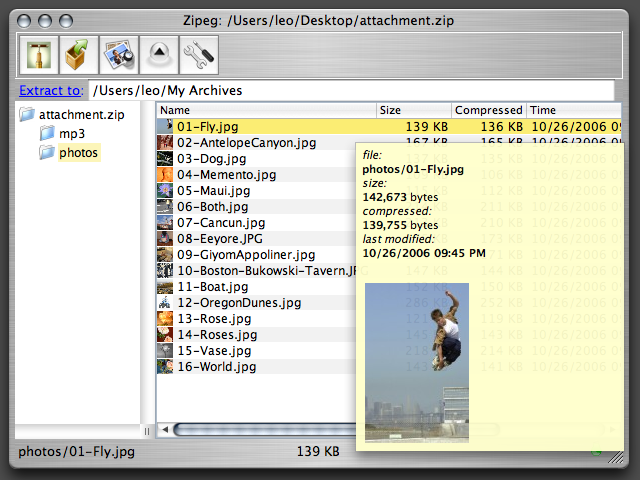
Zipeg version 1.2.1 is now available. I was surprised when I stumbled upon Zipeg, at just how handy this small utility would prove to be. This application "is free Macintosh file utility for Mac OS X, that allows you to open and explore content of zip, rar and other types of archives quickly and easily, preview files and images before you extract them. Than you can unzip or drag and drop the files you really want." It really is that simple, but very very useful. It is freeware and available to download here. You can also make donations to the author.

FileJuicer V.4.7.1 Released

Echo One has released FileJuicer version 4.7.1. This little application has many features and allows you to extract images from various file and folder types. For example from a PowerPoint slide show, PDF files. You can also recover images and video from erased flash cards, and text from damaged files. It does a lot more than I have mentioned here, so head on over to the Echo One website to check out the full list of features. FileJuicer is available to download and try, or to buy for $12.95.

Post Christmas Sales

Well, I hope you all had a good sleep yesterday, after stuffing yourself with Turkey and all that Chrimbo cheer. Well, in the search for some post-Christmas bargains, I found this little one over at Empire Direct. OK, so I know many of you will want the latest Intel based MacBook, but some prefer the older iBook for its screen and styling.

Point your browser over here and you could pick yourself up a brand new Apple iBook, with a G4 1.2GHz processor, 12-inch display, 32MB ATI 9200 graphics card, and a 30GB hard drive. All this for £399 plus £8 delivery. It is in stock now, but be quick, I don't think this will be available for too long.

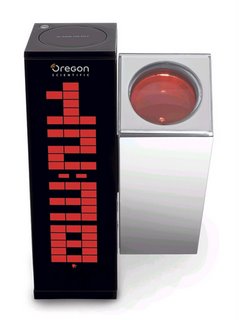
Oregon DP100 World's First Daylight Projection Clock

Oregon Scientific, today unveiled their new Daylight Projection Clock, the DP100. We just love gadgets like this, and the fact that the DP100 can be used in the daytime is a massive plus point. We will be bringing you a full review of the DP100 in the New Year, but in the meantime, catch the full details below.

This sleek and stylish timepiece is the world’s first LCD clock capable of illuminating numbers whilst in daylight. It projects the time and indoor temperature on any surface and is also light-source sensitive, adapting to how bright or dark its surroundings are. The projection arm can rotate up to 180º, meaning the time can be viewed from any angle at almost any distance, breaking the mould from traditional timepieces.
Its innovative design is as clever on the inside as it is beautiful on the outside, designed with a minimalist black and silver casing. An infrared motion sensor means that the Daylight Projection Clock is motion activated, making it unnecessary to fumble for buttons, when changing the LCD display from; digital clock, calendar, alarm and indoor temperature. By using the “projection auto” mode, the projected image will alternate between time and indoor temperature, providing more convenience. When the alarm sounds, setting the 8-minute snooze function is easy by waving just above the clock, again using motion trigger mechanism. The clock displays temperature information in both Celsius and Fahrenheit as well as animation effects for aesthetic purposes.
This world’s first daylight projection clock is sensitive to light source and can automatically and intelligently adjust the intensity of the projected image according to changes in lighting throughout the whole day. Sleek, stylish designed. It is practical and decorative.

For details on Oregon products call 0845 601 3964 or visit www.oregonscientific.co.uk or head on over to www.firebox.com where you can order the DP100 for £79.95.

Wii Sports - Wii will get fit !

So we have had a long (and tiring) weekend with the Nintendo Wii and under normal circumstances we would exit Sunday fresh for the new week ahead. Things are different now we have the Wii, for a change everyone who played is knackered. All weekend the game that got the biggest play-time was Wii Sports Bowling, this game is just so addictive. Such a simple concept, swing your arm, release the bowling ball, knock down the pins. The main difference here, is that you do it from the comfort of your own home, and it is fun! There are additional controls like angling the Wii Remote to spin and curve your ball, plus an extra training mode with Power Bowling, where the number of pins steadily increases.
Baseball was our second favourite, where timing is absolutely crucial. One player pitches, the other is determined to hit that home run. Again great fun, with curve balls, and different angle hits.
Tennis is pretty good too, but we struggled with two players, let alone four, with just not enough room to avoid knocking into each other. You really need a big screen to enjoy four player tennis.
Golf and Boxing got a short look in, but just didn't seem that well put together, somewhat an after-thought. Of the two Golf seemed the better choice, where actually swinging the Remote at different speeds determined the power of your shot.
All in all, Wii Sports is a great game, made even better by the fact that it is free with the Wii console. The biggest difference to the console wars this Christmas is that you will be running around your lounge, burning off all that Christmas dinner. Thanks to Nintendo we can all get fit and have fun at the same time.

Nintendo Wii - UK Launch Initial Impressions

Nintendo Europe launched their much anticipated Nintendo Wii today. Plenty of consoles were available in Kent, and we rushed back to the office to open the box and set-up our new baby.
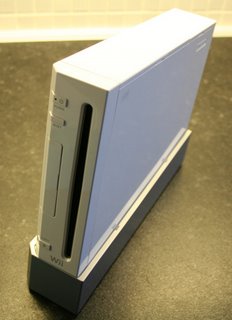
Initial impressions are that it is a small, well made and stylish box of tricks. It feels just right, nice, white and glossy. Set-up is easy, plug into the mains, scart to the TV, connect the sensor bar cable, turn on, and within 15 minutes (this included a couple of internet updates) we were ready to play.
Everything about the interface seems smooth and polished. Even entering the boring stuff, like WEP security settings seems fun, hovering your hand on the screen with the Wii Remote. The console is very quiet in use and sliding the disks in is a joy. We are testing Wii Sports now, so will report back later with our findings.
For £179.99 you can buy yourself a lot of fun this Christmas. Our main thought (with an Apple flavour) are that if Apple had done a console in 2006, it would have been the Wii !

Nintendo - Wii have no Wiimotes

Anyone who is anyone today will know about the launch of the new Nintendo Wii, and whilst consoles seemed plentiful, there was no extra Wii Remote Controls in most retailers deliveries. This left a lot of people disappointed, the only option they had was to buy WiiPlay, a game that included the controller, but cost a little extra. Let us hope they filter through in the next few days. Check back on Geekanoids later today, we have a Wii and will be giving our initial impression. (actually, we know what we think now, but are too busy playing Bowling)...

iRooster - Wake up to your Mac

iLove clever and useful little applications for the Mac, it is what makes the platform unique and great. iRooster is one such application. In it's most basic form it is an alarm clock for your Mac, but has some nice little features too. For example, the Lullaby feature allows you to fall asleep to a track from your iTunes library. Another unique feature is 'Chimp Tunes' which allows you to "Find out what everyone else wakes up to with this iRooster music recommendation service." A 14 day trial is available, with the full version costing $9.95, available for download here.