IRISCard Pro Scanner Review

Getting information into your computer quickly and easily is a problem a lot of people face. Managing information is yet another problem. With the mass of emails most people have to deal with lately, any product that promises to ease the strain is well worth a look. The IRISCard is one such product that concentrates on one type of scanning and promises productive results.

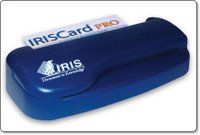
The IRISCard is available in three versions, a mini version which scans in monochrome only, and two Pro versions (one is for the Asian market) which add full colour scanning and advanced sorting options. On test here is the Pro version, which is a compact dark blue coloured unit.
The package contains the tiny scanner unit, a USB cable, quick start guide, instruction manual, and the IRISCard software. There is no power supply, as the scanner draws its power from the USB port.

When testing these products I always try to set things up without the manual, just to see how easy it is. So after installing the software, I plugged in the scanner and launched IRISCard. The screen I was presented with was pretty clean and easy to find my way around. Placing a business card in the back of the scanner sets things going. There are no buttons to press and the unit draws the card in automatically.

Scanning a card takes about ten seconds, and once scanned a thumbnail appears in the software. Highlighting any scan gives you are larger view of it in the main window. The quality of the scan is not fantastic, but at 600dpi is more than readable, but that is not what this product is about. The IRISCard scanner and software combination uses Optical Character Recognition and some clever sorting skills. The resulting information is sent direct to an application which you choose prior to scanning. A drop down menu gives you options of Text, HTML, vCard, Address Book, AppleWorks 6, Microsoft Entourage, and Now Contact…

For my tests I selected Address Book, as this is what I use as my contact manager. After making a scan and opening the Address Book application I was impressed with my first findings. I scanned six different business cards and all the information was transferred with just one error. Everything else was in the correct place, the telephone and fax numbers were correct, even really long email addresses. The only correction needed was not really the softwares fault, it was someone's name which appeared as all uppercase on the business card, so it appeared the same in Address Book.

Scanning some more awkwardly designed cards managed to throw the IRISCard software, but it seemed that anything it did not quite know where to put, it placed into the notes field. This meant that I could easily cut and paste into the correct Address Book field. You can also export cards as other formats, after they have been scanned. So I could export the cards are HTML complete with hyperlinks to my contact websites. The only problem here is that you could not export a single card by selecting it, you simply get the whole lot.

So would I buy one, or recommend an IRISCard Pro? Well, for myself, probably not, I just don't have enough business cards. The product is really good at what it does though, so if you have a lot of business cards, or perhaps you meet knew contacts every day, then this is a superb solution. It is a very handy device and just being able to slot in a business card and have the info sent to your contact manager application is brilliant. If you have this need, then you will find the IRISCard Pro invaluable.

Product: IRISCard Pro
Price: £135.00
Supplied by: I.R.I.S. s.a
Contact: +32-(0)10- 45 13 64
Sennheiser CX300 Earphones - wise upgrade !

Listening to music… a great British pastime, and something I enjoy every day. It comes as no surprise, mainly because it has been said many times before, that the earphones bundled with the iPod, or any MP3 player, are not brilliant. The iPod earphones are better then most, but for a small investment you can get a lot more music for your money.

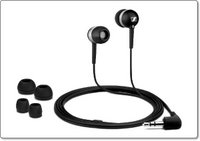
Sennheiser are well known for their high quality offerings, but this needn't break the bank. Their CX300 earphones weigh in at under £20 and are available in either black, white or silver. They come supplied nicely packaged with small, medium and large ring adaptors for a comfortable fit. Of the three colours I really like the black, which are accented with silver rings. To see the other colours there is a link at the end of this review to the Sennheiser website.

Being the in-ear type of headphone, comfort is very important. Out of all the earphones I have tried, these win on the comfort stakes. The material used is very soft, with a matt finish and the medium size for me was just right. They don't fit too deep inside the ear canal, just a little way in. Once fitted they really block out a a lot of outside noise, so are perfect if you listen in a noisy environment.

Of course, I used the CX300's with my trusty iPod (what else) and the clarity of sound delivered was superb. Bass was nice and deep, the mid-range was rich and the treble end was very good too. In comparison to others, it was only the higher end that was not as refined, nothing to worry about, but worth mentioning. Even at high volume they behaved impeccably, keeping things clean all the way.

So when you buy an iPod, yes the supplied earphones are OK, but invest a little and you will enjoy your music a whole lot more. The paltry asking price for a pair of CX300 earphones really do make this a no brainer… it is definitely money well spent.

Product: Sennheiser CX300 earphones
Price: £39.99
Amazon: £16.24
Supplied by: Sennheiser UK
Contact: info@sennheiser.co.uk

*Please be aware, there are a lot of cheap copies of headphones on ebay. Please ensure you are buying genuine products when making a purchase.

Netgear SPH200D - THE Best Skype Handset

The Netgear SPH200D is a cordless phone that allows you to make calls via Skype without the need to have your PC switched on. Yes, I know I have been bringing you a lot of these different solutions lately, but this offering from Netgear takes things one step further…

OK, so over the past month we have looked at a cordless Skype handset from Belkin, a handset that incorporated wireless calls with a mobile phone from Tovo, and now Netgear have the SPH200D, which is brand new to the market.
The SPH200D allows you to make those all important and often free Skype calls, but it also incorporates a DECT handset, so you can make normal landline calls via your regular provider (eg. BT).

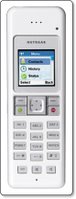
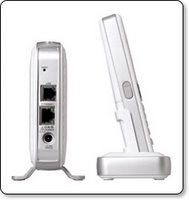
What you get in this package is pretty impressive. You get the handset itself, which is a really nice white and silver affair. It sports a full colour screen, nice backlit buttons, and a four way rocker button. There are additional buttons for intercom, mute and the built in speakerphone. Also in the box you get a receiver module, it looks like a mini ethernet hub. You plug this into a power socket, then one cable goes into your router, or ethernet network, and the other cable connects to a spare phone socket. The last nice addition to this package is a docking station. You can locate this pretty much anywhere in your house, as long as you can plug it in with the supplied power adapter. This dock is where you sit your handset when not in use, and it keeps the juice topped up too.

When the handset first powers up, all you have to do is sign into your Skype account. You then have access to all your contacts, call history, and you can set your status, in exactly the same way as you do on your computer based Skype application. You can also change the ring tones, display brightness and contrast, in pretty much the same way as you would a mobile phone. If you are calling a Skype contact, then the call is free, completely free. Or you can call a regular phone through your Skype account. This is called a SkypeOut call and depending on what subscription or promotion you are on, there may be a small charge.

Now for what makes the SPH200D really useful…>>> the DECT (Digital Enhanced Cordless Communications) capability. Most households have cordless DECT phones nowadays. The SPH200D has this too and it makes this a really invaluable package. When you dial in a number or choose to call a regular landline or mobile phone from your contacts, you are given an option. You simply select to either make a SkypeOut call or a Landline call. This is brilliant, because now you have the best of both worlds. You can use Skype when it is cheapest for you to do so, and make regular calls when Skype is not the best option.

Before I tell you that you MUST buy this product, just a little snippet about Skype. I am currently on a promotion where I get totally free national calls in the UK for the next six months. If you are not on this promotion then regular Skype works like this.
If you are calling a Skype user, for example someone who has Skype on their Mac or PC, then the call is free. However, if you are calling a mobile, landline or an international number, then you will be charged. You basically have to keep your Skype credit topped up. The rates are very good though, especially on international calls.
There is also a new service called Skype Pro. An initial 5 month subscription will cost £9.20 which includes approximately £3.40 of calling credit, after the 5 months introductory period is over £1.50 per month is deducted from your Skype credit.
The Pro benefits are that you only pay a 3p connection fee per call to UK landlines, with nothing extra for the minutes you use. You also get free voicemail, plus a discount on a SkypeIn number. The regular Skype-to-Skype computer based calls remain free.

OK, so enough on Skype, back to the Netgear SPH200D. This is the best combination product I have seen so far and it has got me really excited. Since I have had it to review it has worked flawlessly and has not failed me once. The design is awesome, with a crisp glossy white finish. You can even expand the system with up to three additional SPH150D handsets (£65-£70), so you can have Skype and DECT in every room. The average street price is around £105 though I have seen it dip under the £100 mark if you shop around. This pricing is very good and buys you a top class product that is not only a real pleasure to use, but will also save you a lot of money.

Product: Netgear SPH200D
UK Street Price: £105 (UK average)
Supplied by: Netgear, Inc.
Contact: +44 (0)1344 458200
Link to product datasheet.

Tovo t450g - Mobile & Wireless Calls

The Tovo t450g is a new offering from Mobiboo Europe which promises easy switching from a mobile network and a VOIP access point. So, in much the same way as all the Skype handsets that have been appearing, this handset adds mobile capability to the equation.

Now, don't let that Skype comment throw you off track, this handset does NOT run Skype. Instead it connects to a wi-fi router or hotspot and routes the call through this via the Tovo network. The handset is supplied sim-free, so you can put your current card in it and dial away as normal. Big savings are promised from the handset, but this assumes that you are happy to make most of your calls via VOIP, and that you cancel your BT landline (not a requirement, but it is in the savings equation).

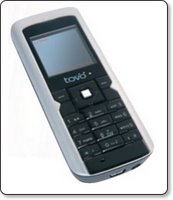
The handset itself is OK, not really that impressive, sort of a step back. Yes, the connectivity technology is there, but the screen is a bit of a let down and the camera is only a 0.3 megapixel affair. You do get a charging dock in the box, along with a USB cable and earphones, which go some way to making up for the mediocre handset.

Call quality over a normal mobile connection is very clear and over VOIP is more than acceptable, so I can see a place for this in the market. I think that to make full use of it, you need to be dedicated to making the most of the VOIP calls. You can connect to any open wi-fi hotspot, or any Mobizone, Cloud, or looseconnection hotspot, of which there are many dotted around the UK.
The biggest draw for anyone (including myself) would not be the handset, but the potential savings. A sim free handset will set you back £169.95, but gets you a very cheap pay as you go package, costing just 2p per minute for local and national calls. Tovo-to-tovo calls are free, plus you can tag on Mobiboo Dashboard to your service, which gives you a service similar to Skype for a fixed yearly charge.

Can I recommend the Tovo t450g? Well, it is not for me, but that is because I have a mobile I am happy with and use Skype for the rest of my calls. However, if you want a no fuss handset, that combines a mobile phone with a wireless VOIP handset, then yes, give it a try. You are not getting the latest and greatest in the design stakes, but you are getting the latest in technology.

Product: Tovo t450g
Price: £169.95
Supplied by: Mobiboo Europe Limited
Contact: info@mobiboo.com

DocumentWallet Review - get organised!

DocumentWallet from GGT Enterprises is one of those applications that is difficult to see how and why one would use it, but I decided to dig a little deeper and see if I could find a permanent place for it in my dock.

Basically, in its simplest form it is a scan organiser. You scan directly into the DocumentWallet application and then it asks you to assign certain tags to your scan. The fact that after every scan you can assign a title, date, and category makes this a very useful tool, but it also does a lot more besides.

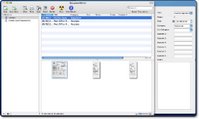
For my test I scanned in a selection of post office receipts and bank statements, each time entering the relevant information. I could choose between scanning a single item, or if I selected 'Scan Multi' for a multiple page statement, they would be saved under a single entry in the application window. So once my scanning was complete they were presented in a three pane window (see image). To the left are the 'Collection' titles, which work in much the same way as iTunes or iPhoto libraries. The upper right window gives me a list of my scans, which can be sorted by clicking on the relevant heading. The bottom window shows me thumbnails (which are adjustable in size) or my scans. There is also a details drawer, which pops out the right hand side. This displays information about any scan that I highlight.

Once all this information is in DocumentWallet I can do various things with it, and this is where the application shows its usefulness. I can search my documents and as I type in the amount of scans (and their thumbnails) reduce accordingly. Apart from the powerful searching, I can also highlight a scan and save, print, email, or burn it. If I select email, it is placed within my email application, ready for adding some text to the recipient.
Another handy feature is being able to add to my scanned documents, so as I receive more credit card statements (rather unfortunately this is bound to happen), I can add them to my existing scans. This makes for very neat and effective organisation. I can even add to things from external files, so if someone emails me some receipts or invoices, I can add them into the relevant location within DocumentWallet.

So, what started out as a simple scan organiser, really has shown me that I can make my files a lot easier to handle. Just for the sole purpose of getting my bank and credit card statements into order, it is worth its $29.95 asking price. It works with any TWAIN compliant scanner, and you can even try it for 21 days before you commit to making a purchase. If you do a lot of document scanning, then I would highly recommend that you try DocumentWallet, you will be pleasantly surprised.

Product: DocumentWallet
Price: $29.95
Supplied by: GGT Enterprises
Contact: support@receiptwallet.com

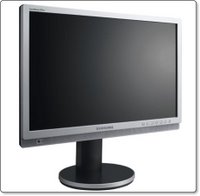
Samsung 215TW LCD Monitor - Spot on!

The Samsung 215TW is one of the few products I was actually happy to purchase for Geekanoids, without seeing it first. I had heard so many good things about it that I was just hoping that the rare occasion when my wallet comes out, was justified.

Samsung offer a lot of monitors in their range, and there are so many choices from other manufacturers. Apart from the reviews, the 215TW boasts an impressive specification. Of note, the 21-inch 1680x1050 panel offers 1000:1 contrast, is nice and bright at 300cd/m2, and has a nice 178 degree viewing angles. The panel is also true 24-Bit, so there is no trickery like found in some cheaper panels to achieve the 16.7 million colour display. Although I didn't buy this to play games, the 8ms response rate makes it ideal for gaming and video playback too. On the rare occasion I have played a game, there was no ghosting or noticeable lag.

Connections are very impressive, with DVI and VGA inputs I can have two computers connected at the same time. You are also treated to composite, s-video and component video inputs. Just for the fun of it I tried a DVD player through the composite video connections, and I was really impressed. Colours were punchy and the crispness and detail would be hard to beat.

My main use for the 215TW is graphic work, encompassing Photoshop, Quark Xpress, Freehand (yes, I still use Freehand) and a lot of web based work. The colour accuracy is very impressive and the display backlight is so uniform, it really is hard to find fault. Well, the only thing negative I can say is that the 215TW is so difficult to move. It has a very nice slide mechanism for adjusting the height of the display, which makes it difficult to lift. Thank goodness that you don't have to move these things very often.

There are a lot of cheaper monitors out there, some even adding an extra inch whilst still be cheaper. Be warned though, these cheaper monitors use different display technology. They would be OK for gaming, but if you are serious about graphic orientated work, then it is worth spending that little bit extra. There is no better test than seeing a monitor with your own eyes, but if you are not able to do this and you rely on mail order, then give a Samsung 215TW a go... I am certain you will not regret it.

Product: Samsung 215TW
Price: £360
Purchased from: Pixmania UK
Contact: 08700 118 117

Total Training - Learn Adobe Acrobat Effectively

Learning a new application can sometimes be a pretty daunting experience, well it was for me anyway. That was until I stumbled across Total Training, who publish a series of DVD's with a difference. So, I decided to brush up on my Acrobat skills courtesy of "Total Training for Adobe Acrobat 8 Professional".

Now, what I thought I would receive and what I got was a nice surprise. Not one to read the instructions first, I popped the first of the two DVD's supplied into my MacBook. When Apple DVD Player didn't launch I decided to take a quick squizz at the instructions to reveal that I had to install an application called Launchpad, which incidentally works on both Mac and PC platforms. Once this is installed I could get things underway.

Just to explain what Launchpad does… apart from the regular video playback controls, it allows you to easily bookmark sections. This allows you to easily revisit sections at a later time. There is also a Bonus Button that unlocks special features throughout the training session. Plus, a Get More Training button allows you to view additional tutorials and to see the entire catalogue of DVD's available. You can also alter the size of the training video as well as access a contents and help section.

Once the training gets underway, you will soon see that the way features are explained is really invaluable. The first sections gives you an excellent overview of Adobe Acrobat, followed by creating PDF files, linking, commenting and security within your files. The more advanced second DVD gives you details of how to create forms, preparing PDF files for prepress, presentations and how to work with layers. There is a lot more covered besides what I have mentioned here, so it is important that I emphasize just how thorough this training package is. I came away from this experience with a much better knowledge of Acrobat, along with things that I did not even know were possible. The beauty of training like this, is that you can do it at your own pace, take breaks when you want to, and of course you can go over sections as many times as you need to grasp the particular subject. The Total Training for Adobe Acrobat 8 Professional package is worth every penny.

Product: Total Training for Adobe Acrobat 8 Professional
Price: £120 +VAT.
Supplied by: Ceritec (UK)
Contact: 0870 766 9826

Lindy HD Enclosure - Save yourself some cash

If you need to add extra storage to your computer an external hard drive is the easy and relatively cheap option, with large hard drives available at really good prices. However, if you already have an old IDE hard drive, it would be a shame to waste it, when it could be put to good use. Also, bare IDE hard drives are so cheap nowadays that the product I am looking at today could be right up your street.

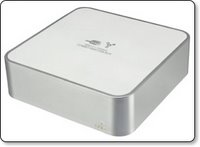
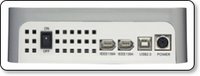
The Lindy USB2 & FireWire Combo Hard Disk Box is an enclosure that is styled to match the Apple Mac Mini. It is made of plastic, that is sprayed silver, with an internal metal shielding that is coated with white plastic on the top. It really does look like a Mac Mini and would be ideal for stacking. The front of the casing sports a small activity LED and round the back there is two FireWire 400 ports and a USB 2.0 port, as well as the on/off switch and power connector.

Inside there is a standard molex power connector and an IDE cable and plug. The plastic mounting sled can accommodate a 3.5-inch IDE hard drive, which can be picked up for bargain prices if you shop around. Mounting screws are provided and within about five minutes I had a drive installed, the enclosure casing back together and was plugged in to my Mac. Performance is certainly on par with a other external hard drive of this nature and I personally think that the plastic construction helps dampen the hard drive noise, so it is nice and quiet. Their is no fan in the enclosure, so cooling is purely achieved via the vents on the back and underside.

Although this case is obviously designed for Mac Mini users, due to the standard FireWire and USB connectivity, it can be used with any PC or Mac. It looks nice and swish, so it wouldn't look out of place on any desk. The Lindy USB2 & FireWire Combo Hard Disk Box is well constructed, easy to set-up and offers great value for money. It'll give you a sense of achievement if you re-use an old hard drive. Even you if buy one just to put in this enclosure, you will be happy that you saved some pennies.

Product: Lindy USB2 & FireWire Combo Hard Disk Box
Price: £39.99
Supplied by: Lindy UK
Contact: +44 (0) 1642 754000

Belkin Wi-Fi Phone for Skype review

Today I am taking a look at the Belkin Wi-Fi phone for Skype... Skype, Skype, Skype, I always sing the praises of Skype. For those of you who do not know, Skype allows you to use your broadband connection to make voice and video calls to other users Macs or PCs, so long as they have Skype installed. In addition to this, you can also make what are called SkypeOut calls to regular landlines and mobile phones. These cost a small amount of money, but in my case I am on one of the many promotions Skype run from time to time, so I get my landline calls free until May 2007.

The only downside of Skype is being tied to a computer. You need to have your Skype application running and logged in... that is until now! Over the past few months Skype handsets have been appearing. No, I don't mean the wired handsets that cost around £15, this new breed use Wi-Fi to connect to your wireless router and then to the outside world.

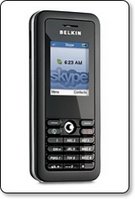
Sorry for the long introduction, back to the Belkin Wi-Fi phone. In the box you get a USB cable (for charging from a computer), a mains powered charger, a manual on CD-Rom, a Quick Start Guide and the handset itself. The handset looks very smooth, comparable in to a medium sized mobile phone. It has a numeric keypad, two soft keys, call start and end, plus a four-way navigation key. The screen is full colour and a nice size, with a nice crisp display. The feel of the handset is great, it has a smooth rubberised feel to it, very nice in the hand.

Setting up couldn't be easier. After the initial charge, you switch the handset on, set the language, and it then searches for wireless networks. Picking the network you want to connect to will ask for a password (if it is protected). This is asked for as a hexdecimal string, so if you network is protected by WEP for example, do a quick google search for a converter to convert from WEP to HEX. With the security part out of the way you will be asked to either sign into Skype or create a new account. Assuming you already have Skype, typing in your username and password is all that is needed. You can then access you contacts list, set your status to online, away, busy etc, and make calls to other users computers or SkypeOut calls to landlines and mobiles. Navigating the menus and setting up other aspects of the handset is just as easy. You can even change your ring tone (three to choose from) and set the handset to vibrate on an incoming call…

The beauty of the Belkin Wi-Fi phone is that now you can leave it connected to Skype all the time. You will get a lot more use out of it because it is just so natural to pick up a phone and dial. Of note, if you switch your computer on and sign in to Skype, your Belkin connection remains unaffected, so in theory two people could use one Skype account at the same time.

Call quality varied, but this happens even when calls are made via a computer. I would say that 80% of calls I made with the handset were absolutely fine, crystal clear. 10% were acceptable, perhaps sounding more like mobile phone quality. The remaining 10% were a bit choppy, due to network traffic or moving a bit too far away from my wireless router. So, in the house, this handset was already proving its worth, but what about if I was out and about? Well, if you have an account with The Cloud, BT Openzone or another provider, then so long as you are within range of a hotspot, you can connect and make calls. I tested this at a local Cloud hotspot and connected successfully first time. The call quality was great and I was so pleased that I had made a totally free call.

Incoming calls are also possible. If someone has you in their Skype contact list, then they can easily call you from their computer. If you want people to be able to ring you from a regular handset then you would need to subscribe to another service. You can get a SkypeIn number, which can be based in various UK towns and cities (what I mean by this is, that even if you don't live in London, you can have a London based SkypeIn number). This costs around £23 per year, but can be had cheaper if combined with other services. A SkypeIn number also gets you access to voicemail services, so callers can leave you messages. The fact that people can call you, makes the Belkin handset an even more viable proposition.

Should you buy one? is very easy to answer. If you already have Skype, then yes, invest in one of these. If you don't have Skype, then get it and start experiencing the world of free or cheaper calls. I do not think that the Belkin Wi-Fi phone for Skype could replace a mobile phone, but if you are up for the challenge or live in an area with a lot of hotspots you could easily reduce your mobile bill. The only thing I would like to see is a docking station to charge the handset whilst indoors, other than that the Belkin handset is faultless.

Product: Belkin Wi-Fi Phone for Skype
Price: £99.00
Supplied by: Belkin UK
Contact: +44 (0)1933 35 2000

Griffin XpressCable review - optical goodness

Griffin Technology, better known for their iPod accessories also make a variety of cable solutions. Previous reviews of their products have revealed great quality, so I was very interested to learn if their Xpress Cable would keep up the good work.

The Griffin XpressCable is a digital optical audio cable, coloured white with grey accents to the tips, it measures in at three meters long. So straight out of the packaging you can use it for connecting various audio equipment like a DVD player or your XBox 360.

Also supplied is a pair of 3.5mm mini-jack adapters. These can be plugged onto either or both ends of the cable, converting the toslink connection to a 3.5mm stereo jack. This allows you to take advantage of some Apple Mac's digital audio outputs, such as the Mac Mini, PowerMac G5, Airport Express, not forgetting the later Intel based Macs, oh and before I forget, the iPod Hifi.

So, a cable is a cable, yes? Well, a lot of people say that digital signals are already digital, so a £5 cable will work as good as a £50 one. I strongly disagree with this misconception. The XpressCable is well constructed, the plugs seem to have longer bodies to them, so you get a real solid connection. I have experienced optical cables before that just fall out of my XBox 360, but there was no such problem with the Griffin Cable. Audio delivery was crisp and clean, definitely on par with optical cables costing double the money. If you want a well constructed cable that delivers great audio, without breaking the bank, then look no further... oh and I almost forgot, it is white in colour, so it will match your Mac gear to a tee.

Product: Griffin Technology XpressCable
Price: $19.99
UK Street Price: £12.00
Supplied by: Griffin Technology
Contact: +1 (615) 399-7000

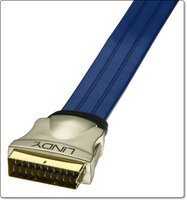
Lindy Premium Gold Flat Scart Cable Review

The Lindy Premium Gold Flat SCART cable promises to deliver a "Superior quality connection for your Home Cinema equipment", well it certainly is a unique looking cable, so let's take a look at what you get for your hard earned money…

To kick things off, if you have plenty of cables and things are maybe looking a bit messy, you know the normal spaghetti junction, then this flat design may well help things out. It can easily be routed through tight spaces, even underneath equipment if that makes it easier to hide things.
The gold plated connectors are absolutely fantastic, some of the best quality I have experienced. When inserting into the back of equipment, I found the connection to be very easy and more importantly secure.

I tested the Premium Gold Flat Scart Cable with two different devices. A Pioneer DV454 DVD player and a Panasonic DMR-EX85 HDD recorder. The Pioneer showed the biggest improvement over the standard supplied scart cable. The easiest way to describe it in layman terms is that there was less interference and the picture picked up a definite sharpness (whilst still looking very natural). The Panasonic delivered a good picture anyway, but I still saw a slight improvement in detail.

This cable from Lindy UK is available in a variety of lengths, with the 1m version on test costing £21.99. For this very reasonable amount you get a really high quality scart cable. A lot of people shun spending money on things like this, but if you put this up against the scart cable that came with your kit, you will be amazed. If you are just starting out, then put aside £40 or £50 at least for a couple of these, you will not regret it.

Product: Lindy Premium Gold Flat SCART Cable (1m)
Price: £21.99
Supplied by: Lindy UK
Contact: +44 (0) 1642 754000

Recharge4 Review - Extend Gadget Battery Life

The ReCharge4 from Exspect promises to deliver a smart battery that recharges a lot of different devices. Ranging from mobile phones to MP3 players, claiming to extend battery life up to four times. Read our review below to find out if it really does deliver on its' promises.

The ReCharge4 might be mistaken for something that has been done by so many other manufacturers, but even within the first few hours of use, I was convinced that this little device had been really well thought out. The package consists of the ReCharge4 battery unit, which has a power input on the base for recharging its internal 4800mAh lithium-ion battery. On the top right of the unit is another socket, where you plug an extension cable, it is this cable that you then attach the various tips that in turn plug into the device you want to charge or use.
On the front of the unit is a small button and a line of green LEDs. If you press the button it shows you how much juice is left in the Recharge4. It takes around six hours to initially charge it to full power. In my test it was showing a full charge after three hours, but I left it plugged in for the full six hours to be on the safe side.
To finish the package off, you get a mains adapter for recharging the internal battery and a small cloth pouch for carrying everything around…

So, I had a fully charged ReCharge4, now for the test. I had a Motorola L7, Nokia 6280 and a Samsung D600, both with completely flat batteries. The Motorola went first and after connecting the charging lead, I plugged in the supplied Motorola tip and then put this into the phone. You are supposed to press the button on the front of the ReCharge4 to initiate charging, but I found that this was not necessary as the L7 started charging straight away. After three hours the L7 was fully charged and only two out of the eight LEDs on the ReCharge4 had gone out. Because I am clever at maths, I guess that means a quarter of the capacity had been used. The Nokia 6280 also fully charged in around 3.5 hours and the Samsung charged to almost full capacity before the Recharge4 unit ran out. This was pretty impressive, to be able to fully charge two mobile phones and almost a third from such a small device.

There are three versions available for mobile phones, MP3 players, or portable gaming devices. The main unit remains the same, it is just the tips that are supplied that changes. For example, the mobile phone version comes with tips for almost every Nokia, Motorola, Sony Ericsson and Samsung offering. The MP3 version comes supplied with tips suitable for the Apple iPod, Creative, iRiver and MP3 players that charge via USB. These small tips are available separately, so you can buy the most suitable main package and then add a few individual tips for specific devices.

In summary the Recharge4 is a very well designed, compact, and useful device. The asking price represents pretty good value for money. Combine this with the fact that you can add new tips for your new devices and you have a useful device that will help power your gadgets for many years to come.

Product: ReCharge4
Price: £39.99
Supplied by: Exspect UK
Contact: info@exspect.co.uk

Crumpler Sticky Date - Carry your Mac in Style

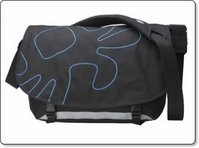
If you want to carry your Apple kit, or other computer related items around with you, you shouldn't have to settle for an all black affair, you know, one of those bags that lets everyone know exactly what you are carrying. Something stylish, and more importantly a bag that really works well by protecting your valuable kit. A name that always comes high on an Apple users list is Crumpler, they are well known for high quality and the fact that they are designed for us Apple fans. In the following review I was lucky enough to be able to try their Sticky Date Big Logo bag...

The Crumpler Sticky Date Big Logo is one of Crumplers larger bags and it will swallow anything from a 12-inch right up to a 17-inch widescreen MacBook Pro. Colour combinations also look great on this bag, the black/Blue combination we have here is the most understated, or you can go for the bright firebrick red/lawn or olive/yellow combo. Each bag also come with a high visibility strip on the front, so you can be seen if out and about in the dark.

Styling aside, what about the quality and carrying ability?
Well, the quality is second-to-none, made of what Crumpler call "Original 1000D Chicken Tex", it is a very strong fabric and has a waterproof lining. The buckles and shoulder strap are made of the same material that car seat belts are made from, so they are very strong, and all adjustable. The shoulder strap also has some nice padding, as does the back of the bag, so it is kind to your shoulders and back…

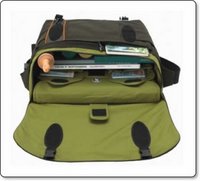
Open up the front flap, which is secured with some buckles and large velcro patches, you are presented with so many pockets and a lot of space. The very first pocket you encounter is zipped, this contains another zipped compartment, two velcro fastened pockets about the size of a 5th gen iPod and some pen holders.
Inside the main body of the bag, are three more velcro pockets for smaller accessories, plus two mesh fronted pockets (again fastened by velcro) where you can store yet more accessories whilst still being able to see what you have in there without having to open them. This central compartment is about big enough to fit an A4 ring binder, maybe two at a pinch.

The back compartment is where you store your laptop. It has a large velcro flap to make your laptop safe and a sleeve for your lappie that can be completely removed from the main bag. This sleeve is made of the same material as the lining and will swallow up to a 17-inch widescreen MacBook Pro. It also has a semi-rigid divider inside, which allows you to segregate some accessories, for example your mains adapter.

So what did I fit in it?
I loaded up the Sticky Date with a 13-inch MacBook, mains adapter and mains cable. Then slotted in my 5th gen iPod, cable yoyo and sync cable, my JVC Everio HDD camcorder, JVC charger, my small Canon digital camera, 4 compact flash memory cards and to top it all off, three copies of MacUser magazine. Now this was getting a little heavy, but still had room to spare... and if you are feeling brave, the bag sports some external loops, so you can hang a Crumpler pouch onto a loop for your mobile phone, few !

I found that the Sticky Date Big Logo was really easy to use. That removable laptop sleeve is really useful, and the capacity is just right for that single day trip. I was able to use the rest of the bag for lots of accessories, with the peace of mind, knowing that my expensive laptop was safe from getting bashed. This is one rugged bag and it looks great too. If you have invested in a laptop and have the need to carry it on business or perhaps on holiday, then please do not spend your hard earned cash without checking out the Crumpler Sticky Date Big Logo or if you need something a little different, you are bound to find a suitable offering from the rest of the Crumpler range.

Product: Crumpler Sticky Date Big Logo
Price: £99.00
Supplied by: Crumpler UK
Contact: crumpler@simms.co.uk

Overflow Review - organise your dock

Overflow from Stunt Software has been installed on my computer for almost a month now. I waited this long to bring you the review because I wanted to see if I actually used it, and if it performed well. So exactly what is Overflow?

Well, if you dock is anything like mine, it is bursting with too many icons, all stretched out in one long line. Sometimes I find myself searching for an application just a little to long. Yes, I know that Spotlight is there for quick launching, but I want something more GUI based... this is where Overflow steps in.

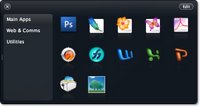
Overflow is a small application that be set to launch at system startup, it resides in your dock, but is also accessible by pressing a keyboard shortcut, which you can set to pretty much anything. Upon launch you are presented with a grid of spaces and some categories listed along the left side. To set Overflow up you simply set the categories, such as applications, utilities, documents etc. Then you drag the icons (as you would to the dock) into the grid.

Then you can quickly and easily launch applications from Overflow. It is nice that you can also drag regularly used documents into the application. For example, if you always load up the same letterhead template to use, drag it into Overflow and you can save yourself some time. Nice touches like an icon glowing when you put your mouse over it, make this seem like a really simple, yet swish app. You can even navigate Overflow via your keyboard, which makes it a lot quicker to launch things.

Overflow doesn't really do anything that you cannot do with the dock, but what is does is organise it, and for that I commend it. This is one application that will definitely stay installed on my Mac.

Product: Overflow
Price: $14.95
Supplied by: Stunt Software
Contact: info@stuntsoftware.com

Griffin iKaraoke Review - Fun with your iPod

How about a bit of fun with your iPod? Well, crack open some beers, get your iPod out and connect a Griffin iKaraoke, for what should be some guaranteed fun.

The iKaraoke landed on my desk this week, so I rushed home to get it tested by the ultimate gadget users in my house, a few invites went out to my gaming friends, and the house was full for a bit of a knees up. This new gadget from Griffin Technology plugs into the dock connector on the bottom of your iPod. I tested it with a 5th generation full size iPod, but it also works with the 1st & 2nd gen Nano, the iPod Mini, and the 4th gen iPod.

Once plugged in you can sing along to your favourite music track, which is great, but Griffin took things one step further... you can add reverb to your voice via an on-screen setting, plus you can also connect the unit to your home hi-fi unit via a line out socket. So you Karaoke skills (or lack of in my case) can be broadcast at some pumping volumes. Already great fun, well to push the possibilities even further, you can lose that wire connecting you to the hi-fi…

The iKaraoke also has an FM transmitter built in, so you can set a frequency for it to transmit on (again on the iPod screen) and then tune your hi-fi into the same station, and voila! it will have you prancing around the room (or hiding) whilst singing along to your tunes. You can also mute the music, which allows you to announce something, this could be useful if you were using this at a party on in a pub situation.

The microphone unit that you hold in your hand is really well made, and has a high quality feel. It has a switch for turning vocals on and off in your music, plus iPod controls around the other side for track selection, and play/pause. When you power it on, there is also a nice red glowing light around the tip. Back to your iPod screen and you can also adjust the volume of the music, so that your voice can be heard.

So did we have a good time? Well, it was fun, and everyone wanted to have a go. The minor problem was the quality of filtering out vocals from the music tracks, which is a tricky thing to do in all fairness, but could have been better. The FM transmission was pretty good, not fantastic quality, but more than acceptable.
On a more positive note, the iKaraoke really did deliver on what it promises, and that is to have some good fun. Out of the eight people (not including myself) that used it, I asked if they would buy one. Well two said yes, but did not have iPods. Of the remaining six that all own iPods, five said that for the low cost they would definitely invest in an iKaraoke. What more can I say...

Product: Griffin Technology iKaraoke
Price: $49.99
UK Street Price: £25.00
Supplied by: Griffin Technology
Contact: +1 (615) 399-7000

Lindy Premium Gold HDMI Cable Review

If you have found yourself investing in new HD technology lately, then you best treat yourself (and your kit) to something that will give you the best out of your investment. Everything is moving into the High Definition age, and connections are changing. Scart is out and even component video connections, which for a long time were considered to give the best picture available, are being replaced by HDMI.

In the same vein that a scart cable bundled with a DVD player was pretty useless, this new HD kit either comes with a very flimsy cheap HDMI cable, or more often than not, none at all. The Premium Gold HDMI cable from Lindy UK offers a really robust looking cable, with some high quality construction, without asking ridiculous prices…

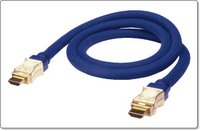
The cable is of a striking blue colour, it is triple shielded and comes with 24K gold plated connectors. The connector on each end is of a unique RF-BLOK patented design, which provides increased EMC shielding and reduces interference. Now, whilst I could not test for this interference in my set-up, I should add that the clarity of image delivered by the Lindy cable over the one bundled with the Toshiba HD-A1 HD DVD player was nothing short of phenomenal. The colours were vibrant, there was no fringing and just the overall feel of the cable construction oozed quality.

The two metre cable we tested here costs £48.99, which is not cheap, but you will be hard pushed to pick up this length and quality of HDMI cable anywhere else. You can buy the Premium Gold HDMI Cable direct from Lindy UK in lengths from 0.5m to 15m, and you get a 25 year warranty thrown in for good measure. Remember to add one of these to your 2007 High Def shopping list.

Product: Lindy Premium Gold 2m HDMI Cable
Price: £48.99
Supplied by: Lindy UK
Contact: +44 (0) 1642 754000

Trend Micro Internet Security 2007 Review

Hello and welcome to the review of Trend Micro Internet Security 2007. Again I am dictating this review with vista speech recognition. It was essential when setting up my new vista laptop that I give it the necessary protection from the outside world. There are many virus and internet protection suites available, but quite a few are slow in bringing out bicester compatible options. Trend stepped up to the mark with their new vista certified version of the Internet Security suite.

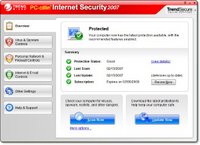
Installation was very straightforward taking just five or six minutes to complete, followed by the obligatory virus definition updates. Once everything was fully up to date you are presented with a very nice user control panel. This shows the current protection status, the dates of your last scan and last update, followed by when your subscription expires.

This application gives you protection against viruses and spyware, a personal firewall, wireless network protection, and the ability to protect other computers on your wired network. Moving on there is also phishing protection, a spam filter, web site access controls and date or theft protection… Pretty much every aspect of your online activities can be protected in one way or another. What I like about Trend Micro Internet Security is the fact that it seems to integrate so much better with the system than offerings from the likes of Symantec. What I mean by this is that it doesn't take over your system, all too often when installing a Symantec product I have experienced problems with connecting to the Internet and to other computers on my network.

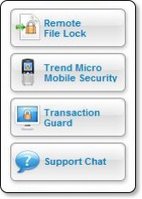
Apart from the excellent experience so far, this Trend product also offers some really nice additional tools. Without going into into too much detail Remote File Lock really grabbed my attention. It allows you to create a folder on your PC or laptop and assign a pin number to it, then you can drag any private or sensitive documents to this folder. In the unfortunate event of your PC or laptop being stolen you can lock the contents remotely of the folder via the Trend Security website and prevent your files from being accessed. If you then later recover your stolen property, you can reverse this action and unlock your files. The extra services panel on the user interface also allow you to access Trend Micro Mobile Security, Transaction Guard, and Support Chat.

Mobile Security provides virus protection for your mobile phone, which is a growing area for concern. Transaction Guard is free software that allows you to protect your personal information whilst completing things like Internet banking or password sensitive actions. This is not an online service, but a free application that you physically install on to your PC. Support Chat is quite simply access to online live support. One last thing worth a mention is the HouseCall three scan feature available on the Trend website, this allows you to scan a PC with the web based software and it delivers you hate detailed report of security threats detected on your computer.

In summary I am very impressed with the amount of features offered by Trend Micro Internet Security 2007. Not only is the interface a pleasure to use, but the installation process was a breeze. If you need to protect your windows based PC, then look outside the circle and try something different for a change. If you have never heard of this product then the Trend Micro website does a very good job of explaining exactly why their product is superior. I for one will never go back to a Symantec based product. Trend Micro Internet Security 2007 is available starting at just £39.95 for a downloadable version with a one year subscription to updates, or £59.95 with two years of updates. If you prefer to have a boxed version lend this costs the same amount but with an additional £4.50 shipping. I should also mention that this cost gives you a licence to install protection and three PCs, now that is what I call value for money.

Product: Trend Micro Internet Security 2007
Price: £39.95 (start price)
Supplied by: Trend Micro UK
Contact: sales@trendmicro.co.uk

SyncWear Shirt - Wear your iPod !

The newly designed SyncWear MP3 Shirt for the iPod Nano certainly was something a little different for me to look at this week. This is a second generation design from "Malachi & Company" under the new SyncWear name. For a very short history lesson, the previous generation shirts were sold under the PodWear ProActive name.

This short sleeve shirt is made of 100% polyester and to touch it feels very high quality. If you look at the stitching it really is impeccably made. The shirt is very lightweight and lends itself well to sports use, though it could be used for any occasion. So let's take a look at what makes this shirt unique…

As the title suggests, the SyncWear Shirt was designed with the iPod Nano in mind, but it does offer a lot more besides, so if you don't own a Nano please keep reading. At the base of the shirt is a dual-layer 3-in-1 side pocket. One of the inner pockets is custom fitted for the Nano, the pocket next to this will accommodate a USB type MP3 player, such as a 1st generation Shuffle. There is then a layer of material between these two small pockets and a larger storage area. The idea for this larger area is to bundle up your excess headphone cable. The pocket is then secured with two velcro tabs.
Now, at a pinch I managed to fit a full size 5th generation iPod in the larger pocket, albeit with only one velcro tab secured. I also managed to fit an Archos 404 Cam MP3 player in there, with both velcro tabs secured. This should give you an idea of just what can be used with the SyncWear Shirt.

Along the side of the shirt are two fabric loops, through which you thread you headphone cable. This keeps it nicely tucked out of harms way. The upper loop is just below the neck on the front of the shirt (as shown in the photo). This is my own minor problem, that whilst this works absolutely fine, I personally would have like the same loop repeated on the back of the shirt, just to give me another wearing option, but I really am splitting hairs here.

The blue SyncWear Shirt that I tested is a really nice deep navy blue colour. It was (and still is) very comfortable to wear, it is very useful and above all, it looks very stylish. It is also available in black, red, and black with navy trim, plus their is also a women's cut version. I never thought I would be impressed by a piece of clothing, but know I find myself saying that "a T-Shirt has made me me want to go out more and get active with my iPod". Anyone who does a sport, or carries their iPod around a lot, should pick up a SyncWear Shirt, you really won't regret it.

The RRP on the SyncWear Shirt is $33.99, but for a limited time you can pick one up for $29.99 with free ground shipping in US and just $8.99 shipping to the UK. This equates to a total delivered cost of around £20 for the UK, which I think represents great value for money.

Product: SyncWear Shirt
Price: $33.99
Supplied by: Malachi & Company
Contact: contact@malachiandcompany.com

Razer Pro Pad - Mouse Pad Review

When optical mice hit the scene they were touted to be capable of tracking on almost any surface, in much the same way that a CD smeared with jam would still play. Users soon came to realise that whilst optical mice were a massive step forward, if you wanted accurate movement the mouse surface was still very important.

The Razer Pro Pad aims to gives you a far superior surface to those 99p squishy jobs that you can buy in your local supermarket. Standard mouse mats are OK, but the rubberised offerings are not great for smooth optical tracking.
What you get with the Pro Pad is an anodized aluminium base, topped off with a very smooth white surface on both sides. The coating is non-slip, which basically means that if it ultra-smooth, whilst still offering the correct amount of resistance. Each side of the pad is slightly different, one being a little rougher and giving more feedback. On each corner of the Pro Pad are small foam rubber feet, that raise the surface about 1.5mm off the desk and stop the pad sliding around everywhere. Like the mouse surface, these are on both sides, so you can flip your pad over.

The size of the Pro Pad is huge, measuring 330mm by 265mm (and just 2.5mm thick), so you get plenty of room to move your mouse around. It does take up quite a bit of desk space, so I think it really is aimed at the serious user. That said, if you can accommodate it, then please do take a look as this is a very high quality product and will enhance the way you use your mouse.

Having tested a lot of mice and mouse pads, I can say that the Pro Pad really impressed me. The surface offers just the right amount of resistance and really is ultra-smooth. If I was searching for a negative, then making the Pro Pad 10mm or 15mm smaller would make it perfect (for me). If you own an optical or laser mouse and need it to track correctly, then I highly recommend that you check out the Razer Pro Pad today.

Product: Razer Pro Pad
Price: £19.95 (average UK)
Supplied by: Razer USA Ltd
Contact: saleseu@razerzone.com

Transcend Speedy Secure Digital Memory

When choosing digital memory nowadays we are spoilt for choice, so to make your decision easier I took a look at two offerings from Transcend. I chose to look at this particular brand on four counts, performance, reliability, price and the warranty.

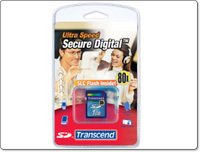
Both the items tested here are Secure Digital memory cards. An 80x speed 1GB card and a faster 150x 2GB card. I don't believe in quoting transfer rates and getting all technical, because in real world situations they really mean nothing. If you want the transfer rate specifications then they are available on the Transcend website. I tested both cards in a Nokia 800 internet tablet, and a JVC Everio hard drive camcorder. In the Nokia 800 the 80x speed card performed very well. It seems that the Nokia 800 sometimes suffers from slight jumps in video playback, which I really put down to the bitrate of the file you are playing back. In comparison the 150x speed card did improve things, and it was noticeable. I put this down to the read rate being better on the faster of the two cards…

Testing the cards in the JVC Everio was a different matter. I used them for the still capture feature of the Everio. Both cards really performed almost identically, with differences in write speed being less apparent, really down to a split second.

Transcend have a good track record for the reliability of their cards. In my short term test I experienced no write or read errors at all, I am hoping that I can hang onto these cards a little longer and report back on how things are going three months down the line. Pricing is also very competitive, if you jump down to the end of this review you will see just how keenly priced they are. The lifetime warranty is also difficult to better, rest assured that if you treat your memory card well and it develops a fault, Transcend will swap it out.

Now there is a difference in pricing between the 80x and 150x speed, so where should your money go. Well, my advice would be that if you are buying for a consumer level digital camera, the 80x speed is sufficient and will save you a little money. If performance is paramount, for a pro camera or video playback, then it is definitely worth spending that little extra on the 150x speed version.

Product: Transcend 150x 2GB Secure Digital Card
Price: £21.15 (average)
Supplied by: Transcend UK
Contact: sales@transcend-uk.com

Product: Transcend 80x 1GB Secure Digital Card
Price: £12.93 (average)
Supplied by: Transcend UK
Contact: sales@transcend-uk.com