Apple Improves iPhone Specs for June 29

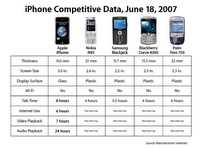
Apple today announced that iPhone™ will deliver significantly longer battery life when it ships on June 29 than was originally estimated when iPhone was unveiled in January. iPhone will feature up to 8 hours of talk time, 6 hours of Internet use, 7 hours of video playback or 24 hours of audio playback.* In addition, iPhone will feature up to 250 hours—more than 10 days—of standby time. Apple also announced that the entire top surface of iPhone, including its stunning 3.5-inch display, has been upgraded from plastic to optical-quality glass to achieve a superior level of scratch resistance and optical clarity.

“With 8 hours of talk time, and 24 hours of audio playback, iPhone’s battery life is longer than any other ‘Smartphone’ and even longer than most MP3 players,” said Steve Jobs, Apple’s CEO. “We’ve also upgraded iPhone’s entire top surface from plastic to optical-quality glass for superior scratch resistance and clarity. There has never been a phone like iPhone, and we can't wait to get this truly magical product into the hands of customers starting just 11 days from today.”

Read the full press release here.

Apple UK open new shop in PC World

This came as a surprise to me, but news has appeared on Apple's website detailing a new shop they have opened within PC World at Enfield, Middlesex, UK. My previous experiences with buying Apple kit from a PC World has left a lot to be desired, so this news is very welcome. The page on the Apple website explains how the full range of desktops and laptops are on display, with regular demonstrations of the kit and related software. Good move, let us hope this helps to spread the word.

7Digital Cheaper Music Downloads in the UK

A new service from 7Digital offers users a chance to download MP3, AAC and WMA music tracks from leading artists (and some exclusives) starting at just 50p per track. It is great to see an iPod friendly, DRM free service that can save some pennies for users. Another great feature is that your download history is stored in your account, so you can access your downloads from anywhere you have an internet connection. Of note, video downloads are also available.

Loads of iPhone apps including gas.app

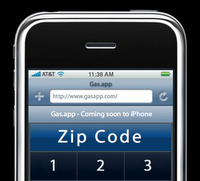
There are new applications for the iPhone springing up everywhere now, but how about checking this one out. Gas.app improves googlemaps and adds more gas stations (amongst other things). Check it out and let us know what you think in the comments.

Coverflow for Files in Leopard

There are lots of new Finder enhancements in Leopard, but one that interested me was Coverflow, which works in much the same way as it does in iTunes, but gives you large previews of your photos, PDF files and other documents. Flick through them just like you would in iTunes. Looks really good !

Check out Apple's new site

Wow, even though we didn't get any new hardware announcements from WWDC, the new site design is superb. Check out the expanding sidebars on the Apple website for starters, very cool.

Apple Mac OS X Leopard - Official

Apple today unveiled a near final version of Mac OS X Leopard, the sixth major release of the world’s most advanced operating system. Scheduled to ship in October, Leopard introduces over 300 new features, including a new Desktop and Dock with Stacks, an intuitive new way to organise files; an updated Finder featuring Cover Flow™ and a new way to easily browse and share files between multiple Macs; Quick Look, a new way to rapidly preview most files without opening an application; Time Machine, a new way to easily and automatically back up and restore lost files or a complete Mac®; Spaces, a powerful new feature to create groups of applications and instantly switch between them; and enhanced iChat and Mail applications, which easily allow users to communicate even more creatively.

“Leopard is the best release of Mac OS X to date, surpassing even Tiger, and will further extend Mac OS X’s leadership as the most advanced and innovative operating system in the world,” said Steve Jobs, Apple’s CEO. “We think current and prospective customers are going to love Leopard, and that it will help make the Mac even more popular.”

Leopard includes a completely new Dock featuring Stacks, which can help manage a user’s desktop clutter caused by browser and email downloads. With the click of a mouse, users can instantly fan out the contents of a stack to easily see each item. Leopard’s Finder has been completely redesigned, adding Cover Flow as an innovative way to quickly browse and locate files and applications. Finder’s new Sidebar simplifies the organisation of files on a Mac, and adds easy access to shared Macs and PCs on a home network. Subscribers to .Mac can also use the new “Back to my Mac" feature to browse and access files on their remote Macs over the Internet. Also new in Leopard is Quick Look, an innovative new way for users to instantly preview almost any file, and even play media files, without opening an application.

With its unique ability to let users travel back in time to find deleted files, applications, photos and other digital media, Time Machine is a revolutionary way to protect your digital life. With just a one-click setup, Time Machine automatically keeps an up-to-date copy of everything on the Mac. In the event a file is lost, users can use Mac OS X’s Spotlight™ to search back through time to find and then instantly restore the file. Time Machine can automatically back up a Mac to an external hard drive connected with a FireWire® or USB cable, to a server, or wirelessly to an AirPort Extreme® base station with an attached hard drive.

Leopard also includes three new technologies that take full advantage of the latest developments in processor hardware: full native 64-bit support to enable applications to take complete advantage of 64-bit processing while still running side by side with existing 32-bit Mac OS X applications and drivers; easy multi-core optimization and scheduling to take advantage of the latest Intel hardware; and Core Animation, helping developers easily create animated user experiences as amazing as Leopard’s Spaces and Time Machine in their own applications.

Other new features in Leopard include:

• Leopard Mail, offering more ways to customise and add personal style to email than ever before, with more than 30 beautiful stationery designs and layouts that look great on a Mac or Windows PC; Notes, making it as easy to take and organise notes as it is to compose and read emails; To Dos, for creating lists viewed directly in Mail and automatically sync them with iCal®; and data detectors that automatically sense phone numbers, addresses and events so they can be easily added to Address Book or iCal;
• Leopard iChat with iChat Theater, letting users present photos, presentations, videos and files in a video conference; Photo Booth effects, enabling users to transform their iChat video in real time with fun distortion and colour effects; and video backdrops that allow users to choose any photo or video that makes them appear to be anywhere in the world, or out of it;
• Leopard iCal, introducing powerful group calendaring features based on the open CalDAV standard that make it easy to organise and coordinate schedules with other people;
• Spaces, giving users a powerful new, clutter-free way to create customised spaces on the desktop with only the applications or files needed for each project, and the ability to quickly switch between them with one click of a mouse or keystroke;
• Web Clip, bringing anything that a user wants from a web page to Dashboard as a live widget;
• Boot Camp, making it possible to run Windows natively on Intel-based Macs*; and
• new development tools, including Xcode® 3 with a next generation editor; an all new Interface Builder for easier integration of advanced animation effects into an application; simpler debugging; and support for Objective-C 2.0; DashCode, a better way to create new Dashboard widgets without writing a line of code; and Xray, a new application for optimising application performance.

Pricing & Availability
Mac OS X version 10.5 Leopard is scheduled to ship in October and will be available through the Apple Store® (www.apple.com/ukstore), Apple’s retail stores and Apple Authorised Resellers for a suggested retail price of £89 (inc. VAT) for a single user license. The Mac OS X Leopard Family Pack is a single-residence, five-user license that will be available for a suggested retail price of £139 (inc. VAT). Volume and maintenance pricing is available from Apple.

Apple US Store gets revamp

With the WWDC keynote just finished, the US Store (online) is back up and running. It has had no new products introduced to the site, but does sport a completely new look. What do you all think?

Apple WWDC 2007 Coverage

Well, it is about 5 minutes until the WWDC 2007 starts and Steve Jobs takes to the stage. We will be giving you as much coverage as we can here, from the various feeds we are following, including some live audio feeds that we have access to. I hope everyone enjoys the announcements to follow.

6pm GMT (10am San Francisco): the Keynote is starting, lights dimming. New commercial playing, sounds very funny, joking about Vista.

6.03pm: Steve takes to the stage.

6.05pm: Announcements about attendance and ADC members, going over Intel switch.

6.06pm: Intel CEO Paul Otellini on stage.

6.07pm: Apple Store worldwide is down. Paul Otellini given special Apple Award designed by Ive.

6.09pm: Eleectronic Arts, developing for Mac again. This includes Command & Conquer, Need for Speed Carbon, Harry Potter and Battlefield 2142 - all in July.

6.12pm: Wow, Mac games will come from EA at the same launch date as PC titles. Madden 08 and Tiger Woods 08 in August.

6.14pm: John Carmack from iD Games on stage, showing some new technology for the first time. A game can be built first, then the graphics get done.

6.16pm: Moving on to Leopard. 22 million active OSX users at present. Leopard will ship in October with 300 new features. Showing 10 new features now.

6.19pm: New features include; Transparent menu bar and dock. Dock is also thinner, or should I say narrower. New 3D look. Dock allows 'stacks' which are like folder organisation right in the dock. Stacks pop out into a neat window or column that has transparent background, can be used to open files or even applications.

6.27pm: New finder windows look similar to iTunes. You can navigate through files like in Coverflow.

6.29pm: New .Mac feature 'Back to my Mac"… Seems like .Mac is automatically updated with your Macs IP address, so it knows where you are. Allows you to easily get files from your work Mac through your .Mac service.

6.35pm: New feature, Quick Look, allows you to preview most file types without opening the application you used to create it. Quick Look even plays movies!

6.39pm: Leopard is fully 64-Bit, but works with both 32 & 64-Bit applications. Massive speed improvement shown opening a large image. Running filters on the image, almost 3x faster in 64-Bit.

6.41pm: Core Animation. Stunning animation effects whilst searching for a video.

6.44pm: Boot Camp. Built right into Leopard. Runs XP and Vista. Comments on Parallels and VMWare, saying that users have three solutions to run Windoze. Quite funny as the screens on those Windoze show it running Solitaire :-)

6.47pm: Spaces… (we have seen this before). Group alike apps into their own space. Re-arrange with ease with drag & drop.

6.49pm: Dashboard. New Movie Time widget, plays trailers right in the widget. Web Clip (which we have seen before) lets you clip bits from the web and make widgets out of them, very clever.

6.55pm: Feature 9 - iChat. Better audio, backdrops, effects and tabbed chats (yes!). Demo with Phil Schiller. Sharing right from within iChat (with iChat Theater), they are sharing a slideshow. If it works in Quick Look, it seems that it will share in iChat. Even sharing a video.

6.59pm: Now using a backdrop. Phil with fishes swimming behind him.

7.00pm: Time Machine. You can back up more than one Mac with a Network Attached Hard Drive. Search back in time (seen it all before).

7.07pm: Developer copies of Leopard available today.

7.10pm: Safari 3 (that will ship with Leopard) announced for Windows. Runs on XP and Vista. Faster than Internet Explorer. Public Beta of Safari 3 released today.

7.16pm: iPhone. Will ship June 29. Custom apps will be possible, no Software Developers Kit required, just need to be written as a web application. Apps run on the iPhone within Safari.

7.25pm: Keynote is over.

New Apple Store in Munich, Germany - photos

Thanks to AppleInsider, who has an article and loads of photos showing the work on the new Apple Store due to open in Munich, Germany, during the second half of 2008. Check out the superb photos and if you have any you would like to send to Geekanoids, please feel free to email them in.

The Night Before WWDC 2007

So, it is the night before the Apple Worldwide Developers Conference kicks off. All is quiet on the news front at the moment, but is this the calm before the storm (this is the only type of storm I really like). Hopefully, Steve Jobs will really mix things up this year. Yes, we are going to get the iPhone, Leopard release date and full details, and most likely iWork 07, but what else is he going to throw in.

One more thing…
Hopefully, there will be more than one 'One more thing'. Will it be a new aluminium iMac, a revised Mac Mini, full screen iPod, or perhaps something completely new on the software front. Will the 'One more thing' announcement be connected to the iPhone, with YouTube video streaming direct to the device. This may sound selfish, but I hope that not too much is centered around the iPhone, as being in the UK we cannot really get too excited yet.

Keep checking back on Geekanoids tomorrow, we will bring you the latest WWDC07 news from Steve Jobs keynote speech as it happens… I personally cannot wait.