Apple launch new Mac Mini

Amidst all the new announcements today, Steve Jobs only mentioned the new revision Mac Mini in the Q&A section at the end of the event.

The new models sport either a 1.83GHz Intel Core2Duo or a 2.0GHZ, both have 1GB of RAM, and you get either an 80GB hard drive or a 120GB. Intel GMA 950 graphics remains unchanged. Oh, and you get iLife '08 with it too.

Apple detailing new iMacs and iLife 08 today

Early reports from various websites attending the Apple Special Event confirm that new iMacs are being launched. They will have 20-inch or 24-inch displays, aluminium enclosures and glossy GLASS displays. They look very thin, black on the back, with a full compliment of ports. More news as we have it.

Update 1: Models will have up to a 2.4GHz Core 2 Extreme processor, up to 4GB of memory. ATI Radeon HD graphics card, and up to 1TB of hard drive storage. 802.11n wifi and Bluetooth 2.0 built-in. The keyboard will also be wireless, nice thin design (0.33-inches thin), like the one we reported on last week. All models available starting today (not sure of the lead time until the AppleStore is back online).

Early opinion: The new iMacs look pretty darn cool. It seems like Apple has not re-invented the iMac, rather it has evolved it. The materials used look like they are really top quality, aluminium, glass and superb finish plastics. This looks very exciting.

Update 2: iLife '08 also being detailed. One of the apps in the suite is being replaced.
iPhoto gets new 'Events' organising, so photos taken on particular days or shoots (like a Birthday party) are put into these 'Events' so they can easily be retrieved. Improved editing also allows you to copy changes you made on one photo onto other photos. Another new feature allows you to hide photos, which is pretty cool.

Update 3: Looks like .Mac is getting the rumored upgrade. With .Mac Web Gallery you can do one button publishing of galleries from iPhoto, or… from your iPhone. You can then download print quality images from this new 'Web 2.0' application. At last, there is a way to get photos out of your iPhone without syncing, so the iPhone talks to .Mac all in time for the UK launch, yippee. Photos sent to your .Mac from the iPhone can then sync with iPhoto. Other users that you authorise can also send photos to your .Mac Web Gallery.

Update 4: iMovie is next, with a new way to edit your movies. Works with AVCHD hi-def camcorder. One click encoding for iPod, iPhone, Web Gallery, Apple TV, YouTube etc. With the YouTube option, you can also upload direct from within iMovie.

Update 5: iWeb now has Live Web Widgets, you can grab content from the likes of YouTube, Google Maps, AdSense etc and drag it right into iWeb. The Media Index page allows you to drag photos and videos onto the page and it'll build itself.

Update 6: iDVD gets ten new animated themes and professional grade encoding.

Update 7: Magic GarageBand, sort of seems like a modern day Bontempi organ. You pick your genre, piece of music, change instruments. It is all simplified and you play around until you have something you like for the project you are working on.

Pricing: iLife 08 for $79 available today, and starting today it ships with all new Macs.

Update 7: Big one this, well in size at least. The .Mac storage has been bumped to a massive 10GB, up from 1GB. No doubt this is to allow for all those photos from your iPhone and HD video content. This makes me happy.

Update 8: iWork 08. Wow, Steve, you are giving us the whole caboodle today :-) Starting off with Keynote with new transitions and text effects.

Update 9: Pages, now with two new modes, a word processing and separate page layout mode. 140 new templates and compatible with Microsoft Word documents (no word on if this includes 2008 versions, but I expect it will). Plus they added change tracking.

Update 10: New application time ladies and gentlemen. Numbers is Apple's new spreadsheet application. (Sidenote, probably too much info, but I am nearly wetting my pants with all these announcements). Numbers can import from Excel and has customisable templates and works in the same fashion as Pages and Keynote.

Pricing: iWork '08 available today for $79.

Update 11: Q&A session, Steve invites Tim Cook (Apple COO) and Phil Schiller (EVP Product Marketing) up on stage. Various questions to follow;

Q: How thin are the iMacs?
A: They're really thin. You can measure it in the next room in just a few minutes. But they're appreciably thinner.

How is the Mac Mini doing? And are you updating it? A: We are refreshing the Mac Mini and making it even faster. It's already in the online store.
Comment: What the ?@£! does this mean when the store comes back online we will have a new Mac Mini? Come on store, go live again!

Q: What's the relationship between Apple and Google/YouTube?
A: We like their products. It's a good relationship. We like working with them.

Questions an answers from Gizmodo.com (so don't expect too many, I don't want to steal their limelight).

Q: Will the iPhone use both EDGE and wifi to upload pictures?
A: Yes, both.

Why not support HD uploads to .Mac?
A: The camcorders right now don't capture in HD, just slightly less than HD. That's the resolution we support.

Q: Apple is known for premium priced products, and has a notion of being for the elite. Is it your goal to overtake the PC in marketshare?
A: I'll tell you what our goal is. Our goal is to make the best personal computer in the world and to make products we are proud to sell and recommend to our family and friends. There are some stuff in the industry that we wouldn't be proud to ship and recommend. THere are thresholds we can't cross because of who we are, so there is a very significant slice of the industry that wants that too. Our products are usually not premium priced, you add the features you have to add to make them useful, and in some cases they are more expensive than our products. THe difference is we don't offer stripped down, lousy products. If you move those aside and compare us to our competitors, we compare favorably.

Looks like that's it. Check back soon for Geekanoids thoughts on what Apple has announced today.

Geekanoids Laser Etched MacBook Pro - Complete & Good to Go

Monday, 30th July, 2007; Geekanoids today announced the completion of their Laser Etched MacBook Pro Project. A new top of the range MacBook Pro funded by some rather snazzy sponsorship. Check out the full details below and some video footage further down the page.

As you are already reading this on the Geekanoids website, you probably know the type of content we cover, but for our new readers here is the lowdown on just what we do. Geekanoids is a UK based website, covering technology related news, as well as publishing full written and video reviews of various products. Although there is a bias toward Mac related content, a wide variety of content can be found. This includes reviews of Mac and PC software, digital cameras, mobile phones, and a whole host of gadgets. You will find a strong Mac content mainly because it is our platform of choice. If you are a PC user, this shouldn't put you off visiting us, as many of our articles and reviews are applicable to all platforms, so if you are looking for unbiased opinion on that new printer or digital camera you have your eye on, check Geekanoids out, as we may well have covered it.

Over the past month Geekanoids have been working closely with a number of companies worldwide to sponsor 'laser etched' advertising space on a new MacBook Pro. Owner/Editor of Geekanoids, Dave Cryer said, "We really wanted to improve the content on on the website and it became clear that our most popular content was our video reviews. We needed more powerful equipment to produce the video content and saw this as a very creative way of raising the funds. Without the support of these great companies it would not have been possible."

The funds raised covered the cost of a 15.4-inch MacBook Pro, which sports the latest Santa Rosa chipset and LED backlit screen. It will be used with Apple's Final Cut HD Express software to create some very informative and unbiased video reviews. The reviews will be available on both www.geekanoids.co.uk and via the podcast section of the iTunes Store.

The laser etching was performed by Razorlab, based in London, UK. The whole process was a joy to experience, and with their meticulous attention to detail, the end result really looks fantastic. When viewed in dull light, the etching appears as a light grey, and when caught at an angle by artificial or sunlight, it appears to light up as a vibrant white finish.

It gives us great pleasure to share the transition, from a virgin MacBook Pro, to the completed laser etched version;


The companies that supported the project are listed below;

Quark
…produce my software of choice. Quark Xpress is the superb page layout software for design and publishing professionals worldwide.

Simms International Accessories (Crumpler & Built NY)
...distributor of Crumpler's range includes laptop bags, messenger bags, photo bags, backpacks and e-vice pouches.
Simms are also the UK distributor of Built NY since July 2007. The ever-growing line of bags and accessories made from neoprene. Products as diverse as a laptop sleeve, baby bib to the lunch tote – the latest addition to the award-wining Built NY Bottle Tote product line.

Griffin Technology
...creator of all things iPod.

Stunt Software
...is a maker of fine Macintosh software for anyone who wants to be more productive with their Mac.

Crucial
...the Memory Experts - provides reliable PC, notebook and Mac memory to boost your system performance and improve general workflow.

Academy Class
...First class training for creatives and developers.

Alien Skin Software
...develops filters for Adobe Photoshop, Adobe Photoshop Elements, Adobe Fireworks, Adobe After Effects and Corel Paint Shop Pro. Graphic designers and digital photographers everywhere use our plugins for print, Web, and photo restoration work.

BMI Solutions
…are the largest reseller of Document Scanners within the UK, price promise guaranteed.

Epson
...for high quality low cost printing with individual ink cartridges. The choice of professionals.

Realmac Software
…creators of RapidWeaver, the powerful website creation tool for the mac.

MAKE
…MAKE is a project-based quarterly magazine that unites, inspires, informs and entertains a growing community of people who make incredible things in their basements, garages and backyards. We call them Makers.

EazyDraw
...make drawing fun on OS X.

Roxio
...develops and markets the best-selling digital media software in the world, offering products for CD/DVD burning, photo editing and video editing.

With this newfound goodness in Mac equipment, be sure to keep checking back on the Geekanoids website for great news content and plenty of video reviews.

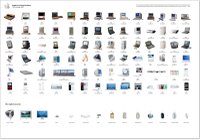
Great image - the Evolution of Apple

Art director and designer Edwin Tofslie has posted this fantastic image. It shows the evolution of the Apple Macintosh, with some accessories thrown in for good measure. It is very interesting to see how the shape and form factor of Macs have changed over the years… thanks Edwin.

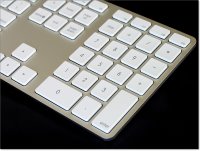
New super slim Apple Keyboard for the iMac

Engadget has posted what could be the real deal when it comes to the new iMac super-slim keyboard. Just look at this unit, it oozes quality and that all important thinness. If the iMac compliments this new design, we are all in for a real treat. Check out the Engadget website for more images.

Top 10 GMail Tweaks

Here are the 10 most impressive GMail plugins and tweaks. There's plenty more to choose from but these in particular will make your life easier and enhance your GMail experience.

via trendplex read more | digg story

Free VoIP Landlines for Life... For a Price

Vonage has something new to worry about: free. Since everybody hates paying for anything internet, Ooma's jumping on the free-subscription bandwagon with reverse razor / blade model: shell out crazy cash ($400) for a sexy little Ooma Hub with lifetime free local and long distance service.

via engadget read more | digg story

Intego launch FileGuard X4 Beta

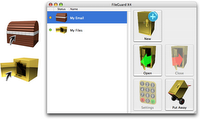
Intego, today announced the public beta release of its new FileGuard X4 data protection program. FileGuard X4 creates virtual safes that provide unbreakable protection for sensitive files. Users can create as many safes as they need for different types of files; send sensitive files to others with no risk; and store safes on servers or external disks with full security.

FileGuard X4 is designed to meet the needs of mobile users who have sensitive files on their laptops, as well as home and business users who want to ensure that their confidential data is protected. Unlike Apple’s FileVault, which requires that users encrypt their entire home folder, FileGuard X4 lets users choose which files or folders they want to protect, and only the ones they want to protect. FileGuard X4’s virtual safes are easy-to-use, practical, and flexible, offering many options, such as permissions for shared access, simple drag-and-drop copying to and from safes, and unbreakable encryption.

“Identity theft is one of the leading computer security issues these days, and the only way to prevent it is to ensure that all personal and confidential documents are fully protected,” said Laurent Marteau, CEO of Intego. “FileGuard X4 lets users protect their most confidential documents, with unbreakable encryption. Even if someone gets access to their Mac, they won’t be able to break into these safes.”

Features of FileGuard X4:
· Store sensitive files in secure virtual safes
· Industry-standard encryption makes safes unbreakable
· Create as many safes as you need
· Set a different password for each safe
· Create safes by drag-and-drop, or from the Intego menu
· Safes increase in capacity as you add more files
· Change the size of a safe or compress it to save space
· Open safes by a simple double-click in the Finder
· Protect sensitive files on laptops in case of loss or theft
· Protect files on portable media, such as iPods or USB key drives
· Safes work like folders - drag files to and from your safes
· Safe icons indicate their status (open or closed)
· Use floating windows to access safes at all times
· Send safes by e-mail, or store them on servers or external disks
· Set read and write permissions for safes stored on shared volumes

System Requirements:
· Mac OS X 10.4 (Tiger) or higher
· 20 MB hard disk space

The public beta of Intego FileGuard X4 is available for free and can be downloaded here.

Steve Jobs - Stanford University

If you ever need something to enlighten your day… to give you some encouragement… to help put things in perspective… or to have a positive outlook on life… or perhaps you just love Steve Jobs, then you should take a look at this video. It captures Steve Jobs commencement speech at Stanford University in 2005, where he talks quite frankly about certain aspects of his career and life that have moulded him into the person he is today.

Griffin launch iKaraoke TunePrompter - Free

Griffin Technology, today announced iKaraoke TunePrompter, a useful tool for creating karaoke videos from your existing music library. TunePrompter enhances the full karaoke experience of Griffin's iKaraoke, an iPod accessory featured in Time, The New York Times, BusinessWeek, and hailed by The Wall Street Journal as "fun to use and unintimidating."

TunePrompter is a freeware application for Mac and PC that lets iKaraoke users make their own free karaoke videos using any song they own. The iKaraoke supplies the music, you supply the words and you can enjoy karaoke with any song, anytime and anywhere.

Using TunePrompter is easy.
1. Download and install Griffin iKaraoke TunePrompter
2. Open TunePrompter
3. Load your favorite song
4. Type your lyrics in or let TunePrompter help you find them
5. Tap your spacebar along with the music to teach TunePrompter

Connect the iKaraoke microphone to your iPod and you're on. iKaraoke removes the vocals from your video, allowing you to karaoke anytime, and anywhere.

Ultimate iKaraoke Contest
To celebrate the debut of iKaraoke TunePrompter, Griffin will give one lucky iKaraoke-er the Ultimate Griffin Prize Pack worth more than $800. Entering is easy. Just download TunePrompter at www.griffintechnology.com/products/tuneprompter and make karaoke videos of your favorite music.

Then, between now and August 24th, simply submit feedback through the software. What works? What needs improvement? Tell us and you'll be entered into a random drawing for the Ultimate Griffin Prize Pack with more than $800 in top-selling Griffin schwag.

This prize pack includes one each of the following products: iKaraokeTM, iTrip Auto®, PowerDuoTM, California RollTM, ReflectTM, TempoTM, AirDockTM, iTalk ProTM, SmartShare®, TuneCenterTM, RoadTrip®, EarJamsTM, TuneBudsTM, CenterStageTM, PowerMateTM, AirClickTM iPod & USB, ElevatorTM, and iMicTM.