
 There are three new iPhone adverts for your perusal today. All are shot on plain black backgrounds, of actual users, explaining how the iPhone is the best device ever. They then zoom out to show the surroundings beyond the black screen. In my opinion, not Apple's best, but well worth a look anyway.
Still need a Pocket PC? Try the HP iPaq 110 or 210
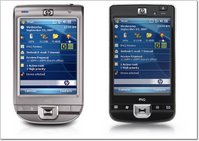 The PocketPC may not be as popular as it used to be, but HP don't seem to b slowing down, with their latest two offerings due to start shipping October 8th. The HP iPaq 110 (left) will sell for $299 and the iPaq 210 (right) will cost $399. Both have wifi, bluetooth and Marvell PXA310 processors running at 624 MHz. The 210 adds a larger 4-inch touch screen display, and in my opinion looks a lot nicer. If you need a PocketPC then you could do a lot worse than this pair.
Geekanoids Shop - Books, iPod Protection & much more
 It takes a lot of time and resources to keep the Geekanoids website running, and I thoroughly enjoy it. If you would like to pick up a bargain and help support Geekanoids at the same time, then please take a look at our online shop.
We have a books section, with some great savings to be had. Our very own StickiT iPod skins, help to keep the scratches off your iPod. On top of all this we have some great affiliate offers for you to browse.
Keep an eye on the shop over the next 48 hours, as we are launching a section with some brand new products for the 5th generation iPod Video, iPod Classic, 3rd generation iPod Nano, iPod touch, and the iPhone. We might even have the news up on the site on Wednesday, but definitely by Thursday at the latest.
2G Online Storage from Diino
Online storage is growing in importance every day now. As we manage to gather more and more personal data, backing it up is very important. Digital photos, MP3 files, PDF's, the list goes on and on. I am always on the look out for free storage, and Diino offers just that.
Diino will give you a free account with 2GB of storage. You can use this for practically anything, from private storage to sharing files with friends and colleagues. The free account even allows two users to be logged in at the same time. You can even upgrade to give yourself more storage, with 10GB starting at approx £5 per month. That said, 2GB of free online storage should not be sniffed at.
The Cloud - Cheap UK Wi-Fi for iPod Touch
 The Cloud has announced that it is giving Wi-Fi access to owners of Apple’s new iPod touch in thousands of hotspots across the UK. From Monday, users will be able to use their iPod touch to access the internet and Apple's online iTunes service in Wi-Fi hotspots provided by The Cloud.
The new Wi-Fi service, called Cloud Unlimited Music, will be available from Monday 1st October 2007 for £3.99 per month, specifically for iPod touch, and is not subject to any minimum term contract.
Owen Geddes, Group Director of Business Development at The Cloud, commented; “We believe this is a significant step forward in making music, podcasts and video available when, and wherever, people really want it. iPhone users will soon be able to make the most of our Wi-Fi network with O2 and The Cloud when the iPhone is introduced in November and we want to make sure people who have the Wi-Fi enabled iPod touch are able benefit from our network of over 7,500 hotspots too.”
iPod Touch users need to sign-up for the service at www.thecloud.co.uk/ipod, where they can register their individual device for use on The Cloud’s network across the UK and pay for the service. Once a user has registered their device, they are able to connect to any The Cloud Wi-Fi network without complicated usernames and passwords. The service is being introduced in the UK first and will become available in other European markets shortly.
iPhone 1.1.1 Software Update Available
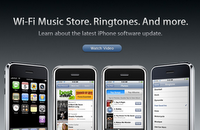 If you plug your iPhone into iTunes today you will be offered the chance to update your software to version 1.1.1. The main part of the update brings access to the iTunes Wi-Fi Music Store, so you can preview, purchase and download your tunes whilst you are out and about. This is a nice feature and one that many users will be pleased to see (promised by Steve back when the iPod touch was announced).
This new version adds a lot of new features and fixes including;
- Access to the iTunes Wi-Fi Music Store
- Improved speakerphone and receiver volume
- Home Button double-click shortcut to phone favorites or music controls
- Space bar double-tap shortcut to intelligently insert period and space
- Mail attachments are viewable in portrait and landscape
- Stocks and cities in Stocks and Weather can be re-ordered
- Apple Bluetooth Headset battery status in the Status Bar
- Support for TV Out
- Preference to turn off EDGE/GPRS when roaming internationally
- New Passcode lock time intervals
- Adjustable alert volume
Apple have posted a video showing the new features here.
If you have third party applications installed, then the update is reported to restore your iPhone to its virgin state, removing all the extra apps. An unlocked iPhone seems to be returned right back to its pre-activation state, with no chance of using the various applications to hack again, so I guess it is just a waiting game for some.
New look Apple Store Online hits the UK
 You may well have seen it covered elsewhere that the USA online Apple Store got a face lift the other day. Well the new look with rounded corners and blue highlights has now hit the UK. It looks very fresh and is very welcome.
Two great iPhone Videos
I stumbled upon these spoof iPhone videos on YouTube. You gotta love them for both their simplicity and unique take. Check them out below.
Apple Newton Revisited or Tablet Mac ?
 AppleInsider report on a rumour that Apple may be working on a new PDA type device. Supposedly 1.5 times the size of the iPhone, with a high resolution 720x480dpi screen. This next gen device could appear in the first half of 2008 and may even be announced at MacWorld in January.
So, could this really be the return of the Newton?
My take on this is that the iPhone is a very Newton-like device anyway. You can schedule calendars, make notes, text, transfer files via Wi-Fi, connect to it via BlueTooth, play music and videos, the list goes on. Of course I would like to see a device like this, and yes it would sell very well indeed, but I think we are more likely to see something a little different.
Another rumour doing the rounds is that of an ultra portable laptop, perhaps a 10-inch or 12-inch offering, very thin, still a clamshell type design, all aluminium and maybe sans hard drive. This may well come to fruition as a totally separate product, but if this Newtonesque device is true, it may well be born as somewhere between these two rumors. Let me explain...
One segment that Apple do not participate in is that of the Tablet PC. I think it unlikely for them to try a PDA device again (once bitten, twice shy), but I do think they would like to do the Tablet PC thing right. Remember the ModBook that generated so much interest, well surely this did not go under the radar of Steve Jobs. Personally, I think we will see a 10-inch, maybe 12-inch Tablet Mac, with a very thin aluminium lid to cover. Full touch screen interface like the iPhone and iPod Touch, but with a more fully fledged version of OS X. This device would allow many of us to travel around very lightly, but still have the power to complete real-world tasks. Solid state memory for storage, somewhere around the 32GB mark and maybe even a small 80GB or 160GB hard drive for saving files too, allowing the solid state to be emptied (apart from OS X of course). Maybe I am dreaming, but I think this is a lot more likely than a device that would be touted as a large iPhone.
iPhone Update - Day 2 usage
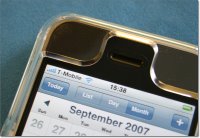 After having had and heavily used the iPhone for over 24 hours now, I wanted to bring you a small gallery of images below and an update.
Throughout day one I played with the device off and on, pretty much all day, and this morning still had about two or three hours left. Because I was due to go out, I had to charge the battery for an hour. I did this off the mains charger, rather than my Macs USB port and for the first time I got a full charge. The iPhone can display the usage of your device and lets you know how long the battery has lasted since its last full charge. Strange this was that I had it plugged into my Mac for about six hours, and although the battery icon showed full, it did not register as full.
Anyway, that small discovery out of the way I headed out. During today I took a few calls and at lunchtime logged onto a wi-fi hotspot with no problem at all. As I mentioned in my last iPhone related post, EDGE is very slow, but my outside wi-fi experience was superb, nice and fast, just how it should be. I also used Meebo for the first time properly today. This is a web based chat client that uses your AIM, Yahoo, MSN, Google, ICQ or Jabber account, to enable you to do instant messaging. Nice thing is that you can use it on any computer, but it also has a really nice iPhone interface. You can see an image of how a chat looks below (with names private bits deleted). It works very well, and you can easily flick between various conversations.
Using Meebo also showed me just how good the on-screen iPhone keyboard is. Yes, you can hit the wrong keys every now and again, but you have to just trust it and every time (in my experience) it auto-corrected every time with the right word. It took me until today to get used to the keyboard, but trust me you will love it.
To finish off my day I took in a quick cartoon. Wow, the screen really does rock. Colours are bright and vivid, with nice crisp lines. As I headed back to the office to take the photos for the gallery below, I realised that I had used my iPhone for eight hours without the need to use headphones. The big satisfaction was that it had not let me down once, the only sad thing was that not one passer-by had asked me about it, even when I was laughing at a cartoon in the coffee shop.



Intego releases FileGuard X4 - protect yourself!
 Intego, the Macintosh security specialist, today released FileGuard X4, a data protection program that stores sensitive files in virtual safes. Using industry-standard, unbreakable encryption, FileGuard X4 allows Mac users to protect personal and confidential documents, and be sure that hackers or data-thieves will never be able to access them.
FileGuard X4's safes are not only secure; they are also portable. Users can store safes on file servers or external disks, and can keep them on home or office Macs with no risk of anyone opening them. They can even send FileGuard X4 safes to friends, family or colleagues, who can access files contained in those safes, as long as they have the password, even if they don't have FileGuard X4 software. FileGuard X4 can create safes of any size, for any kind of document, and also create special safes to protect e-mail and instant messaging transcripts.
FileGuard X4's safes are accessible from the Finder, and open with a double-click. Safes act like folders; users can add files to them by simply dragging files to a safe’s icon. Safes have floating avatars, unique icons that display above other windows, so users can drag files to them regardless of which other windows are visible. Users can access safes from the Intego menu, located in the Mac OS X menu bar, and from standard Open and Save dialogs.
“Everyone has sensitive and confidential files on their Mac, whether personal or business documents,” said Laurent Marteau, CEO of Intego. “Securing these files is essential, especially for people who use laptops. FileGuard X4 provides the most flexible solution for protecting sensitive files on a Mac.”
Features of FileGuard X4 are numerous and include;
• Stores sensitive files in secure virtual safes
• Industry-standard encryption makes safes unbreakable
• Users can create as many safes as they need
• A different password can be set for each safe
• Safes can be created by drag-and-drop, or from the Intego menu
• Safes increase in capacity as more files are added
• Safes can be changed in size, or compressed to save space
• Safes can be opened by a simple double-click in the Finder
Intego FileGuard X4 is available now from Intego’s website, for £34.95, $49.95 or €41.76.
D-Link Add 500 Channels to DSM-520 Media Player
 Today D-Link announced it has expanded the capabilities of digital media adapters (DMAs) by adding more than 200 channels of Internet TV to its best-selling MediaLounge(TM) Wireless HD Media Player (DSM-520), a wireless device that allows users to enjoy videos, music, photos and more from a PC on a TV using a simple remote control.
More than 200 online channels serving millions of Internet videos are brought to the TV by the D-Link HD MediaLounge Player using active-TV technology, a new service that allows easy access to Internet video and entertainment sites with a remote control.
The active-TV line-up includes programming from 36 U.S. channels, offering movies and music videos, radio stations, sports, news entertainment and shopping. In addition to YouTube, some of the notable channels include: Comedy Central, AOL Video, CinemaNow, Google Video, Movielink, ROOtv Music Videos, Akimbo, MTV, Musicmatch, Napster, VH1, ESPN, FOX Sports, MSN TV Today, Reuters News, Yahoo! Sports and eBay.
The new Internet TV lineup also includes international programming from 14 countries, including the BBC and other networks from the United Kingdom, along with digital entertainment from Australia, Denmark, Sweden, the Netherlands, Spain, France, Italy, Japan, Korea, Norway, Poland and Taiwan.
The D-Link MediaLounge with expanded Internet programming is now shipping. Existing DSM-520 customers will receive a free upgrade to their products that will allow them to access the new channels. The upgrade is available now for Microsoft(R) Windows(R) XP and Windows Vista(TM) operating systems.
"Our MediaLounge Player has revolutionized the way people receive and watch digital entertainment. Now you can expand your viewing beyond the PC and bring a vast amount of Internet TV directly to your living room," said Steven Joe, President and CEO of D-Link Systems, Inc. "There are other media players out there, but they only provide limited programming. With D-Link's MediaLounge player, the channel line up is already far-reaching
and continually expanding."
To learn more about the D-Link DSM-520 MediaLounge Player and for a complete list of programming, please visit http://www.dlink.com/activetv.
Price and Availability
Firmware enabling active-TV technology is free of charge to existing DSM-520 customers and will be available Oct. 4, 2007 at http://www.dlink.com. The DSM-520, with an MSRP of $249.99, can be found throughout D-Link's network of retail outlets and at its online store http://www.dlinkshop.com.