My Switch from Boot Camp to VMWare Fusion

My platform of choice is a MacBook Pro (or Mac of some description) running Mac OS X Leopard. I just love the way Leopard is so stable and let's me get on with being creative. In some circumstances I just need to delve into Windows XP. Mainly to run my accounting software, but also my kids ask me to run little utilities and exe files they download (from trusted sites). I used to use Apple's Boot Camp, but I got really fed up of rebooting my Mac every time I needed to run Windows XP. This is where VMWare Fusion is so powerful, I can run virtual machines right within OS X Leopard, without needing to restart. It really does make life a lot simpler.
I switched to VMWare Fusion because I wanted the Best of Both Worlds.

Please check out my video and feel free to leave your comments.

Case-Mate launches new Naked cases for iPhone and touch

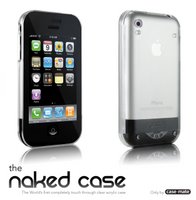
Most cases for the iPhone and touch are open-faced, so that you can use the touch screen. This is OK, but does leave the screen open to scratches. Case-Mate have announced a new case today that sounds very promising.

The Naked Case, by Case-Mate, is the only case that provides full protection of the device, including the screen while at the same time allowing full touch-through access to the iPhone or iPod Touch.

The patent-pending electrostatic membrane on the front of the case passes electrical pulses through to the device's screen, insuring that touch controls work flawlessly while in the case. Precise cutouts allow access to all other controls. The solid acrylic protects the device while allowing its true beauty to shine through. In fact, it's as if the iPhone or iPod Touch was wearing nothing at all! The Naked Case is the only case that offers 360 degree protection of the iPhone and iPod Touch. The case is available for order here.

Apple releases Aluminum Keyboard Firmware Update 1.0

We all love Apple's super slim aluminum keyboard. I personally have one and it is their best keyboard today. If you have one, grab this new firmware update.

Apple notes; This firmware update addresses an issue with the aluminum Apple Keyboard and the aluminum Apple Wireless Keyboard where a key may repeat unexpectedly while typing. The update also addresses other issues. Mac OS X 10.5.2 is required before installing this update.

The update package will install an updater application into the Applications/Utilities folder and will launch it automatically. Connect your aluminum Apple Keyboard before following the instructions in the updater application to complete the update process. If you are installing from a MacBook or a MacBook Pro, your computer's power cord must be connected and plugged into a working power source.

Apple releases iMac EFI Firmware Update 1.3

Apple has released a firmware update for iMac owners, the update fixes several issues to improve the stability of iMac computers.

Apple notes on their website. After the firmware is successfully applied to your Mac, your Boot ROM Version will be:
 IM71.007A.B03

You can confirm the version of the BootROM installed on your computer using System Profiler. To complete the firmware update process, please follow the instructions in the updater application (/Applications/Utilities/iMac EFI Firmware Update.app). The updater will launch automatically when the Installer closes.

Stop the MacBook Glare with Proporta !

The only reason I changed from my MacBook to a MacBook Pro was to stop myself looking at that glossy screen. Don't get me wrong, the MacBook is superb, but the reflections were just not for me. The Advanced Screen Protector from Proporta promises to help reduce glare, whilst protecting your screen at the same time. It can be washed and re-used and also comes with a money back guarantee. For around £8 (plus postage) it could well be worth checking out.

Apple Introduces New AirPort Express with 802.11n

Apple® today updated its AirPort Express® mobile base station with 802.11n to deliver up to five times the performance and twice the range of the previous model*. Priced at just £65 (inc VAT), AirPort Express is the world’s smallest 802.11n-based mobile base station. It can be plugged directly into the wall for wireless Internet connectivity and USB printing at home or easily brought on the road for wireless freedom wherever there is an Internet connection. AirPort Express features AirTunes™, which works seamlessly with iTunes® to give users a simple and inexpensive way to wirelessly stream iTunes music from a PC or Mac® to any room in the house.

“Apple is leading the way with a broad range of innovative 802.11n base stations for almost any wireless networking need,” said Philip Schiller, Apple’s senior vice president of Worldwide Product Marketing. “From the small and portable AirPort Express, to AirPort Extreme for workgroups of up to 50 users and the new Time Capsule for automated backups, Apple customers now have more great ways to extend their wireless networks with 802.11n.”

AirPort Express features a single-piece, compact design weighing just 6.7 ounces, providing maximum portability. AirPort Express offers both PC and Mac users the ability to share a single DSL or cable broadband connection with up to 10 simultaneous users. Users can also share a printer wirelessly that is connected to the USB port. Apple’s AirPort Utility software provides easy step-by-step instructions for setting up and configuring AirPort Express; and with its advanced security features, AirPort Express safeguards data on networked computers with support for Wi-Fi Protected Access (WPA/WPA2), 128-bit WEP encryption and a built-in firewall. Apple now includes 802.11n as standard in its entire line of AirPort base stations and Mac notebooks as well as iMac®, Apple TV® and Time Capsule™.

AirPort Express includes a built-in combination digital and analogue audio connector allowing users to connect to a home stereo or powered speakers. iTunes automatically detects remote speakers and displays them in a simple pop-up list for the user to select. Once the remote speakers are selected, AirTunes wirelessly streams iTunes music from the computer to the AirPort Express base station. Multiple AirPort Express base stations can be set up around a home, each connected to a set of powered speakers for a whole-home music experience. AirPort Express can also extend the range of an existing AirPort Extreme® wireless network.

Pricing & Availability
AirPort Express is available immediately through the Apple Store® (www.apple.com), Apple’s retail stores and Apple Authorised Resellers for a suggested retail price of £65 (inc VAT).

Roxio 9 - Tonnes of new features

Roxio®, a division of Sonic Solutions®, the leader in digital media software, redefines Mac burning yet again with the introduction of Toast® 9 Titanium. Toast 9 allows consumers to record high-definition content from high-definition (HD) camcorders and favourite HD programming from Elgato's EyeTV devices to Blu-ray Disc (BD). Users also have the option to burn HD video and slide shows on standard DVDs. Having used Toast for many years now, I was very excited to learn of this release, it is well worth reading on...

For on-the-go entertainment, Toast 9 introduces Roxio Streamer(tm). Streamer allows users to stream video content stored on their home Mac® to a Wi-Fi connected iPhone® or iPod® Touch or any Internet connected Mac or PC. Already the first choice for music fans wishing to create great sounding CDs and DVDs, Toast 9 offers the ability to capture streaming audio for recording Internet radio. Another Toast innovation allows captured music tracks to be automatically tagged with song titles, artist or other related information.

Toast 9 Titanium is available direct from Roxio at www.roxio.co.uk for £69.99. The High Definition/Blu-ray Disc (HD/BD) plug-in, which is needed to author BD video is sold separately for £14.99 and is available free for those who purchase Toast 9 online at www.roxio.co.uk until 13th April 2008.

"With the growing adoption of high-definition devices, comes the need for consumer applications that allow users to enhance and enjoy their favourite movies, photos and music on HDTVs or on-the-go," said Vito Salvaggio, vice president of consumer products, Sonic Solutions. "With high-definition video authoring, remote streaming of personal and commercial content, as well as exciting audio innovations, Toast 9 continues its long history of breakthrough features that empower Mac users to make the most of their digital media."

Toast 9 is packed with new features and enhancements that set the standard for burning, watching, listening and sharing digital content on the Mac and beyond.

New Feature Highlights:

  • Blu-ray Disc Support - Store as many as 12,500 music tracks, 50,000 photos, and hours of high-definition video on a single 50 GB Blu-ray Disc.
  • Mac & PC Data Spanning - Span large files across multiple discs, including Blu-ray Discs, for easy retrieval on any Mac or PC.
  • Life in High-Def - Enabled by a HD/BD plug-in, consumers can burn HD video content to Blu-ray Disc and watch it on their HDTV using any BD set top player. For consumers who do not own a BD burner or media, the plug-in allows burning high-definition content to standard DVDs. Users can also create HD video projects using footage from AVCHD camcorders or recorded TV shows or movies.
  • Video Editing - Easy removal of unwanted video segments from Elgato's EyeTV and QuickTime® video files before burning the final project to disc or exporting it to a portable player.
  • Toast 9 includes a variety of innovative features designed to simplify and accelerate the otherwise time consuming and CPU intensive video conversion process. These include Batch DVD-Video conversion to enable consumers to queue multiple video files for use with Roxio's Fit-to-DVD(tm) compression technology. The Fit-to-DVD compression technology enables consumers to compress large files to fit on a single layer 4.7 GB disc. Pause and Resume buttons enable users to suspend and later resume a video conversion project, and a Video Quality Preview enables users to review a snippet of converted video to verify video quality prior to initiating a complete file conversion.
  • Library Extension - Build an extensive audio library by capturing any audio playing through the Mac, including Internet audio.
  • Audio Fingerprinting - Automatically identify untagged music files and add song titles, artists and genres, eliminating the mystery of "Track_01".
  • Perfect Mixes - Create perfect mixes with DJ-style crossfades and transitions, output level adjustments, and enhancement filters.
  • On-the-go Entertainment - A new application called Roxio Streamer enables on-the-go consumers to access video recordings stored on a home Mac and stream it to a Wi-Fi connected iPhone or iPod Touch or any internet connected Mac or PC.
  • High Quality Photo Discs - Toast Photo Discs store thousands of full-resolution photos as well as automatically-generated slideshows viewable on Mac and PC.
  • iLife and Aperture - Access iLife® 08 and Aperture(tm) libraries directly from Toast 9's Media Browser.
  • Personalized Disc Artwork - Personalize discs with labels, cover art, and inserts. Includes drawing and text editing tools, as well as over 600 clip art images and built-in Google image search. Supports LightScribe and Labelflash(tm) drives and media to allow users to burn artwork and labels directly to discs.

Pricing and Availability:
Toast 9 Titanium is available now for purchase direct from Roxio at www.roxio.co.uk, and will be widely available from e-tailers and retail outlets this month for £69.99. Owners of previous versions may be eligible for upgrade offers. The HD/BD plug-in will be sold as a downloadable component from roxio.co.uk for £14.99. Roxio will offer the HD/BD plug-in for free for customers who purchase from www.roxio.co.uk until 13th April 2008.

SpeedDownload 5 - looking good 'n' fast

Yazsoft is proud to announce the immediate availability of Speed Download 5. Developed exclusively for Mac OS X, Speed Download is an easy to use, powerful and reliable download manager.

Speed Download sets a higher standard for download manager innovation, and is expressly designed to be a central, unified hub for almost all downloading and file transfer activities.

This new upgrade continues to enhance and tweak the performance of Speed Download to ensure utmost reliability. Version 5 includes tons of key improvements, and is a recommended upgrade for all Speed Download customers.

Some Key New Features in Version 5:

  • New: Completely redesigned and fully customizable interface
  • New: optimized Speed Download engine and components for faster performance and wider compatibility
  • New: introducing Simple and Advanced usage modes
  • New: iTunes-like Minimized mode with user controlled color picker
  • New: Overhauled built-in FTP Client; support for more connections; dual pane view introduced
  • New: Filters bar
  • New: 'Live' bandwidth throttle
  • New: individual file scheduling
  • New: queue downloading scheduling
  • New: Speed Download dock menu notifications
  • Enhanced: Auto-resuming of downloads, uploads, and file transfers at all times
  • Enhanced: built-in Smart Folder technology
  • Enhanced: Secure (encrypted) turbo-charged file-sharing between Speed Download users
  • Enhanced: My Server section
  • Enhanced: Download website content for offline viewing
  • Tons of tweaks and performance oriented changes
  • And much more!

Giveaway: as an added bonus, Yazsoft is also giving away two 8Gb Apple iPhones. From February 12, 2008 until March 31, 2008, everyone can submit their email for free entry to the draw. No purchase necessary. The winner will be chosen by random draw the second week of March 2008 and announced on this website.

VeryPC launches green computer system

British eco computer firm VeryPC has announced the launch of their greenest product to date. Aimed at all sizes of organisations, from SMEs to PLCs, GreenHive reduces the electricity per user to a measly 9 watts (excluding screens). Despite this, each user still has the ability to draw on the power of an AMD energy efficient 2.3GHz multi-core processor. A normal PC could typically use 100W or even more.

For example a call centre with 560 PC’s would save around £85,000 pounds a year in electricity by switching to GreenHive from a traditional desktop PC solution.

GreenHive works on the principle of having special GreenPCs, each act as a hub for distributed processing, storage and connectivity for up to 7 users within 10m. VeryPC’s own research shows that a typical multicore office PC sees about 5% average use of its processing resources, they have shown that by sharing the processing power with other users, a similar speed can be achieved, but more users can be accommodated.

GreenHive is not a thin client, and as such doesn’t require special ‘Terminal’ servers, the GreenHive will plug straight into an existing network without modification. It was recently announced [1] that a medium sized server in a data centre has a similar carbon footprint to a 4x4 doing 15mpg. A GreenHive unit has a similar operational footprint to a light bulb, and like a light bulb can be turned off when not in use.

VeryPC MD Peter Hopton says “it can save an organisation over 90% of the electricity associated with their computer towers, which equates to a lot of money in a business environment.....not only is GreenHive operationally more efficient, but it also provides huge reductions in manufacturing energy, logistical energy and waste electronics.”

Businesses can pick up a GreenHive box for 7 users from just £1500, or they can get a package for the appealing price tag of £3300 including flat screen monitors, colour laser copier, a three year next day swap out warranty and a three year online back-up.

The company hopes to prove that being environmentally friendly can also be economical. They can be contacted on 0845 6170 081.

BBC iPlayer - iPod touch friendly!

After following the ups and downs of the BBC's support for the Apple Mac platform (yes, I even signed the petition), I was amazed at my discovery yesterday. Many of the on-demand TV services are not that friendly with the Mac, so when I learned that the BBC were developing support for our beloved Macs, I was really pleased.

Just last night I found myself browsing the internet with my iPod touch. When I went onto the BBC iPlayer site, to see if there were any updated news on Mac support, I clicked on a programme just to see what happened. To my surprise, Quicktime stepped in and played the programme. Perfectly formatted for the iPod touch screen, I could now watch the last seven days of television, via wi-fi on my touch. OK, so some of the programmes are not available, but that is down to the BBC and not the particular device being used to watch. The couple I did watch showed a perfect picture and nice speed buffering, so no pauses or skips. This may well be old news that had skipped my radar, but I wanted to shout out a big 'THANK YOU' to the BBC... let's hope the other channels follow.

Proporta Laptop Sleeve - something a little different

If you are looking for something with a bit of design thought, to protect your laptop, check out this new offering from Proporta. It is ideal for protecting your MacBook against scratches and impact damage; it can also be stored away safely when not in use.

The Proporta Laptop Sleeve is available in three sizes; 13inch, 15inch and 17inch to perfectly fit whichever MacBook you have. It also features elasticated sides for an even more snug fit. This soft to the touch sleeve incorporates a nylon lining to prevent scratches caused on the move by knocks, bumps and loose items in your bag. Seems like a bit of a bargain at £19.95 too. Come back soon to check out a full review.