
 The Apple Store is now back online, with a couple of updates to the store. The first is the new MobileMe retail packages being added. As we already knew, £59 for a single user or £89 for a family pack (5 users). The product/service is being touted as shipping Mid-July, which seems about right. The transition for current dotmac subscribers is this week, on the 9th July, so the following week for new users gives Apple a few days to bed in the new service. I am looking forward to this one and will bring you my views on MobileMe when it goes live.
Apple Store is Down - new Products or MobileMe
 What could it be this time? The Apple Store is down this morning. Could this be just the MobileMe news of a July 9th start date. They will obviously be selling new subscriptions through the online store. Or, could it be a new product, like an updated MacBook? My money is on the MobileMe product, but my dreams are with a new Aluminum MacBook, with a nice sleek case... oh, no, that's the Air... we will keep you posted.
Eee Monitor - challenge to iMac
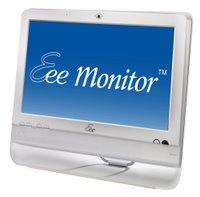 Over at Laptop Mags blog we found some really snazzy photos and brief details of the Eee Monitor. Please check out their gallery and article here.
I find this news very interesting for many reasons. Firstly, with my recent acquisition of an Advent 4211, I have been reading with great interest about users getting Mac OS X running on it. My proposed use is to also install Linux (Ubuntu) on this little unit.
Secondly, I have an Asus Eee PC 1000H on winging its way to the Geekanoids office. Why? I hear you ask. Well, I know that we cover primarily Mac based news, but these new mini-PCs or Netbooks, give users the chance to have a really portable device. In my day-to-day use, there is often times when I pop out, to a meeting, or perhaps to a local café for a change of scenary and I don't want to take my 15-inch MacBook Pro with me. I am sure a lot of people have the same thing happen to them, where a cheap 8.9-inch or 10-inch laptop would be ideal.
This leads me to my interest of the Eee Monitor (sorry it took so long to get to the point). For a long time now, if I wanted a second desktop based Mac, perhaps for myself, or another room in the house, my only choice due to price was the Mac Mini. The iMac is just too expensive for a secondary or luxury purchase. Well, if the Eee Monitor comes in at around the £300 mark, they will get my money. It looks very impressive. I am sure the 19-inch monitor will be of a decent quality and the Linux OS will suit me very well for the intended internet browsing and email use. Add into the equation the slim possibility of being able to install Mac OS X and you have a win win situation. The question of whether this is intended to be a monitor for an Eee PC netbook or a standalone all-in-one computer... I favour the latter. It has no VGA or DVI port to accept another computers video signal. Also, if you look closely at the back, it has one ethernet and a modem output, hinting that it has networking built-in. Last, but by no means least, the front of the uit sports an infrared receiver, triggering this would enable the built-in tuner, surely controlled by the units OS. Oh, and one more thing, around the back you can see some fans underneath the central grill... these must be to cool a processor.
I will be watching the Eee Monitor very closely. It really looks as though it is challenging the iMac on the design front and absolutely smashing it on price... interesting!
Apple release OS X Leopard 10.5.4 Update
 Fantastic news hit the scene late yesterday. Apple released the 10.5.4 update to OS X Leopard. This comes with some great fixes, and it is certainly nice to see Apple continually strive to improve the speed and reliability of Leopard. For a full rundown of what the 10.5.4 delivers check out the Apple article here. The update is available via 'Software Update' that resides in your Apple menu, or you can download the combo update here. A smaller 'Delta' download, for those of you already on 10.5.3 can be found here.
Some of the main inclusions are as follows;
- Resolves an issue with saving and reopening Adobe Creative Suite 3 files on a remote server.
- Includes additional RAW image support for several cameras.
- Addresses AirPort reliability issues with 5GHz networks.
- Improves overall iCal reliability for meeting requests, cancellation notices, delegation, and syncing with iPhone.
- Resolves an issue that prevents deleting an iCal event without notifying the creator.
- Addresses a potential performance issue when loading secure web pages in Safari.
- Addresses an issue in Spaces, in which switching from a space with a Finder window keeps the Finder as the active application instead of the application residing in the destination space.
- Fixes another Spaces issue in which dragging an application from the list of application assignments in Spaces System Preferences does not assign the application to the desired space.
iMac Project 2008 - New iMac & edits = better videos
It has been a whole year since we started producing video reviews on a regular basis. Last June we managed to purchase a MacBook Pro which we had sponsored and laser etched with various company logos. This was a great success, not only did it get great exposure, but it also performed admirably with the video crunching we threw at it.
This year we needed some extra processing power, which came in the shape of a new 24-inch 3.06GHz iMac. This time around we had the sponsors logos thermally printed and applied to the back of the iMac. We also created a desktop wallpaper displaying the logos too. The new iMac is superb, really fast, quiet and stable. We have upgraded our software to Final Cut Express, so we can edit together some more attention grabbing video reviews for you this year. As well as the iMac, a new Audio Technica AT2020 mic, an Alesis Multimix 8 USB2 mixer, and some new studio lighting. I hope you start to see an improvement in quality and keep coming back to the Geekanoids website to check out our great reviews.
A big thank you goes out to the sponsors, who are listed below;
Academy Class
BMI Solutions
Crucial Technology
Eazydraw
Maccast
Make
Mamut (MYOB)
Miglia
Proporta
Quark
Roxio
Jungle Disk & Amazon S3 - first thoughts
 Over the past week I have been testing the latest version of Jungle Disk, working alongside Amazon S3. I have never used either before, but the small price-point of Amazon S3 was very attractive to at least see if the service is a viable solution for me.
In simple terms, Amazon S3 (Simple Storage Service) is a storage solution 'in the cloud'. I am starting to dislike the 'in the cloud' term, but we are all stuck with it. It equates to uploading and storing your files on a server at Amazon HQ, hidden away behind some security wall. The S3 service is pretty complicated and you need to use an application (either built by yourself or pre-made) to give you a GUI and some way of getting your files uploaded. One such solution is Jungle Disk.
The application is available for Mac, Windows and Linux, so everyone is catered for. You can get a 30-day trial download, or pay $20 for all three platform versions, with unlimited free upgrades, plus the ability to install on as many computers that you own. This is fantastic value for money. Setting up the software is really easy. It asks for your Amazon S3 log-in details and hidden key. Once logged in, you can set up your first upload. This again is really straightforward, simply ticking boxes for what you want to include or exclude. You can schedule automatic backups, or click the 'start' button manually. You get a nice progress bar, so you always know how far your backup has progressed.
My only niggle was user error. I had forgotten to uncheck some larger files, such as my email database. So this large file had been included in the backup. Not a massive problem, there is a 'cancel' button that effects just the individual file (rather than the whole backup). The button is very responsive and worked straight away. Subsequent backups check the Amazon server and look for changed files only, so in my first test, only the initial backup was just under 2GB. The great thing is, that I checked my Amazon account today and it cost me 18pence so far. The monthly charge will be slightly less than this, but as you can see, this is fantastic VFM. I will keep you updated and bring you more news about the Jungle Disk application further down the line.
Courts Design Finds Formula for Success with OKI
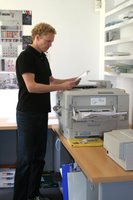 Courts Design is a small multi-disciplinary creative agency based in the quiet Hampshire town of Hartley Wintney. Its core business involves the design, construction and installation of exhibition stands and display interiors. Increasingly, however, it is focusing on graphic design work for clients in the IT and pharmaceutical sectors.
In delivering these services, Courts Design faces the twin challenges of growing competition and increasing constraints on time. To combat these pressures, the company is always looking for ways to raise the quality of printed output while ensuring it consistently meets tight deadlines.
As Mike Abbott, Head Creative of Graphics, Courts Design explains, “in a busy design agency, you need to produce visuals and artwork as quickly as possible. Unfortunately, our previous printer was increasingly unable to deliver the quality of output or delivery speeds we were looking for.”
As a result, Courts Design decided to upgrade to a flexible colour printer from OKI Printing Solutions that can be configured to handle either A3 or A4-sized paper. Delivering 36 pages per minute (ppm) in colour and 40ppm in mono A4, the printer is one of the fastest printers in its class.
Courts Design now uses the printer extensively for all its graphic design work, including brochures, direct mail documentation and marketing flyers as well as for client reports and presentations.
Flexibility
One of the most compelling benefits of the printer is its flexibility. The printer is Mac compatible. This is crucial to Courts Design which makes extensive use of the devices in its daily work.
“We also benefit from the printer’s flexible paper handling,” says Abbott. “We use it to print everything from presentations to document details on high-quality CD labels. Unlike our previous device, it switches easily between different paper sizes, types and textures. This allows us to cut the time taken to develop new materials.
In addition, investing in the printer made sound economic sense. Previously, Courts Design would have often outsourced jobs with tight deadlines, such as client presentations, to digital print houses – a process that would inevitably result in overprinting and wastage of resources.
“The OKI printer saves us money by enabling us to deliver high-quality documents cost-effectively and on-demand,” adds Abbott.
A Colourful Future
Printing in full colour is key to Courts Design, especially when it comes to generating high impact visuals. Research shows that readers pay attention up to 82% longer when colour is used and that presentations are 70% clearer when colour highlights the pertinent details.
Investing in the printer has had a positive impact on Courts Design’s business. It has helped the company to deliver a faster, more efficient service for clients. It has also enabled it to keep short-run print jobs in-house and, in this way, boost profit margins.
It’s most far-reaching benefit at Courts Design, however, has been in building competitive advantage. The printer has not only produced beautiful, colour documents for Courts Design but it has done so quickly, reliably and affordably. In so doing, it has given the business a crucial edge on its competitors.
iPhone 3G - New pouch & StickiT Protector Pre-Order

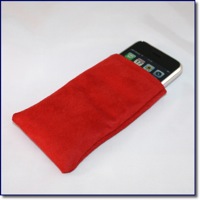 With the new iPhone launching on the 11th July in 22 countries, it is important that you pop your little baby into a nice carry pouch. The GeekPouch is available for Pre-Order now, with shipping very soon after the iPod 3G launch. It comes in black corduroy, red faux suede and leopard fur effect fabrics and will keep your iPhone protected from light bumps and scrapes. Pricing is very simple, just £5.99 (inc. UK delivery) or £10.99 (inc. worldwide delivery) with a little saving on offer if you buy two.
If you are really worried about your new gadget, then you should pop a StickiT on the back. The nice glossy finish to the new iPhones is bound to attract dust and scratches. This thin film will keep the back of your new iPhone nice and shiney. The price is cheap too, just £2.99 (inc. UK delivery) or £5.99 (inc. worldwide delivery). Again, these will start shipping hopefully within a week of the iPhone 3G launch.
Both of these products have been available for a long time now, for the whole range of iPods and the current iPhone. They have proved very popular to date.
Need to know about Scanners?
 If you need to know about scanners, or perhaps you have a document scanner and have a techie question that needs answering, check out this link. Over at the BMI Solutions Community Forums you can ask questions, check out news on the latest products, and you even have the chance to see product videos. The product videos are invaluable, in much the same way as you love our video reviews, it gives you the chance to see the scanners in action before you commit to buy.
This new forum looks like it will be an invaluable source of information, so take a look and add it to you bookmarks.
Apple Backup 3 Disappears
 Am I mistaken, or has Apple removed the link to download the latest version of its Backup application? After the MobileMe announcement, I promised myself that I would make more use of iDisk, for storing some files off-site. It is/was my intention, that when MobileMe is released, I would upgrade my storage space and push some important files into the cloud. This followed considering using Amazons S3 service, but for some reason deciding against it.
After logging into my .Mac account and following the route to download Backup 3, I found my browser in a loop. Then I searched and went direct to this page, but all it does is go to a ".Mac will soon be MobileMe page". Nothing would download! So, perhaps in anticipation of MobileMe launching, maybe a new version of Backup is on its way. Yes, I know Backup resides in my iDisk, but I thought it strange that I was unable to find the download anywhere.
Apple Mail - Search not working? Re-index your messages
 I recently moved all of my Mail accounts and messages over to our new iMac, using the Migration Assistant that comes as part of OS X. Everything seemed to work fine, in fact, although it took a long time to transfer the files, Mail was up and running with minimal fuss.
However, when I came to search for an old email, I could not find it. Mail would only give search results on emails that had arrived or been sent after the transfer. A quick search found this Apple document on the issue. I am happy to say that re-indexing the messages solved the problem. In my case though, I only moved the Envelope Index file and not any additional folders.
Mozilla to launch Firefox 3 on June 17
 Mozilla has announced that it intend to release the full version of Firefox 3 on Tuesday, June 17. This had been my browser of choice for a long time, before slipping into Camino mode, but this new release will see me going back to Firefox full-time.
Help Mozilla celebrate this event, either by holding a party, or by pledging to download the new browser on launch day. They are trying to break the Guiness World Record for the most software downloads in a 24 hour period. If you want a sneak peak, the latest release candidate (RC3) is available here.