
 The Two Techies is a weekly podcast, hosted by Jamie Bunting and Aaron Fisher they discuss the latest and most interesting technology news with the occasional guest on every few episodes. On today's show the guys invited me along to share my views on the tech news of the week. It certainly was a pleasant experience, with a very relaxed format and I am sure you will enjoy a listen. There is some great coverage on this podcast, so I urge you to check it out and subscribe in iTunes. You can also find more information here.
Geekanoids - Video Update & Question Time Request - 22nd July 2010
This video is an update on some of the video reviews coming to the Geekanoids Channel over the coming weeks. Plus your invitation to send in some questions.
Useful Links
YouTube Channel: http://www.youtube.com/davomrmac
Website: /
Twitter: http://www.twitter.com/geekanoids/
Apple iPhone 4 Press Conference - Adam Christianson Maccast Interview
Apple iPhone 4 Press Conference - Adam Christianson Maccast Interview. The internet, YouTube and the news has been filled with the reported reception issue on the iPhone 4. Today, 16th July 2010, Apple held a press conference to address the issue.
In this video I bring you an interview with Adam Christianson from The Maccast, held just after the press conference ended. We discuss what Apple announced with some great insight into what has been offered.
You can catch The Maccast at http://www.maccast.com
iPhone 4 Signal Issues and Viewer Feedback
iPhone 4 Signal Issues and Viewer Feedback. In this video I discuss the iPhone 4 issues along with a special announcement for tomorrow. Plus I need some feedback :)
Deer Rudolph and Eagle Eye team up to escape Redneck Hunter
I uploaded this because I absolutely love Samsung products, check out this awesome video.
Deer Rudolph and Eagle Eye team up to escape Redneck Hunter.
How did they do that?
Check it out at http://www.freehands.me
Wildfire Experience – Jim’s Day
If you and all your friends on Facebook got together what would you do? HTC is giving you the chance to bring all your friends on Facebook® together for a day. All you have to do is tell us what you would do and we could make it a reality.
Crucial Solid State Drives now with Data Transfer Kits
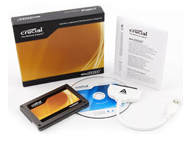 Lexar Media, a leading global provider of memory products for digital media, today announced the Crucial RealSSD C300 with Data Transfer Kit available with the 64GB, 128GB, and 256GB C300 drives. This convenient product bundle includes a Crucial RealSSD C300 solid-state drive, a SATA-to-USB data cable, and cloning software.
Migrating from a traditional hard drive to a solid-state drive offers improved boot up and application load times. In addition, SSDs run cooler, quieter, and with more durability when compared to a traditional hard drive. However, transferring data from an existing hard drive to a new SSD can prove a daunting task to many notebook or desktop computer users.
In three easy steps, the Crucial Data Transfer Kit provides users with a simple solution for copying everything on an existing hard drive and transferring it to a Crucial RealSSD C300 drive – including the operating system, data, email settings, applications, and more. This new Crucial kit makes it as simple as connecting the SATA-to-USB cable to the RealSSD and the USB port on a notebook, running the cloning software, and swapping out the old drive with the new Crucial RealSSD.
“After pushing SSD performance to new levels with technical innovations, we turned our attention to simplifying the upgrade process for users. We succeeded in creating a convenient, start-to-finish solution,” said Rob Wheadon, Lexar Media senior worldwide SSD product manager. “We’re pleased to offer a solution that enables users to get their Crucial RealSSD C300 products up and running in three easy steps.”
All capacities of the Crucial RealSSD C300 drives are available through select resellers worldwide and online at www.crucial.com/ssd, www.crucial.com/uk/ssd, or www.crucial.com/eu/ssd.
Meet the Viewers - Setup #001
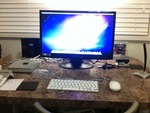 It really is great to hear from viewers that enjoy my videos and just recently I got this superb email with a little article from George. If you would like to share your set-up or opinion about the Geekanoids Channel, please do get in touch.
This is my mac setup, I have recently just bought the mac mini and I am enjoying every second of it.
The reason I bought the mac mini was because of the Geekanoids Channel on YouTube as Dave who presents all the videos describes the apple macs so well it tempted me to go and get one. So I watched more of Daves videos and saw that the mac looked more amazing and the Geekanoids Channel defiantly describes all the apple products well.
On my setup I have the 2010 model of the mac mini with a 1080p 24 inch HANNS G HH241 monitor with a wired apple keyboard and mouse with a griffin docking station for my ipod and a logitech microphone for video chatting. I hope you enjoyed reading.
Geekanoids June 2010 Competition Result
The winners are announced to the Geekanoids June 2010 Competition. Plus details of how you could win a big box of gadgets.
Many thanks to Speck Products for supplying June's prizes.
Protect your iPhone 4 & Samsung Galaxy S with a GeekPouch
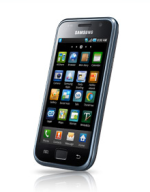 A bit of outright self promotion here, so please excuse me. I make a little bit of money through the Geekanoids Shop that goes toward my running cost. Today I introduced two new Geekpouch's to the store. They are simple cloth pouches, all handmade, sized to fit specific devices. Available in various colours. A black corduroy material, red faux suede and a furry leopard print.
The two new cases for today are for the Apple iPhone 4 and the Samsung Galaxy S. Both of these are lovely phones, but at the same time they are expensive pieces of kit, so protect them with a GeekPouch. Prices start at £5.99 delivered for the UK, £10.99 delivered outside the UK. Check them out here.
My T-Mobile Night In with Blockbuster
This is my T-Mobile Night In, where I text the words NIGHT IN to 3000 on my T-Mobile phone and get a code that gets me five things for £5 at Blockbuster. Check out the video, then check out the links below.
T-Mobile Night In Details can be found here.
The Best Android Apps for Healthcare Professionals
 Chris Thorman, who blogs about EMR systems at Software Advice, has completed a very detailed article about the best medical apps for Android based devices. It certainly makes a very interesting read and you should definitely take the time to check it out.
"When we published our list of the best medical iPhone apps for doctors and students, we had so many requests for a follow up post highlighting medical apps for the Android operating system that we had to do it. We’ve reduced the over 1,200 “Health” apps in the Android Marketplace to 18 categories and 60 apps designed for doctors, nurses and students."
Read the complete article here.