
Manfrotto 055CX3 755CX3 Tripod & Magnesium Photo Movie Head Q5 Review
Manfrotto 055CX3 755CX3 Tripod & Magnesium Photo Movie Head Q5 Review.
Useful Links
Supplied by: http://www.manfrotto.co.uk/
Ministry of Sound MOS004 Headphones Review
Ministry of Sound MOS004 Headphones Review.
Useful Links
Supplied by: http://www.ministryofsound.com/
Zomm - unleash your mobile phone!
 Hey guys it’s TheDelusionzHD here doing a guest review for the geekanoids website. Today I will be reviewing the Zomm, World’s first wireless leash for mobile phones.
Now on to the review there are things I do not like about this product, but let’s start with the positives the Zomm is a very light in weight and yet still packs a big punch. Also the Zomm was invented by a Mother and won the 2010 innovation award at CES. Next the Zomm is charged via a micro USB which is a nice touch instead of a proprietary port. One of the things that isn’t so good about the Zomm is that it connects to your mobile phone via Bluetooth technology so if your mobile phone does not have Bluetooth v1.2 or higher this product is no use to you.
So what does the Zomm do? It is a wireless alarm that connects via Bluetooth, and if you leave you mobile phone 30 feet or more behind it will make an extremely annoying chirping sound, and there for that will notify you to go back and pick up your device. In a sense the Zomm will prevent you from ever losing your mobile phone again, as long as you have it connect via Bluetooth and the Zomm itself is charged.
Onto the next feature of the Zomm is it has a mobile speakerphone built in, so for example if you’re driving home from work you can answer the call by clicking the Z button once or double click it to cancel. If you are ever hurt or in a situation where you can hold down the Z button until the panic alarms sounds and continue holding the button until the alarm stops. The Zomm also comes with a plastic belt clip and a keychain attachment that connects via a little cut out on the top of the Zomm. And in the box you get a Micro-USB wall charger to charge your Zomm and to get a full charge it will take about 4 hours, and a full charge will last about 3 days in my experience. Also in the box you will receive a micro-USB update cable to get your Zomm updated to the latest firmware, and a quick start guide as well.
The feature I do not like about the Zomm… it will drain you mobile phone a lot faster. If you would like to pick a Zomm up yourself you can do so at their website and is currently $79.99 USD or for about 59 EUR, the Zomm come in 3 different colors white with blue accents, black with blue accents, and pink with white accents. Guys this was a guest review of the Zomm Wireless Leash for your Mobile Phone for the geekanoids website if you’re interested in seeing more content from me you can do so on this link.
Until next time peace and love to all!
XGear Clear Smart Cover Enhancer Case Review for iPad 2
XGear Clear Snap-on Case Review for iPad 2.
Useful Links
Supplied by: http://www.xgearlive.com/
One For All X-Sight Plus Universal Remote Control Review
One For All X-Sight Plus Remote Control Review.
Useful Links
Supplied by: http://www.oneforall.com/
ScrapBook on the Blackberry Playbook
 The Scrapbook application for the Blackberry PlayBook is a beautiful pictures application in which you can create nice collages of photos that you've taken.
When you open up the Scrapbook app, you are introduced with a washing line which your completed colages will get pegged to when saved. Also, there is a 'create' button in the bottom right of the start screen to begin creating your collage. This homepage is possibly one of the nicest start screens of any application out there for the PlayBook. It is a physics-based homepave in that when you scroll through your collages left to right, when you reach the end they swing out as if you were really sliding pieces of paper on a washing line. The image previews also look 3D which adds to the beauty of the animations and the idea of it being a washing line of pictures. When you click on one of your images, it simply pans in to show an enlarged preview of your image. Which, when you tap again, it pans out to the washing line view again.
When you click create, this is where the countless fun begins. You are brought to a very basic screen that shows a canvas as the main attraction of the screen. On the right you have three tabs that open up your images, stickers and wallpapers. In the bottom right hand corner you have a bin where you drag items that you wish to remove. And on the bottom left you have a camera button that is your save button; which you should be careful when hitting because, once saved, you won't be able to edit your collage. Anyway, clicking on the images button will bring up all the images that you have taken with your PlayBook's camera and you drag these onto the screen and once released they drop onto the piece of paper. It is exactly the same with the stickers, you pick a sticker, tap and drag to where you wish to place it. With the wallpaper, you choose which one and it will change to that wallpaper, simples.
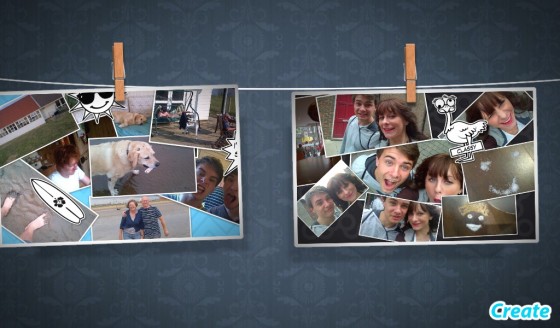
There are a few features that keep this from being a simple and dull application. Such features as the ability to readjust and twist images using multi-touch pinch-to-zoome. The multi-touch is a little off and laggy sometimes, but it isn't so bad that it stops you from putting the image how and where you want. Another feature that the Scrapbook application has is the ability to connect the app up to Facebook; this enables you to post the finished product to Facebook when it is finished.
However, this beautiful application does have quite a few downsides and there are plenty of things I would add in to make it a better application. The first downside I noticed was the lack of ability to edit your collage once you have saved it, as I mentioned earlier. Another downside to this app is that you can only have a certain number of your images in a single collage (I believe the limit to be seven). However, you can still add in stickers after your image limit. Things I would add to improve this application would be the ability to add in some form of text, such as bubble writing or maybe even just a text box. Also, seeing as Facebook is connected, maybe the ability to use your Facebook photos within the app would be a nice feature.
The Scrapbook application for the Blackberry PlayBook really shows off the PlayBook's graphical prowess. It shows off how good of an application can be made on the PlayBook; which makes me doubt other applications that have no transitions or animations. I cannot praise the developers of this application for the clear amount of time they have spent making this a beautiful application. It lacks some features that would make it a more useable application, but then no application is perfect. And for what this app has set out to do, it does extremely well.
Written by Luke. Twitter @l_harkness • YouTube Channel
Diabloskinz Art 1 Skin Review for iPhone 4
Diabloskinz Art 1 Skin Review for iPhone 4.
Useful Links
Supplied by: http://www.diabloskinz.com/
Vevo for the Blackberry PlayBook Review
Vevo, for those of you who don't know, specialize in music videos. They have many artist-specific accounts on YouTube and also have a website similar to Spotify where you can add music videos to a playlist. The PlayBook application isn't too dissimilar to this.
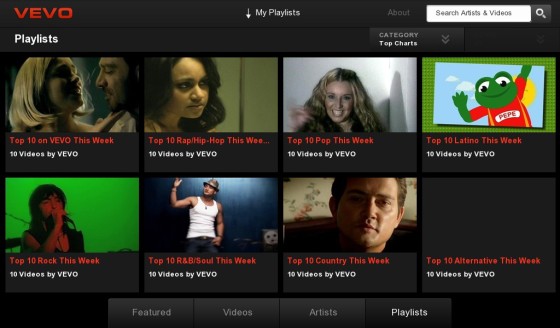
I'll begin with the main home screen of the Vevo application for the Blackberry PlayBook. When opened up, this application instantly shows up some simple yet impressive animations. You have large tiles of videos that can be clicked on to access the video (usually music videos, but sometimes interviews or celebrity playlists) which slide left or right with the swipe of a finger; the tiles do automatically slide also. You can drag from the top to drag down your own created playlist (which I shall discuss later) which gives you the option to edit, clear or select a new playlist. There is also a search box in the top right that searches for either artists or song name. Along the bottom of the home screen, you have have buttons to look at: featured videos, other videos, artists and playlists.
Now, clicking on these four options along the bottom will bring you to the appropriate page. The 'Featured' tab is what the application opens up in and features featured videos that Vevo has selected (usually promotional videos of new songs). Clicking on the 'Videos' tab will bring you to a whole new screen. Within this screen you're given three drop down menus: 'Category', 'When' and 'Genre'; these are filters to help narrow down your results. This is a feature I have found myself using often when I have time to kill and are just looking for some music to listen to that I wouldn't necessarily choose to download myself. The third tab, the 'Artists' tab is similar to the 'Videos' tab, but shows artists instead of songs. This screen also gives you the same three drop down menus of: 'Category', 'When' and 'Genre' helping you filter which artist you wish to listen to. The final tab is the 'Playlist' tab which simply shows playlists that Vevo has pre-selected. There are twelve different pre-selected playlists, all of which are 'Top 10...' and then different genres, for example, 'Top 10 Pop this week' or 'Top 10 Rock this week'. These are good, but I have noticed they aren't updated very often. You also get a drop down menu that lets you choose: 'Top charts', 'Celeb Picks', 'Recently Added' and 'My Playlists'.
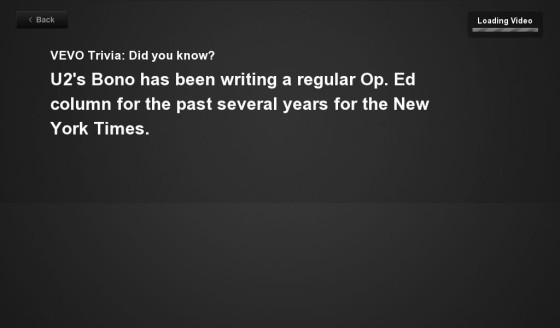
When you have finally chosen a video after seeing all these options and being undecided as to which video to actually choose, you are quickly given a piece of short trivia whilst the video loads, all of which I found very interesting and a nice feature to kill time whilst rhe video loads, not that that takes long at all. After this trivia is shown, you are shown the video in full screen. And I must say, every video is in brilliant high quality and all stream beautifully fast and well. However, at first, it looks as if there are no options within the video, but with a simple tap of anywhere on the screen, you'll be given plenty of options. In the bottom top left you are given the 'info' button that brings up information about the video that is playing, doing this does not slow down the video at all. Next to that is the share button that allows to share with either Facebook or Twitter; a simple but nice feature. You also have an option to buy the song which nicely opens up the 7Digital Music Store on your PlayBook; however, this only searches the song in your store and doesn't take you to a direct option to download the song. The final option along the top of the video is to add it to your own personal playlist, which I find the neatest feature of this application. In the bottom right of the video you have the option to minimize the video, which allows you to see more from the same srtist or related videos. You also get a mute button and obviously your play button in the bottom left that doubles up as a pause button. You can't drag the music stream bar a long the bottom, but can tap to move onto certain places in the song.
Things I really like about this app are the supreme quality of the video and how it manages to render this video. I have a fairly poor internet download speed and it manages to stream every song perfectly without any buffering. I also like all the filtering options that it allows so it is easy to find the song or artist you wish; this is also good for time killing when you're looking for artists or songs to those that are similar to your tastes. My favorite feature has to be the ability to add songs to a playlist though. There have been many times when there are certain songs I can't download or can't be bothered to download and so I just stick them in a playlist in my Vevo app. However, unfortunately, your playlist can't be played offline.
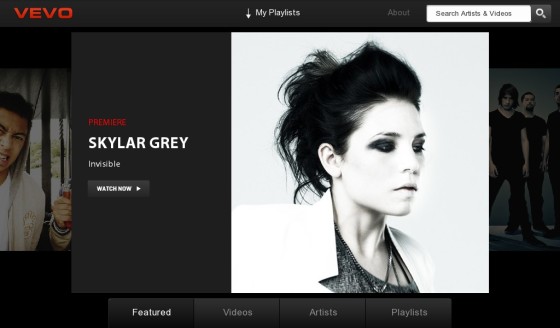
This application isn't perfect though (even though i've sung its praises up until now) and does have a few minor faults that could be changed, added or removed. Even though 8/10 times, the video you select does play, 2/10 of the times it doesn't. It will either refuse to load or you'll be given a message saying something about how the selected video can not be played. I have also had problems with the simple loading of the application, for example, before I began to write this review, I had to uninstall and reinstall the application as it simply refused to get past the opening title screen. A feature that could be added is the feature to be able to name your playlists and be able to shuffle or repeat and such things within them. Also, I would also like to see a few nice animations built into the application to really give it that premium polish that would make this app truly stunning.
Overall however, I have truly enjoyed using this application so far, apart from it's little problems that can easily be sorted in an update, this application works really well. I would highly recommend this application to any avid music video or music fan as the features such as filtering and playlists make this a very good music searching and playing application.
Written by Luke. Twitter @l_harkness • YouTube Channel
Gumdrop Drop Series Case Review for iPad 2
Gumdrop Drop Series Case Review for iPad 2.
Guest Review by Lewis Spearing
Useful Links
Supplied by: http://www.gumdropcases.com/
Griffin Survivor Case Test for iPhone 4 Collaboration
Over the past couple of months we have all been testing the Griffin Survivor case for the iPhone 4. Follow it's journey to see how we all tested it and if it survives to the end. The collaboration videos from all channels involved will feature in this playlist.
Logic 3 iStation Podium Review for iPad
Logic 3 iStation Podium Review for iPad.
Useful Links
Supplied by: http://www.logic3.com/
Radiopaq Duo Headphones Review
Radiopaq Duo Headphones Review... offering up something at a lower price point.
Useful Links
Supplied by: http://www.radiopaq.com/
Case-Mate Gelli Case Review for Apple iPad 2
Case-Mate Gelli Case Review for Apple iPad 2.
Guest Review by Brandon
http://www.youtube.com/itsmemaverickblue
Useful Links
Supplied by: http://www.case-mate.com/
Monster Turbine in-ear Earphones Review
Kitsound BoomDock Speaker Review
Kitsound BoomDock Speaker Review.
Useful Links
Supplied by: http://www.kitsound.co.uk/
Apple iPad 2 Smart Cover Review
Griffin Stylus Review for iPad iPhone & iPod touch
Griffin Stylus Review for iPad iPhone & iPod touch.
Guest review by Brandon
http://www.youtube.com/itsmemaverickblue
Useful Links
Supplied by: http://www.griffintechnology.com/
Zagg Invisible Shield Review for iPad 2
Zagg Invisible Shield Review for iPad 2.
Useful Links
Supplied by: http://www.zagg.com/
Hard Candy Cases Street Skin Review for iPad 2
Hard Candy Cases Street Skin Review for iPad 2.
Useful Links
Supplied by: http://www.hardcandycases.com/