Intego and Mac OS X Leopard - Do the Tango

Intego, the Macintosh security specialist, today announced that all of its software is fully compatible with Mac OS X 10.5, Leopard, the forthcoming version of Apple’s operating system. Leopard will be released on October 26, and Intego has been ready since it released updates to its programs in September.

"We’re very excited to see Leopard in action, and Mac users everywhere will be too," said Laurent Marteau, CEO, Intego. "Intego has worked hard to make sure that, as soon as Leopard is released, our users will be able to protect their Macs and keep the Internet safe."

All of Intego’s programs are fully compatible with Leopard:
• NetBarrier X4
• VirusBarrier X4
• Personal Backup X4
• ContentBarrier X4
• Personal Antispam X4
• FileGuard X4
• Internet Security Barrier suites
• Dual Protection suites

For users who have not updated their software recently, Intego NetUpdate, provided with all Intego programs, will allow them to do so. All they need to do is run NetUpdate and download and install the latest versions of their Intego software, and they’ll be ready to use Leopard.

My Leopard - Mac OS Ordered

It comes as no surprise that I rushed the last two posts about the October 26th launch date for Mac OS X Leopard. I couldn't get onto the Apple Store quick enough to place my order, hasten to say I really hope it actually lands on my doorstep on launch day. So we have CoverFlow in the finder, errrr okay we will wait to see how that pans out. The new Mail sounds pretty neat, as does Stacks. Time Machine is also good, but it depends on how well it is implemented. QuickLook is pretty neat, it certainly sounds like an improvement over Preview. So all in all I am pretty excited. I trust Apple too, so rather than wait, the new OS will go on my system as soon as it arrives.

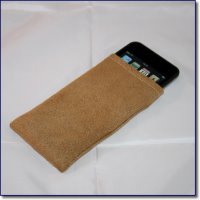
Don't forget, if you want a Leopard style GeekPouch to protect your iPod or iPhone, point your browser here.

Apple ALSO Announces Mac OS X Server Leopard

Apple® today announced that Mac OS® X Server version 10.5 Leopard will go on sale on Friday, October 26, at the same time as Mac OS X Leopard. Leopard Server extends Apple’s legendary ease of use, making it even easier to take advantage of the benefits of a server, and introduces Podcast Producer, the ideal way to automatically publish podcasts to iTunes® or the web. Leopard Server packs more than 250 new features including Wiki Server, allowing people to collaboratively create and modify their shared web sites with just a few clicks; and iCal® Server, the world’s first commercial CalDAV standard-based calendar server.

“Leopard Server is the best release of Mac OS X Server yet, bringing more great innovations, like Podcast Producer, Wiki Server and iCal Server,” said Philip Schiller, Apple’s senior vice president of Worldwide Product Marketing. “With new setup features that have a server up and running within minutes and no client access licenses, Leopard Server is the ideal alternative to complicated and expensive server offerings for small and large businesses.”

Leopard Server presents new features for effortless setup, management and monitoring of systems on the network. Server Assistant configures server applications, network settings such as IP addresses and DNS configurations and user accounts with just a few clicks. Server Preferences simplifies management of users, groups and key server applications, and a Server Status Dashboard widget remotely monitors activity and usage. Leopard Server also eliminates the need to manually set up Leopard clients by automatically configuring client applications, including file sharing, Mail, iChat®, iCal, Address Book and VPN from user information stored on the server.

Podcast Producer is the easiest way for anyone to record content, automatically upload it to the server and convert it into a podcast optimised for playback on almost any device, including a High Definition TV, iPod®, Apple TV™ or multimedia-enabled cell phone.

With Wiki Server, anyone can easily create and edit collaborative web pages, called wikis, with a few clicks of a mouse. Wiki Server has 20 Apple-designed web page themes and provides a complete revision history to make it easy to restore previous entries and merge or compare different versions. Wiki Server can automatically notify users whenever a change is made, keeping them up-to-date on the latest information, and users can tag keywords to find content quickly.

It’s easy to share calendars, schedule meetings and coordinate events within a workgroup, school, small business or large corporation using iCal Server. iCal Server is the first open, standards-based calendar server that works with popular calendar programmes which support the new CalDAV standard and does not require client access licenses, so businesses can add users freely as they expand at no additional cost.

Leopard Server is fully UNIX compliant and its core services, including Apache 2, MySQL 5, Postfix, Podcast Producer and QuickTime® Streaming Server, are 64-bit, allowing users to work with larger data sets and take full advantage of the performance and processing power of their 64-bit hardware. Since Leopard Server is fully 32-bit compatible, users can run 32-bit and 64-bit applications natively side-by-side.

Pricing & Availability
Mac OS X Server version 10.5 Leopard will be available on October 26 at Apple’s retail stores and through Apple Authorised Resellers for a suggested retail price of £319 (inc VAT) for a 10-client edition and £629 (inc VAT) for an unlimited-client edition. An unlimited client license of Leopard Server is included with Apple’s powerful Xserve® rack-mount server hardware at no extra charge. Online pre-orders can be made through the Apple Store® (http://www.apple.com/uk/) starting today and current subscribers to the Apple Maintenance Program will receive Leopard Server as part of their service agreement. Volume and maintenance pricing is available from Apple. The standard Mac OS Up-To-Date upgrade package is available to all customers who purchased a qualifying new Xserve system from Apple or an Apple Authorised Reseller on or after October 1, 2007 for a shipping and handling fee of £5.95 (inc VAT). Leopard Server can run on any Macintosh® computer with an Intel, PowerPC G5, or G4 (867 Mhz or faster) processor, a minimum 1GB of RAM and at least 20GB of available disk space.

Apple to Ship Mac OS X Leopard on October 26

Apple today announced that Mac OS® X Leopard will go on sale Friday, October 26 at 6:00 p.m. at Apple’s retail stores and Apple Authorised Resellers, and that Apple’s online store is now accepting pre-orders. Leopard is packed with more than 300 new features and introduces a brand new desktop with Stacks, a new way to easily access files from the Dock; a redesigned Finder that lets users quickly browse and share files between multiple Macs; Quick Look, a new way to instantly see files without opening an application; Spaces, an intuitive new feature used to create groups of applications and instantly switch between them; and Time Machine, an effortless way to automatically back up everything on a Mac®.

“Leopard, the sixth major release of Mac OS X, is the best upgrade we’ve ever released,” said Steve Jobs, Apple’s CEO. “And everyone gets the ‘Ultimate’ version, packed with all the new innovative features, for just £85.”

Leopard’s new desktop includes the redesigned 3D Dock with Stacks, a new way to organise files for quick and easy access with just one click. Leopard automatically places web, email and other downloads in a Downloads stack to maintain a clutter-free desktop, and users can instantly fan the contents of this and other Stacks into an elegant arc right from the Dock. Users can also create their own Stacks for quick access to folders, documents or applications. Leopard’s gorgeous new look extends to all applications, with every window on the desktop offering a consistent design theme and active windows outlined by deeper shadows that make them stand out.

The updated Finder includes Cover Flow® and a new sidebar with a dramatically simplified way to search for, browse and copy content from any PC or Mac on a local network. Content on any computer on a local network can now be searched using Spotlight™, browsed using Cover Flow or copied across the network with a simple drag and drop. .Mac members can use the new Back to My Mac feature to browse and access files on their remote Macs over the Internet.

Quick Look is the fastest and easiest way for users to look inside files without launching them or even having the application that created them. With Quick Look, users can instantly view full-screen, high-resolution files of virtually anything, even media files, from any view in the Finder.

Spaces gives users a powerful new way to organise their work by creating customised desktops which can contain only those applications or documents needed for each project, with the ability to quickly switch between Spaces with the mouse or keyboard.

Time Machine lets users easily back up all of the data on their Mac, find lost files and even restore all of the software on their Mac. With just a one-click setup, Time Machine automatically keeps an up-to-date copy of everything on the Mac.* In the event a file is lost, users can search back through time to find deleted files, applications, photos and other digital media and then instantly restore the file. If it’s ever necessary, Leopard can also easily restore an entire system from the Time Machine data on an external drive.

Mail has been updated in Leopard and features more than 30 stationery designs and layouts that look great on a Windows PC or Mac so users can easily send stylish, personalised emails with beautiful graphics and photos. Notes and To Dos help users stay organised by acting just like emails that can be easily created, saved as drafts, synced across multiple Macs and stored in Smart Mailboxes. Data detectors automatically sense phone numbers, addresses and events so they can be added to Address Book or iCal® with just a few clicks, and users can keep up-to-date by getting the latest news and blog feeds delivered directly to the their mailboxes with a built-in RSS reader.

iChat®, the easiest-to-use video conferencing application on any personal computer, offers even richer video chats in Leopard with iChat Theater, which makes it easy to show photos, presentations, videos or files in a video conference; screen sharing which lets users remotely view and operate another Mac; and Photo Booth® effects for fun distortions and video backdrops that can instantly make users appear to be anywhere they choose.

Other new features in Leopard include:

• improved Parental Controls, aiding parents in managing their kids’ online activities with automatic identification of unsuitable content before allowing website access, plus time limits and activity logs that can be accessed from any Mac on a home network;
• the complete Boot Camp® release, previously available only as a beta, making it possible to run Windows natively on Intel-based Macs;**
• Web Clip, bringing anything that a user wants from a web page to Dashboard as a live widget;
• new Photo Booth features, helping users create animated iChat buddy icons or fun effects and backdrops with still or video images;
• an enhanced Dictionary with Wikipedia built in, allowing users to access up to date information on virtually any subject in a snap;
• a newly updated iCal with multi-user calendaring based on the new CalDAV standard; and
• an updated version of Front Row, making it even easier to play music or watch movies, TV shows and photos on a Mac using the ultra-simple Apple Remote.

Pricing & Availability
Mac OS X version 10.5 Leopard will be available on October 26 at Apple’s retail stores and through Apple Authorised Resellers for a suggested retail price of £85 (inc VAT) for a single user license, and online pre-orders can be made through Apple's online store (http://www.apple.com/uk/) starting today. The Mac OS X Leopard Family Pack is a single-residence, five-user license that will be available for a suggested retail price of £129 (inc VAT). Volume and maintenance pricing is available from Apple. The standard Mac OS Up-To-Date upgrade package is available to all customers who purchased a qualifying new Mac system from Apple or an Apple Authorised Reseller on or after October 1, 2007 for a shipping and handling fee of £5.95 (inc VAT). Leopard requires a minimum of 512MB of RAM and is designed to run on any Macintosh® computer with an Intel, PowerPC G5 or G4 (867 Mhz or faster) processor. Full system requirements can be found at www.apple.com/macosx/techspecs.

Apple Wireless Keyboard - Nice n White

A few weeks back I bought you some really nice images of the iPod touch, courtesy of Elegant Technology. This time around I have been given kind permission to post a few images of the new ultra thin, Apple Wireless Keyboard. I love the design of this little gem. I have yet to use the wireless version, but if it is half as good as the tethered version, you are in for a treat. More photos of this design wonder can be found here.

GeekPouch - Tan for iPod touch - Limited Stock

In the run up to the holiday season it is very likely you will be filling your own stocking, or someone near to you, with a new iPod or perhaps even an iPhone. Our very own GeekPouches have been proving very popular, it is often hard to keep up with the orders.
For something a little different, we have a very limited stock of iPod touch pouches in tan faux suede. At the time of writing this, we literally have about 15 left, so if you want one of these tan pouches, head on over to the GeekPouch page now.

Apple launch Web Apps Portal for iPhone

If you own an iPhone or plan to get on in the UK on November 9th, then you should bookmark this one. Apple have opened up their Web Apps section of the website. Here you will find stacks of brilliant web applications and sites designed to work specifically on the iPhone. Everything from games, utilities and social networking tools. Well worth a look.

T3 Awards 2007 - iPhone, iPod & XBox 360

T3 Awards 2007 recognised the Apple iPhone as the 'Most Anticipated Gadget' and the iPod as the 'Top Computer Gadget'. The iTunes Store also got 'Best Download Service', so it seems like Apple got a triple whammy. Hold your horses! Apple also got 'Best Music Gadget' and 'The Best Gadget of All Time' for the iPod. The MacBook Pro got their 'Drop Dead Gorgeous Award'. Wow, I think it goes without saying that T3 loves Apple stuff.
There were other awards too, including the XBox 360 which was crowned 'Best Gaming Gadget'. Head on over to take a look at the full rundown.

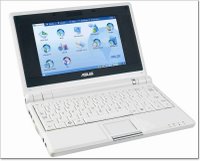
RM Launches the RM Asus MiniBook for £169

RM has launched a PC that weighs less than 1kg, is about the same size as a box of tissues and costs less than £200. It is the ideal computer for learners. Not only is it light, small and truly portable it is affordable too.

"We like the look of this small form factor laptop, and anything that encourages students to embrace technology is a good thing. The styling looks very nice, right down to the diddy touchpad. We will bring you a review of this product as soon as we can." [Dave, Geekanoids]

Students will be able to use the RM Asus miniBook to send and receive email, create and edit documents, view photographs, play videos and MP3 files, browse the Internet, listen to online radio and participate in instant messaging. The screen is just over 7 inches in size and the device takes less than 15 seconds to boot up and has a one click intuitive interface.

The RM Asus miniBook combines the portability and quick start of a PDA with the capabilities of a notebook. It has a solid-state hard drive, for fast boot-up and shut down, which is more robust than a mechanical drive. It features an integrated web cam, microphone and speakers – which make video conferencing quick and easy. It also has internal wireless g and an optional 3G module for easy mobile connection. There is an integrated card reader for easy transfer of photographs and other files, 3 USB 2.0 ports and a VGA out port.

Other key features of the RM Asus miniBook are that it is safe for pupils to take home and it is very portable. Being small and compact makes the miniBook unobtrusive and, therefore, safer for pupils to transport to and from school. And weighing less that 1kg means that the problems associated with carrying heavy school bags are a thing of the past too.

This innovative computer has been jointly developed by RM and its hardware partner, Asustek, the company that also worked with RM on the development of the RM Mobile One notebook.

Commenting on the launch, Tim Pearson, CEO of RM said;
“There has never been such an exciting time for teaching and learning with ICT. Learners these days need to have access to technology at home and outside the classroom. The school gate is now a virtual one. And that is a good thing. What is not so good is if some learners can’t be part of that new world. That is why we are working with our technology partners Asustek to bring affordable, mobile computing to schools. We have a responsibility to ensure that all our children have access to the very best learning and the very best technology that is available. By developing a student device that is in the same price range as an iPod I believe we are getting there.”

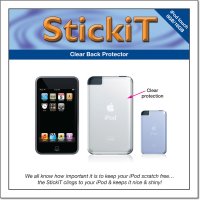
StickiT - Clear back protector for iPod touch

Head on over the the Geekanoids Shop now and you will see we have just added the StickiT Back Protector for the iPod touch. We all know how important it is to protect the screen of the iPod touch, but what about the back? The StickiT is made of a cling-type vinyl, which adheres to the back of the iPod touch with static. There is no glue at all, so when you peal it off, there is no sticky marks and your iPod touch is nice and shiny. You can even use it with some cases, so long as they are not too tight a fit, or a pouch like our very own GeekPouches.
The StickiT Back Protector for the iPod touch is available now, for £3.59 (inc UK postage) or £7.59 (rest of the world).

iPod touch will be THE Christmas gift for 2007

I have now had my iPod touch for about one week, and having shown you all how good it is in my video review, I felt I should give you a warning. If you plan on buying one of these for a Christmas gift, don't leave it too late, as I really think this will be the hottest gift for 2007. Supply should be plentiful, but if my prediction comes true, there will be a shortage and a lot of disappointed kids and adults come Christmas morning.
The iPod touch is just such a rounded product and great performer. You have the best iPod user interface available today, coupled with a gorgeous eye popping colour screen. There is nothing worse than having to prepare content for (other) MP3 players for multiple users, but managing more than one iPod with iTunes is a breeze. So if you have one, two or three of these under the tree on the morning of the 25th, you can still enjoy your jumbo turkey and Only Fools and Horses in the afternoon, without the hassle of converting content and getting it onto the device.
Get prepared way in advance, download content, create playlists for your loved ones, so that syncing your new iPod touch is quick and easy. You may also want to search on ebay and buy a screen protector. This really is an essential item, I personally use an Exim brand, and it save all the small scratches and smudges making their way onto the screen.
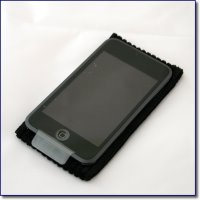
Over at our Geekanoids shop, we also sell GeekPouches, which are small corduroy pouches to keep your iPod touch safe. We will also be adding a back protector to the shop this week, so keep an eye out for that too.

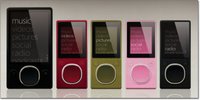
Zune 2 to hit US this November

Whilst I was quite impressed to see the Zune 2 improvements, when is Microsoft going to take the MP3 market seriously? Whilst my MP3 player of choice is the iPod (touch), if I wanted a Zune or Zune2 I could not buy one (easily) as I live in the UK. The first Zune was not a resounding success, selling just over one million units. Had it been available worldwide, it may well have sold three times that.
Anyway, rant over, the new Zune 2 will be available in November, in the US, in both a hard drive based 80GB version, and either 4GB or 8GB flash based versions. The new user interface will adorn this new device and be made available as an update to the previous version. Biggest news for me is that it will support Podcasts, I just hope it will talk to iTunes too, or at least have a way of making it Mac friendly... now that would be good!