Sennheiser VMX100 - posh bluetooth ?

When I got my iPhone it was not via the normal channels. Because I needed to test accessories with it before the UK launch I had to import one. To say I love it is an understatement, so when looking for a suitable bluetooth headset it had to be something special. For some reason the Apple headset did not appeal to me, and the regular slew of Motorola offerings were dull to say the least. Then Sennheiser sent me their gorgeous VMX100 bluetooth headset. Whilst waiting for the delivery man to knock on my door, I read up on the specifications and looked at images just oozing quality. Then the baby arrived, so the story begins...

The VMX100 is beautifully presented, you often hear me talking about how awesome it is to unbox Apple products, well this is a very similar experience. It is available in black or titanium colour finishes. The titanium version that I was sent looks really cool. Upon opening the box and removing the headset, you are presented with tiny boxes containing the included accessories. These being the USB charger cable (so you can charge on your Mac or PC) and the main plug, which accepts the same USB cable for charging. The included Quick Start guide shows you how to turn on the headset and pair it with your mobile phone. So simple, that I was up and running in under one minute.

The headset is a one piece design, with an answer/end call button, a rocker switch for volume, but no on/off switch. This is the really cool part, to turn on and off, you simply swing the microphone out, fit the headset to your ear and voila, you are in action. The swing out mechanism is really smooth and also moves on the other axis to allow it to fit comfortably on your ear. Nothing actually pokes into your ear canal, so no rubber sleeves to contend with, and I must say this was a welcome change and very comfortable in use.

Where the VMX100 justifies its price tag is with the dual microphone technology, that claims to give crystal clear sound. Well, once connected to my iPhone, I must admit that the clarity on the calls I made was nothing short of superb. On the receiving end, the earpiece was very clear indeed, and when at the other end of the call, the microphone delivered impeccably with no distortion or hiss at all. Full credit to Sennheiser on this one, I was very impressed.

Claims of 100 hours of standby and 5 hours of talk time were also pretty much spot on. I would go so far as to say that the standby time is considerably greater, whereas the talk time for myself was around the 4 to 4.5 hours mark. The only area where I felt let down was the reception range. Although nothing is quoted on the manufacturer website, other headsets I have tested have managed up to 10 meters before audio started breaking up. The VMX100 struggled to get anywhere near this. At around 3 meters there was slight break up in audio, and if I went beyond 5 meters or added a wall into the equation, it was not a nice experience. This is not a deal breaker though, as most of the time your mobile phone would be in your pocket or on the dashboard in the car, so never more than a couple of meters away.

Would I spend my hard earned cash on the Sennheiser VMX100?
If it were my money, then yes, the VMX100 is very good at what it does. The design and comfort are pretty much spot on. The audio clarity is excellent and in day-to-day use I had no real problems with it. If you want something that stands out from the crowd, the VMX100 is a good choice. If your budget is tight, there are plenty of other bluetooth headsets on the market. They might not be as good, but they do the same job, so unless you are going to call Mariah and ask her to sing to you, then you could save some of that hard earned cash.

Product: Sennheiser VMX100 Bluetooth Headset
Price: £80.00 headset only : £100 black headset, car power lead, hard case.
Amazon: £79.89
Supplied by: Sennheiser UK
Contact: info@sennheiser.co.uk


Griffin Technology iClear - Protect your iPhone

The iPhone has been around for a while now, well, at least in the USA. The UK launch is just around the corner, with November 9th cited as the big day. When you get that shiny new gadget, you gotta protect it. So why not check out our review of the Griffin Technology iClear case, it might be just what you are looking for.


Product: iClear Case for iPhone
Price: $24.99 : £18 approx.
Amazon UK Price: £13.89
Supplied by: Griffin Technology
Contact: 615-399-7000

Mac OS X Leopard for Dummies - Review

No sooner has the latest (and supposedly greatest) operating system from Apple landed on our doorsteps, that this surprise landed on mine. It seems like there is a Dummy book for more or less everything nowadays, but I certainly did not expect this one so quickly.

Mac OS X Leopard for Dummies covers the new features in Leopard, and does it in a way that is suited for the first time user. It is presented in black and white, but fully illustrated with clear screen shots. You will find it is divided into sections that start with the basics of what the desktop, finder and icons do, moving on to how to organise your files and folders, before taking a look at dealing with CD's and DVD's. iChat and the new screen sharing, using Mail (the Mac email application) and iTunes are all covered. The writing is done in such a way that there is no technical language, and where there is, it is explained very clearly.

The various sections are marked up with easy to follow icons, that indicate things like a 'New Feature' or a 'Tip'. This is great, as it allows you to learn the subject at hand, but also pick up some handy tips along the way.

TextEdit, fonts, and setting up and using a printer are also explained. The book even moves into areas that are a bit more involved, like networking, backing up and how to re-install your system software should the need arise. Even these more complicated tasks are dealt with superbly in layman terms, so you should come away knowing how to really enjoy your Mac.

My only gripe is that a little splash of colour would make the book a more interesting read. That said, this may well effect the bargain £14.99 price, which is a steal. So if you need to learn how to use your Mac from the ground up, or perhaps you need a gift for a friend or relative who has just acquired a new Mac, then Mac OS X Leopard for Dummies is highly recommended.

Product: Mac OS X Leopard for Dummies
ISBN: 978-0-470-05433-8
Price: £14.99 / $21.99
Supplied by: Wiley Publishing Inc.

Stacks in Mac OS X Leopard - Tidy Up!

I have been reading on many forums that users are not too impressed with Stacks in OS X Leopard. Well, I have to agree, the way they are configured is not great. One of the main complaints is how to get the frontmost icon to look like something meaningful. I hope this short screencast helps a little.

iPhone (in the UK) Video Review

It has been such a busy month at Geekanoids, so busy that it has taken me longer than normal to edit the iPhone video footage taken a couple of weeks ago. If you skip below, you will find a video review of the iPhone, where we take a look at the user interface.
I should also add, that having used this device for around two weeks now, I am in love. The iPhone really has replaced my old mobile phone and my iPod too. It behaves impeccably for my mobile communications. Email on the move is a real joy, as is web browsing (although a bit slow over EDGE). As an iPod, I really cannot emphasize how great the screen is. Being able to watch video footage back with popping colours and in widescreen to boot is brilliant. The iPhone comes highly recommended.

Dahon D7 Vitesse Bike - Ease your Fatigue

Sitting at your desk all day? Tapping away at your keyboard 'til your wrists hurt? If this sounds familiar you need to break away from your computer for a while and get some fresh air. With winter drawing nearer, now is a good time to get out early morning and go for a cycle. Or, perhaps you want to reduce your carbon footprint, so that short drive to work could be done in about the same time, whilst creating less pollution... oh, and did I mention you can get fitter at the same time!
Read More

iPod touch Video Review - so thin!

We waited for what seemed like an eternity for our iPod touch to be delivered. Now we have it in our little mitts, it brings great pleasure to bring you our video review of this wonderful device. Apple have packed some great technology and a fantastic screen into the ultra-thin iPod touch. The touch screen user interface is a joy to use, but does it still feel like an iPod? Check out our video review to find out.

Product: iPod touch
Price: £199 (8GB) : £269 (16GB as reviewed)
Supplied by: Apple UK
Contact: 0800 039 1010

Protect your iPod or iPhone with a GeekPouch

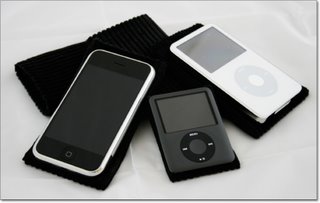
Head on over to this new section is the Geekanoids Shop to take a look at our GeekPouches. Put simply, they are a cotton corduroy pouch to slip your iPod or iPhone into, protecting it from those nasty little scratches. The pouch is not going to break the technology barrier, but it makes a lot of sense to keep your Apple kit in good condition. Not only does it look good, but also increases resale value, should you choose to upgrade in the future.

The GeekPouch is available for the iPod touch, 3rd gen iPod Nano, iPod Classic, 5th gen iPod Video and the iPhone. Prices across the board are £5.99 including UK delivery or £10.99 including international delivery.
Check out the video footage below.

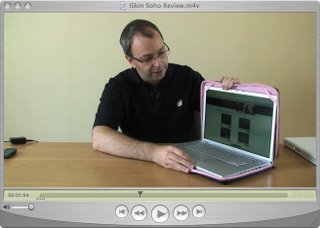
iSkin Soho Laptop Sleeve Review

Want to keep your laptop safe? Then take a look at this video review of the rather stylish iSkin Soho laptop sleeve. Pretty in pink, but also available in other colours, the Solo feels very luxurious, but does it offer good protection? Watch the video to find out.


Product: iSkin Soho
Price: £49.99 (as reviewed)
Supplied by: iSkin
Contact via this online form.

Apple 3rd Gen iPod Nano Review + UK iPhone News

In our latest video installment we bring you more than just a review. We kick off with the news that Apple announced this morning, regarding the UK iPhone pricing, carrier and tariffs. Then onto the review of the 3rd generation iPod Nano. This tiny device arrived at Geekanoids on Monday and to say it is "impressive" is an understatement. How Apple pack so much technology into such a tiny device is amazing. Then squeezing the same number of pixels into the 2-inch screen as on the 5th gen iPod and iPod Classic makes for one of the best screens I have seen to date. Check out the video and enjoy!

Product: 8GB iPod Nano - 3rd generation
Price: £129.00
Note: 4GB model available for £99.00
Supplied by: Apple UK
Contact: 0800 039 1010

Apple iPod Classic First Look & Video Review

The new iPod Classic from Apple landed in the Geekanoids office today, and being a big iPod fan I was eager to bring you this first look. We show you the 160GB silver version, including an unboxing to show exactly what you get for your money, the new user interface, and our overall impression of this new device. In case you are not quite up to speed, the new iPod Classic is available in black or silver, with 80GB and 160GB versions available.

Just imagine having 160GB to store all your music, movies, TV shows, podcasts and photos. Sit back and enjoy the video !

Product: Apple iPod Classic 160GB
Price: £229.00
Available from: AppleStore UK

Belkin PocketTop Review - Lap up the goodness

Working around the home needn't be boring. The Belkin PocketTop gives you the chance to work in style and comfort. This product is available in some great colours and offers some really nice features that enhance the way you work. Check out the video review to see exactly what we thought. *Update* The PocketTop is currently available in Orange, Silver and Green. Since the video review was made three new colours have been announced, Chocolate with Tourmaline, Dove with Tarragon and Steel with Burnt Orange, keep an eye out on Geekanoids when we have some images for you.

Product: Belkin PocketTop
Model: F8N043eaORG
Price: £34.99
Supplied by: Belkin UK
Contact: +44 (0)1933 35 2000

Kodak EasyShare 5300 Review

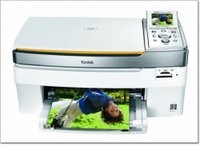
When it comes to choosing a new inkjet printer, you really are spoilt for choice. Add in the need for an all-in-one offering, for scanning as well, and things can become a little more complicated. Kodak plan to change this by introducing the EasyShare 5300 to the market. This is a really smart looking inkjet, in a nice white and silver finish that would not look out of place next to an iMac (though it will of course work with any Mac or PC). It offers the ability to scan, print from a selection of memory cards, and of course is a normal inkjet printer. It sports a 3-inch colour LCD screen, borderless printing, and claims of upto 32ppm in black and white, or 30ppm in full colour, which is pretty impressive.

Paper and inks are where the 5300 really excels. On the paper front you have two trays, one can be kept loaded with upto 100 A4 sheets, for regular documents and/or larger photo prints. The smaller tray sits just above this and is dedicated to 6x4 photo paper (capacity 20 sheets). You keep this loaded at all times and engage it by pushing it into the printer body a couple of inches. When engaged a green LED comes on to indicate that you are going to print from the 6x4 tray. This is a nice way of doing things, although I would prefer to select this in the printer driver on-screen rather than having to remember to engage the tray, but I guess this could just be a personal preference.
Inks and economy are taken to a whole new level. Up until now we have all been told to avoid printers that use all in one cartridges, and for good reason. Supposedly, if an ink cartridge consists of cyan, magenta, yellow and black, when just the black or cyan runs out, you have to replace the whole thing, even if the yellow is still full. With many other printers, this can be very costly. I have seen CMYK ink cartridges cost as much as £30 before, so why is the EasyShare 5300 different?
Well, the 5300 has two ink cartridges, one for the black ink and the other holds the cyan, magenta,yellow, light cyan and light magenta. In a typical scenario the black would always run out first, so it is nice that this is separate. But what about that colour cartridge? Kodak have taken a different angle on this all-in-one cartridge business. Firstly, they say that the 5300 uses less ink than its competitors (see chart). You should expect to get around twice as much printing out of a cartridge when dealing with colour and almost three times as much for plain black text documents. Add this to the fact that the black cartridge has an RRP of £6.99 and the colour just £9.99 and you can start to see just how cheap the 5300 can be to run. You can pick up a black and colour cartridge together for as little as £14.99 if you shop around. This should equate to 2p per black A4 document, 5p per A4 colour document and 7p per 4x6 photo. Suddenly, this printer starts to make sense, if it performs well it could be a winner.

Getting the EasyShare 5300 up and running was pretty easy. There was a slight hiccup, where I had just upgraded to Mac OS X 10.4.10 and the Kodak software would not install. Upon contacting Kodak support I was advised that it was not seeing the last zero in my system software, so thought I was running 10.4.1. This was a problem because the 5300 only runs on OS X 10.4.9 or later. Although this was initially a problem I must really congratulate Kodak on the prompt response to the problem. With 48 hours the driver had been fixed and I was up and running.

In use scanning was a breeze, the 5300 is TWAIN compliant, so I used PhotoShop to scan some A4 magazine pages and photos. Colours were very accurate, whites neutral and blacks where quite dense. The level of detail and density was nothing to shout about, but definitely acceptable for the home market.
Printing was also a very good experience, with nice fast black and white printing. Not anywhere near the 32ppm claim, but I did get a ten page document out in one minute. Full colour business type documents were a little slower at around 6ppm, but the colours were bright and crisp, with no spidery text. Moving onto photos and the colour reproduction was fantastic. A borderless A4 full colour photo took almost to minutes, but the colours looked very accurate, the saturation was just right and the level of detail was as good as a lab print (to my eyes). Printing from the Mac, memory card, or via a PictBridge connected camera to the 4x6 paper yielded pretty much the same results. All around 40 seconds per print and all looked very nice.

So, does the EasyShare 5300 live up to its claims? Well, in the quality department I can give it a resounding yes. Prints were crisp, had great levels of detail, and seemed very colour accurate. My only complaint was when printing A4 borderless prints, that the first one of each batch had some feint lines at the top of the print. This did not repeat itself on successive prints. The scanner is also superb, more than good enough for the home market. Copying direct from the glass to the printer was also very easy and produced good results.

In the running cost arena, the 5300 did not quite meet expectations, but I should quickly draw your attention to just how cheap it is to run. I printed out A4 black and white text filled sheets, until the black ran out and got 332 prints, which equates to 2.1p per sheet, this is fantastic and almost matches Kodak’s 2p claim. Moving onto documents with a mix of colour diagrams, a photo and black text, resulted in 178 A4 prints, which equates to 9.5p per sheet. Kodak claim 5p per sheet, but this is at 5% coverage, whereas my documents were more like 10% coverage, so again pretty impressive. Last up were a batch of full coverage 6x4 photos. Again a new set of cartridges and I loaded up the 5300 and let it run, 142 photos later and the colour cartridge was out, so this worked out at 12p per photo. Again this is very good, not quite the 7p claim, but I would be more than happy paying 12p per photo and printing them from the comfort of my house, rather than going to to a photo lab.

As a complete home printing package the Kodak EasyShare 5300 represents really good value for money. It is cheap to run and produces very good results. You also get a very good scanner and convenient copier function too. If you need to send fax documents, then take a look at the EasyShare 5500 which shares all of the features and specification in this review, but add a fax machine into the equation for an extra £70.

Product: Kodak EasyShare 5300
Price: £139.99
Supplied by: Kodak UK
Contact: 0870 2430270

Waterfield Designs Racer-X Laptop Bag Review

We are very pleased to bring you our video review of the Racer-X laptop bag from Waterfield Designs. This nicely designed bag is available in a variety of sizes, we take a look at the Apple MacBook version in a rather fetching black/red combo.

Update: In the video we mention not knowing what the zip on the rear of the bag is for. Oooops, this is our mistake, the exterior pocket on the back has a zippered bottom so it can be slipped over handles on wheeled carry-on bags, a very nice idea, sorry we missed it.

We liked the Racer-X, a lot, very high quality material and superb manufacturing quality. The Racer-X should be high on your list if you need to carry your laptop around.

Product: Racer-X Laptop Bag
Price: $169 to $189
Supplied by: SFBags
Contact: 877-546-1040
Outside the US: +1-415-546-1040

Harry Potter and the Order of the Phoenix Review

I must admit to never really getting into the whole Harry Potter thing, yes, shame on me! For some strange reason, when EA released 'Harry Potter and the Order of the Phoenix' for the Sony PS3, I was drawn to it like a magnet and just had to take a look.

Previous incarnations of the Harry Potter games seemed to lack something in the magic department, they just seemed to try and do too much magic. In this latest offering EA have nailed it right on the head, the atmosphere of the whole game is spot on, you really feel like you are right there with Harry and the gang in Hogwarts. This feeling is mainly due to the superb graphics and textures that are very detailed and accurate.

To keep the game moving along you have to complete over 30 tasks, learning spells along the way. You also unlock discovery points which in turn make your spells even more powerful. This allows you to unlock even more secrets and certainly kept my interest locked in. There are plenty of battles to be won, which have you twirling your wand, casting spells to defeat nasty kids and even the Dark Lord. During these spell casting battles, you will be impressed by the graphics, and the animation of Harry who reacts in some really cool ways to victory or defeat. Of course the main objective is to defeat your opponent, but paralyzing them is very effective.

The PS3 adds some six-axis controller features, and although they don't seem that accurate, being able to wave your controller to wave Harry's wand is a nice touch. I do not think Sony's six-axis will ever be that accurate, so it was nice to see EA at least implement it in some way.

In summary, Harry Potter and the Order of the Phoenix is a nice rounded game. Interesting game play, different on-screen battles (rather than awful cut scenes), a nice control method and good sound. Above all, what really stands out is the atmosphere of the game. It really makes you feel part of it, and has you coming back for more. This is certainly one you won't put down until you have finished it.

Product: Harry Potter and the Order of the Phoenix
Price: £49.99
Street Price: £34.96
Supplied by: Electronic Arts
Contact: 0870 2432435

Webtalker 5000 Video Review - Skype Goodness

Skype is used by a lot of computer users, but if you use it a lot then you really shouldn't be crouched over your keyboard with a sweaty headset on. Why not add some class to your Skype experience and check out our video review of the Webt@lker 5000 from Topcom.

Update: I wanted to add something I forgot to mention in the video review (silly me), the most important part. The Webt@lker 5000 has a fantastic quality screen, probably the best I have seen on this type of product. It is very sharp and the colours are great. Call quality was equally superb, this probably had something to do with it being hard-wired (rather than a wireless device), but the voice clarity was very noticeable.

Product: Webt@lker 5000 with Skype
Price: £109.99 - £122.00
Supplied by: Topcom
Contact: info@topcom.net

Miglia TVMini Express Review

You have never previously had so much choice for recording TV to your Mac, so when something is done well, it needs to be recognised. The TVMini Express from Miglia, really is a miniature package, from the moment you receive the tiny box, you will wonder just how it will all work.

In the box you get the TVMini Express tuner. A white USB stick, not much bigger than a flash drive, but designed in white to compliment most of the Mac range. You also get a portable antenna, USB 2 cable and a CD containing a PDF user guide and the included 'The Tube' software.

Hooking the kit up is really easy, just install the software, plug in the tuner to a USB 2 port (if this is hard to get to, you can use the included cable to extend your port to an accessible location). The antenna is a different matter, and in my case I could not get a Freeview signal with the tiny portable one that is included. This will vary depending on your area. Plugging into my main roof aerial sorted the problem.

Once everything was auto-tuned in, this little device simply works, and does things very well. You can record to your hard drive, move recordings across to your iTunes library to later sync with your iPod, iPhone or AppleTV. Of course watch recordings or live TV on your Mac. It is even possible to have TheTube software float the TV viewer on top of all other applications. So you can carry on working whilst watching TV. Another nice feature is the ability to see in a single window, what is on the other channels, without having to switch over, this is a real timesaver. To round things off, the EPG is superb, it allows you to easily find programmes and schedule recordings with ease. For this bargain price, you really can bring TV to your Mac with ease.

Product: TVMini Express
Price: £34.00
Supplied by: Miglia
Contact: +44 (0)1442 827222

Gear4 HouseParty Blu Review

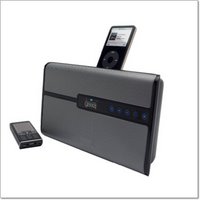
Gear4 have a nice range of iPod related products now, but with the HouseParty Blu they certainly seem to have upped the design ante. This sleek unit has a nice grill to the front, with some backlit touch sensitive controls. Yes, this is an iPod speaker system, with the mandatory dock, but it goes one step further by adding bluetooth.

OK, so the iPod does not have bluetooth as standard, although this can be added afterwards. Where the 'Blu' scores is that you can hook up any A2DP Bluetooth device, like your mobile phone and stream your tunes to it. In practice this work brilliantly. I am not a big mobile phone user, as I use my iPod all the time, but for the purposes of this review some of my fave tunes were transferred to my mobile. The quality was pretty darn good, not as good as docking my iPod, but certainly detailed and very usable.

The volume of this unit is pretty astounding too, with 30W of output it certainly goes loud and keeps the distortion in check too. There is also a line-in, so you can connect other audio devices to the HouseParty Blu. The supplied remote control is pretty much functional, as with most devices of this type, there is no need for an expensive remote.


On the iPod front, you can use the 'Blu' with any dock connecting iPod, as far back as the Mini. Docking adapters, which snap neatly into place, are supplied in the box.

Overall, this is a very nice package. It goes very loud, has a nice quality sound reproduction, and a very pleasing design. Add to this the flexibility of easily connecting a Bluetooth mobile phone, and you have a product that offers that little bit extra over the competition. Well done Gear4.

Product: HouseParty Blu
Price: £79.99
Supplied by: Gear4
Contact: support@gear4.com

Many thanks to Simms International Accessories for sponsoring the MacBook Pro used to create this review… Crumpler bags remain bold, fresh and super ergonomic, utilising durable high tech materials and offering the kind of unique features you won’t even know you need till you’ve tried them. And did I mention the ‘colourful’ names?

Brenthaven MetroLite Review

When you have a laptop of any brand, it is important to be able to take it with you whilst keeping it safe from knocks and scrapes. The MetroLite from Brenthaven offers a stylish choice, with a very nice quality feel to it. Check out the video review to see just what we thought of it.

Product: MetroLite Carry Case
Price: £49.95
Supplied by: Brenthaven
Contact: +44 (0)20 8400 1275