Apple MacBook Air 2011 Core i5 1.6GHz Benchmark Tests. In this video I look at BlackMagic Disk Speed Tests and a Geekbench test.
View my Geekbench Scores here
http://browse.geekbench.ca/user/Geekanoids/geekbench2

Apple MacBook Air 2011 Core i5 1.6GHz Benchmark Tests. In this video I look at BlackMagic Disk Speed Tests and a Geekbench test.
View my Geekbench Scores here
http://browse.geekbench.ca/user/Geekanoids/geekbench2
Manfrotto Agile VII Sling Camera Backpack Review.
Buy this product here http://amzn.to/ManAgileVII
Supplied by http://www.manfrotto.co.uk/
Apple MacBook Air 2011 11-inch Core i5 Unboxing & Tour.
Useful Links
Supplied by http://www.apple.com/uk
My 2nd Channel http://www.youtube.com/dailytechtv
Mac OSX Lion Tips - Sidebar Text Size & Finder Window Hard Drive Space. A couple of handy tips for you.
Useful Links
My 2nd Channel http://www.youtube.com/dailytechtv
What's in my Bag ?
Useful Links
Supplied by http://www.knomobags.com/
My 2nd Channel http://www.youtube.com/dailytechtv
Mac OSX Lion Tips. In this video I show you the preferences to easily minimize windows & stop that annoying reverse scrolling.
Useful Links
My 2nd Channel http://www.youtube.com/dailytechtv
How to make a clean install of Mac OSX Lion with a USB memory stick.
Useful Links
My 2nd Channel http://www.youtube.com/dailytechtv
Olympus LS-20M HD Video Camera & Linear PCM Recorder Unboxing & Tour.
Something new from Olympus to challenge all the handheld video cameras. Keep an eye on my channel over the coming weeks for video samples & a full review.
Useful Links
Supplied by: http://www.olympus.co.uk/
Otterbox Defender Series Case Review for iPad 2.
Useful Links
Supplied by: http://www.otterbox.com/
Ministry of Sound MOS006 Headphones Review.
Useful Links
Supplied by: http://www.ministryofsound.com/
Proporta Mizu Shell Review for Apple iPad 2.
Save 10% on all your Proporta orders by clicking here;
http://www.proporta.com/affiliate/geekanoids
Hed Kandi Velvet Case Review for iPhone 4.
Useful Links
Supplied by: http://www.hedkandi.com/
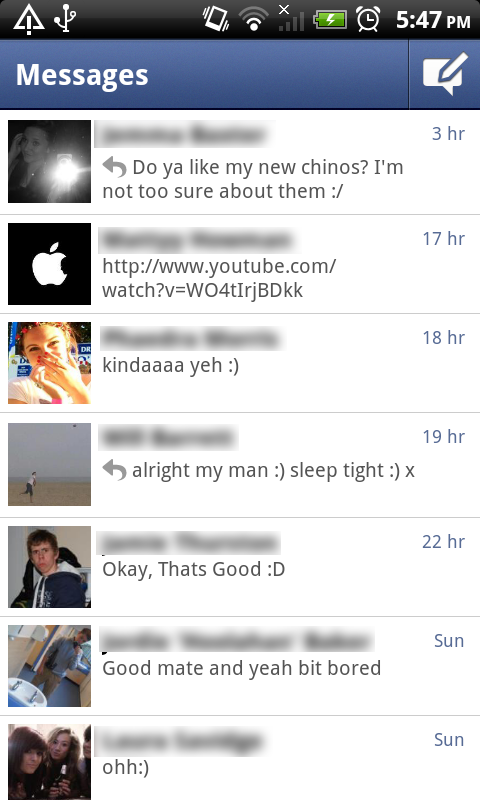 Now, if you don’t know what Facebook is, you don’t deserve to be reading this article so click off and go and read something else. For the 750,000,000 users that do know what Facebook is, then carry on reading for an insight into the Facebook Messenger application for android.
Recently Facebook has been changing all over the place with a new layout to the homepage (including the stalker feed on the top right) and new options and things being moved about all over the shot. Now, I’ve been a little sceptical to these changes because I’ve always believed if something isn’t broken, don’t try and fix it and by moving things around, Facebook and Mark Zuckerberg have confused a lot of Facebook users. However, one thing that I have really liked about the recent Facebook changes is the way that messages and chats are handled. Messages have changed in that you can pop up on chat to someone and if they aren’t online, it sends them a Facebook Message instead of waiting until they’re online to send the chat Message. Now, with this service in place, the Facebook team felt that it was suitable to make a Facebook Messenger application to almost replace modern email completely.
To begin with, you may feel that by me saying that it will replace modern email completely is a bit of an over exaggeration, but if you think about it, nearly everybody you know has Facebook don’t they? However, do you know all of their email addresses? Probably not. I admit that Facebook is possibly for the younger generation, but that just enhances my argument Facebook messages will replace modern email. The current population of 12-20 year olds will communicate over Facebook; if they want to talk to their friends they will leave them a comment on their wall, or if they are online will chat to them that way. In addition, with all Smartphones having push notifications these days, every one with a smartphone can receive the message almost as instantly as if they were sitting at home on their Facebook page. Another thing is that with the new messaging system, if the person that you wish to contact does not have a smartphone, Facebook will text them the message that you have sent (assuming they have their number on their profile) and they can reply by simply replying to the text. One last thing that helps my argument that this form of messaging will replace email is the simple fact, everyone now has an email address that if you are in an email application, you can email and it will send them that message in their Messages; genius!
I’ve rambled on about the new messaging service for Facebook enough, let’s get down to the actual application for Android. The application is set out so simply, but so well! When you open the application you simply have your feed of recent messages with each contact which you can access by clicking on the name of the person you wish to chat or respond to; you also have a compose message button.
 When you click the button to compose a message, you are brought to a screen with a very similar design to the previous, but now you have an option in the top left (signalled with the trademark facebook ‘f’ logo) to take you back to the messages screen. When choosing the recipient you wish to send the message to, you simply start typing in the name and it brings up your friends with that name. One addition I like to this is that if they aren’t online it will show a little mobile symbol next to it, signifying that it will send it to their mobile app. Also, you can choose to send the person a text message from Facebook instead of leaving a message in their inbox. Just like the new Facebook chat and Facebook messaging service, you also have the ability to start group conversations with multiple friends on Facebook. Furthermore, in this screen, you have the option to add an image by choosing one of the following options: Take Photo, Choose Photo or Image Search. Another final feature is that you can add your location to the messages that you send (bit creepy and I’ve never used it, but nice to know it’s there.)
In the options you get the ability to alter the notifications with such things as whether it vibrates, whether it makes a sound, what sound it makes, that type of thing. Other helpful information to know is that you can either refresh by pulling down and releasing, or you can hit the menu button on your phone and choose refresh. Simples.
I have found myself using this application on countless times, in fact recently I received a message from my Network asking if I was still using my mobile as I had only sent like three texts in a month. I use this application more than I use any other form of messaging service. Even though you do get a message option within the Official Facebook app, I find this just quicker; you simply open the app, click compose, type the name, type your message and boom, you send it away. Such a simple application, yet such a useful one and a genius move by Facebook if you ask me; it just needs more publicity and maybe iOS and Blackberry versions to properly excel this application into one of the highest in the market.
Spider Pro Single Camera System Holster Review.
Useful Links
Supplied by: http://www.spiderholster.com/
Dualtek Puregear Extreme Shock Band & Shield Review for iPhone 4.
Useful Links
Supplied by: http://www.pure-gear.com/

Comb-Over Charlie begins with a simple opening menu that lets you access everything you will need to access to enjoy the experience of the game. I really liked the font and design of this game as it gave it a childish yet at the same time mature look to it; very clever design. Anyway, on the first screen you are given four buttons to choose from: Play, Help, Scores and Thanks. Hitting the Play button obviously take you to the next screen from which you can start playing, but I shall get back to this later. Help takes you to a little image-by-image tutorial that you can slide through that gives you simple instructions on how to play the game. Scores brings up your highest offline scores (no online scoring enabled as of yet.) And the Thanks options brings up an image that shows who the game was created by and who they owe additional thanks to.
 Now, when you click Play you are taken to a different screen that lets you select which level to wish to play. However, as with most games, you can only select the levels that you’ve already played and therefore have already unlocked to play. There are eight levels to beat in the game which isn’t a lot, but it took me a good couple of hours to complete them all (mainly because I am appalling at the game.) You also are given star ratings on each of your levels (similar to Angry Birds) based on your score. The controls for the game are very simple, you tap on the screen to make Charlie go up and you click the fire button to fire in a straight line.
Ministry of Sound Hard Shell Case Review for iPhone 4.
Useful Links
Supplied by: http://www.ministryofsound.com/