 The new Apple Airport Extreme Base Station (AEBS) got me all excited when it was first announced. Imagine 802.11n wireless connectivity, all wrapped up in Apple goodness. When I received the unit at my office, there was one big low that I had overlooked, but this was over-shadowed by what seemed to be an awesome product. Read on to find out if this new piece of kit will remain in my set-up…
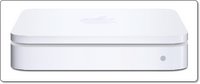
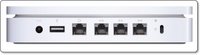 First up is the product design (and packaging). Apple manage to make what should really be a boring run-of-the-mill product into their usual fulfilling unboxing experience. Everything neatly tied and once unwrapped the AEBS oozes quality. It is the same shape as a Mac Mini and about half the height. The front sports a single LED light and the back has the input for power, a USB port, 3 ethernet ports, and a third ethernet port to go to your ADSL or broadband modem/router. There is also a pinhole reset button and a security port for if you want to lock your device down.
Now let's get the negatives out of the way. The big low that I mentioned earlier is that the AEBS does not have a modem built in. This is a shame, as with a modem a lot of people (including myself) could have replaced their existing connection to the outside world completely with this unit. The only other feature I would like to have seen is gigabit ethernet ports, instead of 10/100 speed.
OK, back to the set-up, which is really a case of plugging the unit into either your existing network, or to make a completely new one. The software installation consists of two main items, the AirPort Utility and the AirPort Disk Utility (with a few other bits installed into the background). There is also the 802.11n enabler, for anyone who has a compatible Mac, which includes most of the MacBook range. Running this patch enables the 'n' part of your Mac, so you can take full advantage of the speed increase of your AEBS. Of note, the software included has been upgraded a couple of times, so make sure you grab the latest AirPort Base Station Update 2007-001 to ensure things run smoothly.
Setting things up once the software is installed is really easy, and one of the nice features of the AEBS is the ability to attach a USB hard drive. You can then set (via the software) the access privileges, plus the hard drive can be set to mount on your desktop every time you log in. I tested this with a couple of different USB drives and it worked flawlessly, with data transfer rates more than acceptable. It is also possible to connect a powered USB hub, which in turn can be connected to multiple hard drives and even printers.
Getting things working as a new network was really easy. Things were a little more tricky when trying to extend an existing wireless network, mainly due to compatibility issues with my Belkin N1. It was also a shame that I could not configure the AEBS via an internet browser, only a minor complaint, but I found the Airport Utility a little restrictive in the way it presented the options.
The Verdict is pretty easy to predict. The Apple Airport Extreme Base Station is a fantastic piece of kit. Very nicely designed, and extremely (pun intended) easy to set up. If you run an all Apple network it just works, in other environments it works with a little cajoling. Once up and running, it is virtually impossible to fault and the ability to connect external hard drives is fantastic. I can highly recommend the AEBS if you are looking to add wireless connectivity to your home or office.
Product: Apple AirPort Extreme Base Station
Price: £119.00
Supplied by: Apple UK
Contact: 0800 039 1010