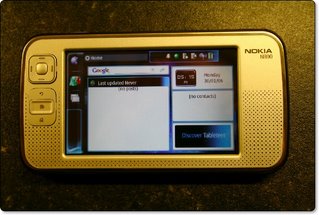
 The Nokia N800 internet tablet landed on my desk today, and having previously tested the N770 I was a little excited to see what had changed and/or improved. More importantly, would I now find a use for the device, when last time around I was left mystified as to how useful it would be for my day-to-day use.
Out of the box the design has improved a great deal. Gone are the slab-like looks of the previous incarnation and you can say hello to some smooth curves, a nice contoured back and a pleasant silver finish to the front. The buttons are a bit odd, sort of set off-centre, and a little non-tactile, but you won't find this a problem, as they are not used too much. The touch screen is the same as before, a glossy finish, very high resolution (800x400) and everything is really colourful, bright and pin-sharp (more on this later). Around the back of the unit is a small flip out stand, which is great for when you are watching videos, and also useful when you set it on your bedside at night to wake you in the morning. A small hole on the top right side of the unit holds the triangular shape stylus, and on the top left side is a click-n-pop-out web camera, which is a nice touch.
 Back to the 800x400 pixel widescreen, and you will not be disappointed, unless you are a fussy bugger like me, as the backlighting is not very even, with noticeable dark patches down the right hand side. To make up for this shortfall, the screen is really nice and sharp, with colours that are really vibrant. The clarity of text is pin-sharp, which is great for viewing websites and emails. The coating on the screen is impressive too, it seemed really scratch resistant. The gloss finish is not what I would say is really high gloss, so reflections are not really a problem. Brightness is adjusted via and on-screen slider, and for most of my tests and use I found the setting to be good around the halfway mark.
 The back of the unit has a cover that comes off nice and easily, underneath this you install the battery, and there is also room for one SD memory card, which can be up to 2GB in size. Also around the back is the stand, which when not in use fits nice and flush to the unit. Lifting the stand out also reveals the second memory card slot, which again is for an SD card up to 2GB, so the N800 supports a total of 4GB which is pretty impressive. During our tests we used Secure Digital cards supplied by Transcend UK (more on this later). Notice that I did not mention a sim card slot, well this N800 is no mobile phone, which would have made this a world beating device in my books.
Buttons on the top include one for powering the unit on and off, plus a +/- zoom button, which is great when surfing the internet. There is also a full screen button, which does what you would expect, it hides all other on-screen icons and just shows the web page you are viewing. If you are playing a video back, then this same button hides all the Media Player controls and plays the video full-screen.
The main use of the N800 is as a fully connected bluetooth and wifi internet communication device. If there is no wireless hotspots around, then you will need to connect the N800 via bluetooth to your mobile phone. Checking your emails, looking at internet sites, instant messaging (with GoogleTalk), RSS news reading, and internet based chat (again GoogleTalk) is really where this device excels. I had my email account set up in no time, and connected the N800 via my wireless network in about five minutes. Looking at internet sites was also pleasant, with the nice clear high res screen serving up the content in a very nice stable Opera based browser.
 Internet based chat is also possible with the Gizmo project, which I already use, so I downloaded the N800 version and again was making calls over my wireless network in no time at all. Gizmo also supports text based chat, so this became my application of choice. Gizmo works in a very similar way to Skype, but for some reason I prefer the latter. The goods news is that Skype is coming to the N800 mid-2007, and I think this will boost sales a great deal.
Playing back some media files was also surprisingly good. MP3 files played back really smoothly, with the built-in speakers doing a good job. Other formats supported include AAC, WAV and WMA. Video playback was really clear, though with some content a little jerky, though I put this down to some files being encoded with a higher bit-rate than the N800 was designed for. Overall though the playback was more than acceptable, almost on par with the Sony PSP, but not quite as good an experience. I did notice a considerable improvement when playing back video files from the high-speed Transcend SD Card. We had two versions of SD card to test, an 80x and a 150x card. Both performed admirably, with the 150x showing quick save times and helping the N800 deliver the video files with less stutters. Video formats supported include MPEG-1, MPEG-4, AVI, and H.263. Streaming internet radio (M3U and PLS) is also supported and a nice feature, though I could not seem to set internet radio as a wake up alarm, which would have been great.
You can also view photos on the device (BMP, GUF, JPEG, PNG, TIFF) and the screen really does a grand job. Remembering that this is not a dedicated image viewer, the quality really will impress.
So, just how useful will someone find the N800? Well, that depends on what your day-to-day activities entail. For me, I am glued to my laptop, and wherever I go, my laptop follows. So I would find that the N800 would be left behind, so it is not for me. If you find that you only attend meetings or do business where you can always use a laptop, then save your pennies.
On a positive note, if you are a business man, or find yourself out and about, but still need to check your emails, or fancy making use of VOIP based calls with Gizmo or the forthcoming Skype, then the N800 is a real boon. If you are already into the Skype scene then the N800 could save you a fortune, once this app becomes available. The RSS news reader also allows you to subscribe to your favourite feeds, so you will never miss that latest headline. On top of all the communication uses, you also get a great MP3 and Video player, plus some built-in games, and a community of open source developers making great apps for the device.
For £279 you can buy an N800 direct from Nokia, which is a pretty good price, you really do get a lot for your money. Whether or not you can make use of such a device is up to you, but even if you only use half of them, I would still say it is good value for money.
Product: Nokia N800
Price: £279
Supplied by: Nokia UK