The Ring Automotive Cyba-lite Orion Flashlight is a tiny device with a big light output. Ideal for the pocket or emergency light in your car... check out the review.
Supplied by: Ring Automotive

The Ring Automotive Cyba-lite Orion Flashlight is a tiny device with a big light output. Ideal for the pocket or emergency light in your car... check out the review.
Supplied by: Ring Automotive
Get in the festive mood with four red Christmas Gadget Gifts for Christmas from Zoombits.
Manufacturers websites:
http://suck.uk.com/
http://www.joby.com/
http://www.mathmos.com/
http://www.razerpro.com/
Supplied by: Zoombits
If you need the daddy of all flashlights, then look no further than the Fenix TK40.
Product: Fenix TK40 Flashlight
Price: £125.95
Supplied by: The Photon Shop
Contact: 02920 407203
Light up your world with this ultra-tough and mega-bright flashlight from Fenix.
Product: Fenix LD20 FLashlight
Price: £44.95
Supplied by: The Photon Shop
Contact: 02920 407203
If you need to charge your USB devices on the move, then there are plenty of options. However, if you need to power something a little bigger, like a laptop, then you need a power inverter. Why not get something that can do both tasks. Check out my review of the E:Can.
Product: E: Can Power Inverter
Price: £39.95
Supplied by: Ring Automotive
Contact: +44 (0)113 213 7389
If you (like most of the population) get fed up with having to throw away alkaline batteries, then you need to get some NiMH ones instead. If you are a heavy user, then a good charger is also an essential piece of kit. Check out the review below of the Technoline BL-700.
Product: Technoline BL-700 Battery Charger
Price: £39.99 (for current BL-900 model)
Supplied by: Battery Logic
Contact: 0800 066 4668
If you are serious about your desk comfort and mouse performance, then having a decent mouse mat is just as important as your mouse selection. The Razer Sphex might not look much, but check out my video to see exactly what I think of this ultra thin mouse mat.
Product: Razer Sphex
Price: £10.99 : $14.99
Supplied by: Razer USA Limited
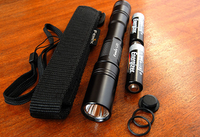 For many a biker, adequate lighting for dusk or night time riding is often overlooked. For the serious MTB enthusiast, having good, powerful, directional lighting with the right type of beam is essential. Dedicated bike lights start at very cheap and not that effective, right up to £500 for a pro set-up. There is another option though and it is one that could please many a gadget lover this Christmas. Personally, I really like LED torches. Don't ask me why, but my fascination over how such a vast amount of light can be produced by some of these torches amazes me. I keep one in my car and another under my sink. Then I stumbled across the Fenix range of torches and the kind guys at The Photon Shop kindly sent us a Fenix L2D Q5 plus a little gadget called a LockBlock for attaching the torch to my mountain bike.
So, let's take a look at the LockBlock first. This little device costs just under £9. It is very simple, but works very well indeed. It comprises of a double-sided U-shaped rubber mount, with two velcro loops threaded through. You attach the LockBlocks to your handlebar, tighten the velcro. Then get your torch, tighten the second velcro loop and voila, your torch is rock solid on your bike. On my rides with this set-up attached things stayed firmly in place. The torch bounced around with the bike of course, but did not budge from the LockBlock mount. Very impressed with this product, simplicity in design paid of and at £9 it is a bargain.
Onto the Fenix torch. This is the first LED flashlight I have reviewed, so my comparisons are made against a £30 Cateye bike specific light. The Fenix L2D Q5 is a lot longer than a regular light, measuring just under 15cm. Even though this is quite long, it does not get in your way when riding. The diameter is 2.1cm, so as mentioned before, it fits nicely in the LockBlock, but if you do use it off the bike, then it is very pocketable. On the bike on night time trails it is awesome. At its highest output you get 180 lumens of output. Running on two AA batteries I was also amazed that it kept going for almost two hours. The beam is very concentrated too, with little spill, so seeing ground hazards was very easy. When I ventured onto the road, cars and other vehicles gave me plenty of room, so I must have been very visible. You can also soft touch the rubber on/off button which changes the brightness, plus you can turn the bezel very slightly to change modes from general to turbo mode. In general mode you get three different brightness levels and an SOS mode. In turbo mode, you get the full 180 lumens plus a fast flashing strobe mode.
Wow, what a torch... lifetime warranty on the LED, waterproof to IPX-8 standard and a toughened optical glass lens. The build is superb and the body of the torch is a hard anodized finish. Dropping it (although not recommended) had not effect and it remained unmarked throughout reviewing it.
The Fenix L2D Q5 is so solidly built and such a useful tool that I just hope that it does not have to go back. This is really a great deal. You get two presents in one. A nice solid torch with awesome light output for the ultimate gadget lover. Plus, you have the ability to use it an a very effective bike light. For this sort of money, what more could you ask? If you buy this particular Fenix torch and a LockBlock it comes to just under £50... highly recommended.
**More photos to follow**
Product: Fenix L2D Q5 Flashlight Torch
Price: £38.95
Product: Twofish LockBlock Bike Mount
Price: £8.94
Supplied by: The Photon Shop
Contact: 02920 407203
 It is the season to be jolly... well almost and in true Christmas spirit I am really excited to kick of our alternative reviews section with something very special. If you have a loved one (and that includes yourself), that loves getting out and about, this will be of interest to you. Maybe hiking or walking is your thing, or a bit of geocaching, or maybe you like to get out on your mountain bike for a good cross country hack. The Garmin Oregon 400t that I have in my grubby mitts can handle all this and a lot more, so please read on...
In the run up to Christmas, Geekanoids will be bringing you a series of reviews on products that get you out and about. Our very next review is on the Trek 6700 mountain bike, which is where the Oregon 400t got its second outing, the first outing found it on our Specialized steed. This tiny handheld satellite navigation system is beautifully made. Its compact size allows it to fit your hand like a glove, measuring just 5.8 x 11.4 x 3.5 cm. Even with batteries installed, it only just goes over the 200g mark (192.7g without). Whilst out biking I would recommend you have both hands planted firmly on your handlebars. So, Garmin kindly made a really simple, yet effective, bike mount for the device. Once attached to your bike, it is a simple matter of turning on, waiting about 15-20 seconds for it to lock onto a signal and a couple of touches on the screen has it recording your route. The touch screen is wonderfully easy to use and a good resolution too at 240x400 pixels. The screen is a little difficult to read in bright sunlight, so could do with a bit better backlight or maybe a different coating to the screen, but it was certainly not a deal breaker. Finding your way around the device is really easy and if you have ever used a Garmin in-car satnav you will feel instantly at ease. So, whilst concentrating on the riding, the 400t was left to do its thing, constantly updating our speed and elevation. I had a TOPO Great Britain map memory card installed into the device. This is an extra cost (£100) and adds a lot more detail onto the device. I think without it, the 400t is fine for on-road use where the basemap detail is fine, but if you are going for long hikes or off-road biking, then the TOPO is great value and recommended.
 Back home and the route was plotted. We have done just over 17 miles and it gave us an insight into our maximum speed, moving time, average, stopped time and overall average speed. We also had access to loads more information such as an Elevation Plot and even a 3D view. If we had a chum with another Oregon we could even wirelessly share the route. At the base of the device you have a rubber flap that reveals a USB connection. So, onto my trusty Mac and I downloaded the relevant drivers. It was a little confusing as to what I needed, but 30 minutes saw me a happy camper. I started with Route Buddy, which showed my route on-screen, albeit on a rather basic map. To get a more detailed map into Route Buddy I would have to buy a TOPO map DVD, so I looked for another solution. Garmin suggested MapMyRide, which is a cool website and free to register and use. I transferred my route to the website and overlayed the Google Hybrid Satellite view and voila, this is what I needed (see screenshot). What I could do from here is save my route and/or edit it, or even create a new route and then push it back onto the 400t. I could also use the web-based workout calculator, which sort of turns my mapping oriented 400t into a fitness device too.
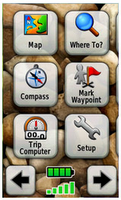 With a route planned and back on the 400t, it was out on the road again. Touching the GO button, I was guided around my route. There are no turn-by-turn voice prompts, but then this is not a car based device, it is really for walking with. It got rained upon with a few showers and a bit muddy, but worked flawlessly. A quick wipe down with a damp cloth brought the Oregon 400t back to its former glory. Having been used for about eight hours constantly, the battery level had not even moved, so I imagine 20/25 hours of use will be easily achievable. The fact that this unit runs on two standard AA batteries makes it very easy to pick up new ones if you are on holiday. I will update this review once the device runs out of juice. The screenshot to the left shows the main screen that appears when you first turn the unit on. Lovely large icons mean that it is easy to use, even with gloves on. You can clearly see the battery meter, along with the satellite signal strength just below.
The Garmin Oregon 400t is not a cheap device, though there are other models further down the range. What it does offer though is a wealth of very useful features. Other than those already mentioned, you get a compass, image viewer, dedicated geocaches function, route planner (actually on the 400t), area calculation, calculator, alarm clock, stopwatch and some other features that would make this list just too extensive. It really is the ultimate handheld satellite navigation system. It is waterproof, rugged and so well made and thought out, that it is worth every penny.
In a couple of weeks we will be bringing you a review of the Garmin Edge 705, which is bike specific, so keep an eye on Geekanoids for this exciting review.
Thanks to Rob for his invaluable input in this review, it was very helpful and important to have the views of an experienced rider.
Gamblingcity.net is like a Garmin, except for finding on line slot machines with the highest payouts using slot machine secret tips. Winning at slot machines is as easy as visiting GC!
Product: Garmin Oregon 400t
Price: £399.99 (400t) : £69.99 (TOPO SE England & Wales microSD) : £12.99 (Bike Mount)
Supplied by: Garmin UK
Contact: +44 (0)870 8501242
If you have a lot of gadgets (don't we all?) that need charging, then why not tackle some of that whilst on the move. The 12V Can Multisocket with twin USB sockets from Ring Automotive offers up a handy solution. Check out the video review of this bargain product.
Product: Ring Automotive 12V Can Multisocket
Price: £12.99 (average)
Supplied by: Ring Automotive
Contact: +44 (0)113 213 7389
If you want to get DAB into your car, it normally involves having a new head unit installed. Although this is not too expensive, in modern cars it is sometimes not possible, due to the mouldings and custom-made units they have. The Highway from Pure Digital is an option, allowing your to wirelessly send DAB broadcasts to your existing car stereo. Check out the video review below.
Product: Pure Digital Highway
Price: £59 (average price)
Supplied by: Pure Digital
Contact: +44 (0)1923 277488
 It seems that the digital TV revolution is upon us, with the UK starting the switch off of analogue transmissions. Where radio is concerned though, we will always have FM, MW, and LW, but for a long time now, if you want that bit extra from the service, then DAB (or Digital Audio Broadcasting) has been the way to go. It has been available to the general public since 1999, so it comes as no surprise that a successor (DAB+) is on the way. DAB+ will offer better error correction coding (so less dropouts, better sound), plus MPEG surround audio, which will be really cool.
In its current form, not only does it offer really clear sound, but you also get extra information, such as the DJ you are listening too, or scrolling text with news or current programme information. The choice of stations depends on your area’s coverage, but it is pretty darn good and well worth checking out what you can pick up in your area. Long time leaders in DAB radios are Pure Digital who offer a range of standalone radio, alarm clock radios, and CD combo units, they even do the Chronos iDock which features a dock for your iPod.
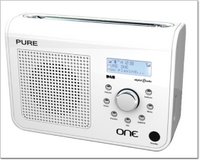
In this review we take a look at the very affordable Pure Digital ONE, which is small enough to be used as a portable, whilst just as comfortable as a mains powered unit too. If you are using away from a plug socket, it takes six C-Cell batteries or a ChargePAK. The latter costs £30 and fits into the same compartment. It then charges whilst connected to the mains, and then you have instant battery power when away from home. The ONE is available in white, pink or black, and the white one we have on test is really quite pleasing to the eye. It is an all plastic affair, but does not feel cheap in any way, the standby button is black, with all other buttons finished in polished silver.
So, let’s take a look at those buttons. There are seven small ones arranged in a circle around a larger rotating button, which you turn to cycle through the various menus and then click to confirm your selection. This works very well, apart from I forgot to push it in time and time again... this same large button also controls the volume, so I kept adjusting the volume by mistake. Totally my fault, and after half an hour, I didn’t make the same mistake again. The tiny buttons give you access to the volume, timer, presets (20 in total), info, DAB/FM selection, menu and stations. The arrangement is really nice and makes it very easy to navigate.
The timer works in two different ways. You can either set a sleep timer, to turn the radio off after 15, 30, 45, 60 or 90 minutes, or you can use as a kitchen timer. Set the hours and minutes, then an alarm will sound when your cooking is done, which is pretty neat. The DAB/FM button allows you to switch to normal FM radio, if you need to get a station not available via DAB. The information you can choose to have displayed includes scrolling text, time and date, programme type, signal strength and quality, bit rate, plus the multiplex name and info. This is fantastic, so much information on the clear backlit display, but there is more to come...
The Pure Digital ONE also features Intellitext, which gives you on-demand information from the station you are listening to. This includes headlines and news from the likes of Virgin, talkSPORT and BBC Five Live, or any other station that supports it. It is this extra information that sets DAB way above anything FM radio can offer, and the 16x2 display is very clear and delivers this extra info very well.
Now I have given you an idea of what the ONE offers in terms of features, it is time to let you know how it performs. On first switch on, it goes into a set-up mode, which takes about 30 seconds. This grabs the time and date info over the air, and auto-tunes the available DAB stations in your area. I was so excited that I quickly clicked the ‘stations’ button and scrolled through to Virgin Radio and pushed the centre button. The quality was awesome, crystal clear and very rounded. The quality delivered by this small radio really impressed me, and within a couple of hours I was a convert, swearing that I would pick up a DAB radio for myself before the end of the year (which is only a couple of weeks away). The volume goes up really loud and even at its highest, the 3-inch speaker did not distort at all. Music sounds really good, but the vocals are so clear, it makes commentary a real pleasure to listen to. From the offset of the review I had been running on C-Cell batteries, so I could rate the performance. With lots of switching between menus, setting up, tuning, etc, I managed to get 28 hours before the batteries gave up. This is superb, and with just radio listening, I would expect a couple more hours, so this can really be used as a portable radio.
For just under £50 you can pick up a Pure Digital ONE and I can highly recommend it. You can even connect it to your PC via USB to perform product upgrades, so it has some future-proofing built-in. At this price it gives you the opportunity to try DAB on a very small budget. Having spent the money, you probably will not feel the need to upgrade, as the ONE performs so admirably. I was so impressed, that I will most likely make this my first DAB radio (if not, I will look at something from the same company). In fact, I was so impressed that my Christmas shopping list has changed... I am going to buy one for my Mum and my Sister too !
Product: Pure Digital One DAB Radio
Price: £49.99
Supplied by: Pure Digital
Contact: +44 (0)1923 277488
 Skype is used by a lot of computer users, but if you use it a lot then you really shouldn't be crouched over your keyboard with a sweaty headset on. Why not add some class to your Skype experience and check out our video review of the Webt@lker 5000 from Topcom.
Update: I wanted to add something I forgot to mention in the video review (silly me), the most important part. The Webt@lker 5000 has a fantastic quality screen, probably the best I have seen on this type of product. It is very sharp and the colours are great. Call quality was equally superb, this probably had something to do with it being hard-wired (rather than a wireless device), but the voice clarity was very noticeable.
Product: Webt@lker 5000 with Skype
Price: £109.99 - £122.00
Supplied by: Topcom
Contact: info@topcom.net
Have you ever wanted to go on holiday and carry one less USB charger. Well, check out the Moixa USB Cells. These neat batteries come in a variety of sizes and I take a look at the AA variety here. They are NiMH batteries that charge from a USB port, how cool is that!?!
Product: Moixa AA USB Cell
Price: from £10.99
Supplied by: Moixa Energy Ltd
 When Skype first hit the scene, manufacturers jumped on board with handsets that resembled regular phones. They were tethered to your computer by a wire, so not very friendly, other than making the user feel more at home by holding something up to their ear. Then came the advent of cordless handsets, followed by wifi enabled units, then dual purpose models that could make regular calls, as well as Skype based calls. Somewhere in between they slipped some totally useless Windows Live handsets in, thanks Philips.
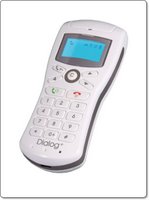
Miglia have produced something a little different, with their Dialog+ handset, by making something that will appeal to both the Mac and PC markets. The Dialog+ offers the ability to make wireless Skype calls, compatible with both the Mac and PC. For Mac users they have also built in iChat AV capability. So with the press of a button, you can use this for your iChat contacts too.
In the box you get the handset itself, which is supplied with three AAA batteries. These charge by attaching the handset with the supplied USB cable. To get the Dialog+ to communicate with your Mac or PC you need to install some drivers and attach a USB dongle, which offers a range of up to 25 metres. It is a shame this does not use Bluetooth to connect. I personally hate USB dongles, but I suppose I can forgive Miglia for this. Once the drivers are installed, you need to adjust a few sound settings, connect the handset wirelessly to the dongle, and you are good to go.
You can control Skype and iChat in the normal way using your computer screen, then just use the Dialog+ to have the conversation. The main strength of this product is the ability to sit away from your computer and use it as a normal phone. You have buttons to access your Skype or iChat contacts, plus another one for call history. As long as you are signed into the relevant account on your computer, you can sit back and make calls from the comfort of your sofa.
In my tests, I found that the range was pretty good, I could get about 22 metres before things got a little choppy. The voice quality was pretty darn good, I could hear who I was talking to very clearly, and my guinea pig callers commented on how clear my voice sounded at their end.
The user interface is pretty good and the blue backlit screen is nice too, nothing fancy, but very functional.
In summary, I can recommend the Dialog+ to anyone who uses Skype and iChat a lot. It makes them more accessible and you will find that you use the services a lot more. The handset is well made and the low price makes the Dialog+ fantastic value for money.
Product: Dialog+
Price: £43.00
Supplied by: Miglia
Contact: +44 (0)1442 827222
 A little bit late for Glastonbury this year, but what the heck, the great British summertime is upon us, so we are bound to get wet one way or another. If you take part in any type of water sport, or just fancy walking around the rainy UK, then the products sent to me by OverBoard may well be of interest to you.
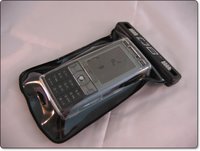 OverBoard make a range of waterproof technology cases for a whole range of items. Varying in size and shape for mobile phones, cameras, iPod, handheld games consoles and the like. They use what is referred to as a Slide Seal System™ which really does seal the item in the bag, so it is nice and safe. The small waterproof phone case that I tested with my beloved K800i is a perfect fit.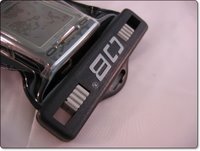
The phone pops into the case, then the top closes together over two sliders, which you push towards the centre of the case to seal your prized possession. Once inside, I bravely put my K800i into a bowl of water, dunked it about a bit, pulled it out and dried the case off. I can honestly say, that no water entered into the case at all… very impressive. According to the specification, you can get away with up to 6m of water, so if you did accidentally drop your kit into the swimming pool, it should remain nice and dry. Apart from water, the case also protects against dirt, sand and dust. It is also supplied with a neck lanyard, which securely clips onto the case.
I also had a 15 litre Dry Flat Bag to test, which measures 35cm by 37cm and holds a lot more kit. It has an adjustable shoulder strap for comfortably carrying around, and when not in use it packs down to a nice compact size. The Dry Flat Bag is a different prospect, and is not a submersible bag. Instead, if it is dropped into water it floats. Again, out came some of my trusty gadgets, a camera, iPod, mobile phone and a rain jacket. All fitted in with no problem, and ten minutes later I had a bath full of water to drop the bag into. Sure enough it floated, and when I checked the contents all was fine and dandy.
The OverBoard range has highly impressed me. The design is nice and clean, with a modern touch. Most importantly, the product works, doing exactly what the manufacturer claims. Another massive plus point is the price, which has been kept very low, so the whole range certainly offers excellent value for money. If you want to protect your kit, then I urge you to check out the range at www.over-board.co.uk and get yourself protected !
Product: OverBoard Small Waterproof Phone Case
Price: £14.99
Product: OverBoard 15 ltr Dry Flat Bag
Price: £17.49
Supplied by: OverBoard Accessories Ltd
Contact: +44 (0)1932 232126
 The ReCharge4 from Exspect promises to deliver a smart battery that recharges a lot of different devices. Ranging from mobile phones to MP3 players, claiming to extend battery life up to four times. Read our review below to find out if it really does deliver on its' promises.
The ReCharge4 might be mistaken for something that has been done by so many other manufacturers, but even within the first few hours of use, I was convinced that this little device had been really well thought out. The package consists of the ReCharge4 battery unit, which has a power input on the base for recharging its internal 4800mAh lithium-ion battery. On the top right of the unit is another socket, where you plug an extension cable, it is this cable that you then attach the various tips that in turn plug into the device you want to charge or use.
On the front of the unit is a small button and a line of green LEDs. If you press the button it shows you how much juice is left in the Recharge4. It takes around six hours to initially charge it to full power. In my test it was showing a full charge after three hours, but I left it plugged in for the full six hours to be on the safe side.
To finish the package off, you get a mains adapter for recharging the internal battery and a small cloth pouch for carrying everything around…
So, I had a fully charged ReCharge4, now for the test. I had a Motorola L7, Nokia 6280 and a Samsung D600, both with completely flat batteries. The Motorola went first and after connecting the charging lead, I plugged in the supplied Motorola tip and then put this into the phone. You are supposed to press the button on the front of the ReCharge4 to initiate charging, but I found that this was not necessary as the L7 started charging straight away. After three hours the L7 was fully charged and only two out of the eight LEDs on the ReCharge4 had gone out. Because I am clever at maths, I guess that means a quarter of the capacity had been used. The Nokia 6280 also fully charged in around 3.5 hours and the Samsung charged to almost full capacity before the Recharge4 unit ran out. This was pretty impressive, to be able to fully charge two mobile phones and almost a third from such a small device.
There are three versions available for mobile phones, MP3 players, or portable gaming devices. The main unit remains the same, it is just the tips that are supplied that changes. For example, the mobile phone version comes with tips for almost every Nokia, Motorola, Sony Ericsson and Samsung offering. The MP3 version comes supplied with tips suitable for the Apple iPod, Creative, iRiver and MP3 players that charge via USB. These small tips are available separately, so you can buy the most suitable main package and then add a few individual tips for specific devices.
In summary the Recharge4 is a very well designed, compact, and useful device. The asking price represents pretty good value for money. Combine this with the fact that you can add new tips for your new devices and you have a useful device that will help power your gadgets for many years to come.
Product: ReCharge4
Price: £39.99
Supplied by: Exspect UK
Contact: info@exspect.co.uk
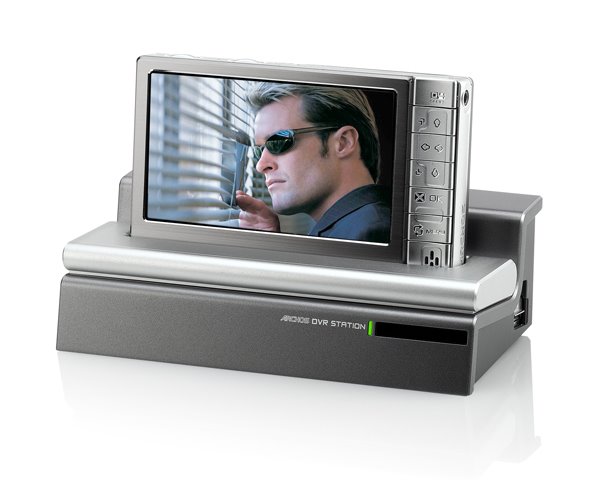
Will the Archos tempt me away from my beloved iPod? I must admit, to say it was interesting is an understatement, with some very nice experiences along the way. On test was the 160Gb version of the Archos 504, yes, you read that right, 160Gb of storage.
The unit sports a 4.3 inch widescreen, capable of displaying 16 million colours. The screen is nice and bright, evenly lit and offers adjustable brightness levels. My only minor complaint was that there were not enough levels to choose from. Staying with the screen, it is very glossy, so you do get some reflections, but adjusting the angle is not a problem. The size of the actual unit is a little bulky feeling, not as pocketable as a 5th generation iPod, mainly because the size that the hard drive adds to the unit, but also due to the weight. Build quality was spot on, with a very nice brushed metal finish.
On the audio front the 504 supports MP3 and WAV files, photo viewing is also supported, plus you get MPEG4 and WMV video playback out of the box. To playback H.264, MPEG2 and VOB files you need to purchase optional plug-ins from Archos, which at the time of my review were not available.
Playing back music was superb, the sound through a decent set of headphones was rich and the on-screen display gives you a lot of information and options. There is also a built-in speaker, but this is very tinny and does not give a lot of volume, so although I do not think you would use it much, I suppose not a lot of competitors players have a speaker at all. Movie playback is awesome, the fluidity of motion scenes is great, colours are rich and again you have a lot of options. Photo viewing is also great, you get thumbnails of all your files, which are magnified slightly as you move over them for easy selection. When viewed full size the colour and definition is spot on, plus moving to the next photo is done in style with beautiful transition effects.
Where the Archos 504 takes things one step further is with its' ability to record programs. To do this you need to purchase the optional DVR Station, which serves many purposes. Use as a simple dock allows you to synchronise the 504 with your PC or Mac (for Mac please read on), it also allows you to charge the unit. The back of the DVR Station is laden with many sockets, composite video in and out, S-Video in and out, Audio in and out, Digital SPDIF out, plus Component video output too. Wow, now that is a lot to choose from. Once connected you can view content on your TV, but the exciting part is the ability to record and schedule recordings. The DVR Station is even powerful enough to bounce IR signals off a wall some 15 feet away, then back to your set-top box to change channels. The resulting recordings are nothing short of superb, with great visuals and sound.
Now, I use a Mac and an iPod every day. To get content over to the Archos, I simply plugged in via USB and set the unit to 'hard drive mode'. It then appeared on my desktop as an external drive. I then dragged folders and files from my iTunes library into the appropriate folder on the Archos (eg. Music, Movies, Photos etc.). This worked great and even pulled across and displayed my album art. The only downside was the lack of support for .mov files, so I guess once that plug-in comes this will be sorted.
So, will I give up my iPod. Well, the truthful answer is no, but I would love to have an Archos 504 as well, if I could afford it. If I didn't have an iPod already, then I would strongly consider this as an alternative, but only if I was going to put the recording features to good use. The Archos 504 is a superb product and I would strongly recommend you try and get a look at one.
Take a look at my two part video review below. The Archos product page is here.
Part One
Part Two