Apple Announces iTunes Radio, Ad-Supported, Free for iTunes Match Subscribers

Apple announced iTunes Radio today, a new internet radio service that is built into theMusic app in iOS 7. The new feature offers music discovery through featured and genre stations provided by Apple or through the creation of new stations based on a specific artist or song.

 "iTunes Radio is an incredible way to listen to personalized radio stations which have been created just for you,” said Eddy Cue, Apple’s senior vice president of Internet Software and Services. “It’s the music you love most and the music you’re going to love, and you can easily buy it from the iTunes Store with just one click.

iTunes Radio keeps track of all of the songs listened to for easy access later for purchasing or repeat listening. iTunes Radio will also be available on Mac and PC through iTunes and Apple TV. 

iTunes Radio will be available in the fall for free with ads while iTunes Match subscribers get an ad-free experience. The service will be available starting in the US only at first.

Source: Mac Rumours


Apple Announces OS X 'Mavericks'

At today's WWDC keynote event, Apple announced the next version of its Mac operating system, dubbed "Mavericks" after a surfing area north of Half Moon Bay in California. Mavericks will feature many new Finder features including tabs, full-screen capability, tagging, and independent handling of multiple displays. 

Tagging items allows users to categorize and search for files more easily. With multiple displays, Finder will display a menu bar in each to allow easier control of all apps. Mission Control has also been modified to allow easy transfer of apps between displays, and Mavericks can display apps through a connected Apple TV. 

A new feature called Timer Coalescing will reduce CPU activity by smoothing out active processes and idle time while another new feature, Compressed Memory, will compress inactive memory to make free space available to running apps. 

Safari gets a revised Top Sites page and a sidebar with direct bookmark and Reading List access. Also visible in the sidebar are links shared by friends through social networks. The browser's memory and energy usage has also been improved in Mavericks. 

Keychain moves to iCloud in Mavericks to enable cross-device synchronization of passwords for use within Safari and other apps. Keychain will be able to suggest strong passwords and will remember credit card information to make online shopping easier. 

Notifications also get an overhaul with the ability to respond to iMessages or even decline Facetime calls right from the notification banner. After waking from sleep, notification banners for alerts received during sleep will appear on the lock screen. 

Maps app will come to the Mac in Mavericks, offering search capabilities, Flyover views, turn-by-turn directions and the ability to send directions directly to an iOS device. 

iBooks is coming to the Mac as well, with direct access to content available in the iTunes Store. Reading features include bookmarks, a night mode, and access to embedded multimedia elements. 

Registered developers can preview Mavericks starting today and the final public release of the OS is planned for the fall.

Source: Mac Rumours

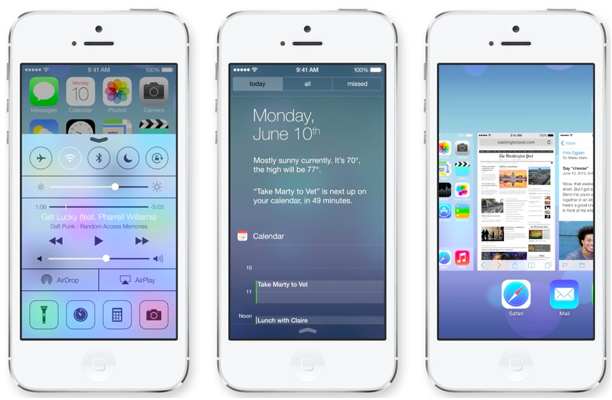
Apple Unveils iOS 7 with Major Design Overhaul, Multitasking and Control Center

At today's Worldwide Developers Conference in San Francisco, Apple unveiled the latest iteration of its mobile operating system. As expected, iOS 7 features a major design overhaul that removes many of the skeuomorphic elements found in previous versions of iOS, instead favoring a clean and gloss-less "flat" look. 

"It's the biggest change to iOS since the introduction of the iPhone," said Tim Cook. "It has a whole new structure that is coherent and that is applied across the entire system," said Jony Ive in a video showing off the new operating system. "We've considered the tiniest details like refining the typography to much larger ones like redesigning all the icons..."

Read the full story here. Source: Mac Rumours


Wave-Themed OS X Banner Goes Up at Moscone West for WWDC 2013

9to5Mac has posted a new photograph showing a wave-themed banner with an X in the middle, similar to the iOS 7 banner that was revealed earlier today. The spartan and minimalistic banners are significant change from the style used in previous years, particularly the OS X banner below.

The X appears to use the Helvetica Neue Ultra Light font, an extremely thin variant of Helvetica and the same font as the iOS 7 banner.

Source: Mac Rumours 

Apple to Expand Social Network Integration in iOS 7 with Support for Flickr and Vimeo

Apple has been making efforts to offer deep social network integration in its mobile operating system, first offering Twitter integration in iOS 5 and then Facebook integration in iOS 6. According to 9to5Mac, Apple will expand its social network integration even further with iOS 7, including support for both photo sharing site Flickr and video sharing site Vimeo

As with Facebook and Twitter integration, Vimeo and Flickr integration will allow users to be able to sign in to the social networks in the Settings menu. Those one-time sign-in credentials will be usable across iOS, providing comprehensive sharing options and easy integration with other downloaded apps.

Flickr is a logical addition to iOS given Apple's existing relationship with Yahoo, and popular video hosting site Vimeo is also a logical choice for iOS 7 as Apple continues to move away from Google products. Apple stopped offering YouTube as a stock iOS app with iOS 6 and also introduced its own mapping app, discontinuing its use of Google Maps. 

While Apple continues to allow direct video uploads to YouTube from its camera app, Vimeo integration will give iOS 7 users an additional option for video uploads. As with Yahoo, Apple has an existing relationship with Vimeo, having offered integration with the service in OS X Mountain Lion. 

As noted by 9to5Mac's unnamed source, though Flickr and Vimeo integration is currently in the works, as with all beta software, there is a risk that it could be removed before the public release of iOS 7. 

Apple's upcoming operating system is expected to feature a "flatter" design to modernize the look of iOS 7 while removing many of the skeuomorphic design elements that were introduced with iOS 6. Apple is expected to debut iOS 7 at its upcoming Worldwide Developers Conference in June with a release to follow in the fall, and MacRumors has noted a surge in traffic from devices running iOS 7 suggesting that a preview is imminent.

Source: Mac Rumours

Google launches new Google+ Hangouts with focus on conversations

The rumors were apparently true: Google's unified chat platform (widely nicknamed Babel) is launching as part of a Hangouts redesign. The new service focuses on conversations that carry over from device to device, including notifications and shared photos; contacts are still there, but they're pushed to the side. Live group video is new, too, while text chats make it clearer as to who has been reading and typing. Android, iOS and web users all get access to the updated Hangouts today.

Source: Engadget 

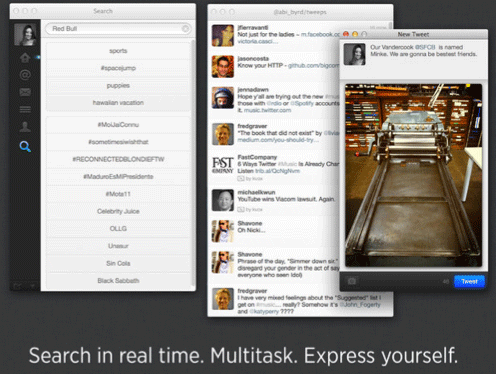
Twitter for Mac update brings photo sharing improvements, Retina display support

Twitter's showing off an updated version of its Mac app today, featuring a number of key fixes, including improvements to photo sharing and a slew of new languages. On the image side of things, you can now share a photo by clicking on the camera icon in the tweet composing module, or just do it the old fashioned way by dragging pictures from your desktop. Also new in this version is support for Macs with retina displays and a total of 14 new languages, including Dutch, French, German, Indonesian, Italian, Japanese, Korean, Malay, Portuguese, Russian, Simplified Chinese, Spanish, Traditional Chinese and Turkish. Interested parties can download the update via the source link below.

[Source: Engadget]

Tweetbot update brings new media timeline and image viewer

The popular Twitter client Tweetbot has been updated to version 2.8, bringing the addition of a new "media timeline" and image viewer for the iPhone and iPad apps. Media view allows users to see photos and images that have been tweeted directly in their feeds, with the text of the Tweets neatly located above the media.

The app's image viewer has also been updated to be faster and features a redesign. In addition, tweet details such as the number of favorites and retweets have been changed to update in real time, Instagram previews have been fixed, along with the standard bug fixes that come with every update.

To locate the new media view, scroll to the top of your timeline and tap the square next to the search button. The update is live now.

[Source: TUAW]

Tumblr for Windows Phone Now Available

Tumblr released an official Windows Phone application on Tuesday, which is great news for those of us who have been trying to find a decent alternative. The application allows you to “post anything from anywhere,” including quotes, links, photos, text, chats and videos. You can also use the app to browse other Tumblr sites that you follow.

The company said that you’ll be able to find new content, share your own, switch between dashboard mode and Explore mode with a swipe across the screen, view GIFs right in your news feed and more. New images from your dashboard will show up on a live tile and can be set to appear on your lockscreen as well.

Tumblr for Windows Phone is free and is available now.

[Source: TechnoBuffalo]

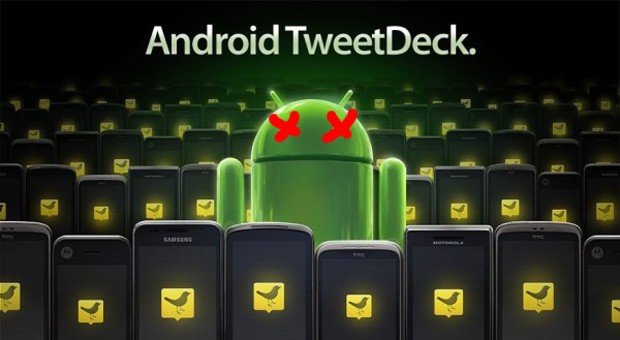
Twitter narrows TweetDeck AIR and mobile app shutdowns to May 7th

Twitter has been warning for weeks that it would shut down TweetDeck's AIR and mobile apps sometime in early May, but it didn't say exactly when loyalists would finally have to move on. The company now has a firm date: May 7th. In just over two weeks, Twitter will both pull the apps from their respective stores and stop existing installs from working as the service's version 1.0 API rides into the sunset. While the persisting native and web-based desktop apps will lessen some of the sting, we'd suggest that you pay your last respects if you have fond memories of TweetDeck's early apps.

[Source: Engadget]

LinkedIn ovehauls its iPhone app in version 6.0

The universal iOS LinkedIn app has been updated to version 6.0. The update brings a dramatic overhaul to the iPhone app, plus bug fixes and improved performance on the iPad.

According to the LinkedIn Blog, the iPhone app has a new interface, which makes using the app a lot easier to navigate and interact with. Now users can invite, follow, like, share and comment on content directly from the update stream, which is now the center of the app.

One particular new feature adds shortcuts to the new navigation area, accessed with a swipe to the right from the main homepage. This makes it quicker to get to certain features of LinkedIn, like connections or who's viewed your profile.

Finally, the app allows users to follow Influencers, and has added Dutch and Norwegian language support.

To celebrate the launch of the new app, LinkedIn has put together a video demonstrating the iPhone app in action. TheLinkedIn app is available now as a free download from the iOS App Store.

[Source: TUAW]