Twitter fights hacking with two-factor authentication

After a string of high-profile hacking incidents, Twitter has finally introduced a two-factor authentication system as a way for members to keep their accounts more secure.

On Wednesday, the information network rolled out the new login verification feature, which people can select to require entry of a six-digit code, in addition to their standard password, to gain access to their Twitter accounts.

"When you sign in to twitter.com, there's a second check to make sure it's really you," the company said in a blog post announcing the optional security feature.

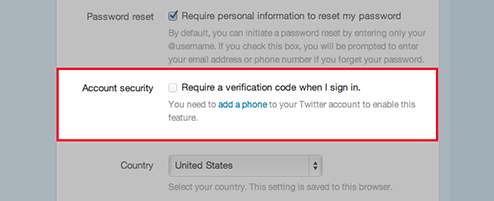
The two-factor system mirrors that of Facebook's and requires members to provide a phone number to which Twitter can send a unique code with each login attempt. Twitter users can turn on two-factor authentication from their Account Settings page, where they can tick the box to "Require a verification code when I sign in." Users then need to enter their phone number, and Twitter will subsequently text the number for verification purposes.

"With login verification enabled, your existing applications will continue to work without disruption," Twitter said. "If you need to sign in to your Twitter account on other devices or apps, visit your applications page to generate a temporary password to log in and authorize that application."

The additional security measure certainly complicates the login process, but the extra step is one many Twitter users, particularly brand users, will welcome with open arms. Last month, the Twitter accounts of CBS News' programs "60 Minutes" and "48 Hours" were compromised by hackers. (Disclosure: CNET is a unit of CBS Interactive.) The Associated Press was also the victim of a particularly cringeworthy breach when hackers sent out a false tweet that claimed the White House had been bombed. This news caused an immediate dive in the stock market.

Two-factor authentication should help Twitter defend against hacking attempts and partly repair its reputation as a public square for people, businesses, and celebrities.

Source: CNET
Two-step verification starts rolling out for Microsoft accounts

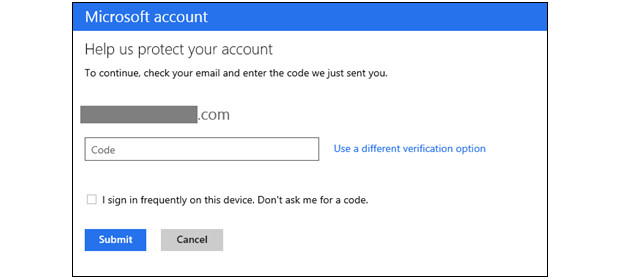
Everyone else is doing it, so why not Microsoft, right? The company has been accused of playing the "me too" game in the past, but we're not going to complain when the the end result is better security. As we learned from a leak last week, Redmond will begin enabling two-step verification for Microsoft accounts. The switch will get flipped for everyone over the next few days and, with email, Xbox Live and Skype (just to name a few) associated with the service formerly known as Live, it's never been more important to keep it locked down. (Especially when others are learning this lesson the hard way.) The two-factor gateway is purely opt-in, except where it's already been required: editing credit card information and accessing SkyDrive from a new computer. There's even a dedicated authenticator app for Windows Phone 8, which works whether or not you've got an internet connection. There's loads more detail at the source and you can check to see if the feature has been turned on for your account at the more coverage link. And if you can, we strongly suggest you turn it on. Like, now.

[Source: Engadget]

Apple adds two-factor authentication to your Apple ID

Apple is beefing up the security of its Apple ID by adding two-factor authentication to the account login process. Customers concerned about unauthorized access to their Apple ID can login to their account at Apple'sMy Apple ID webpage and turn on the feature as described below

  1. Go to My Apple ID (appleid.apple.com)
  2. Click the "Manage your Apple ID" button to login to your Apple ID
  3. Enter your Apple ID and password and click "Sign In"
  4. Select "Password and Security" in the left-hand column
  5. Type in the answers to your account security questions if you are prompted to answer them.
  6. You will see Two-Step Verification at the top of the page. Click on "Get Started" and follow the on-screen instructions.

If you have two-factor verification enabled, you will be required to enter both your password and a 4-digit code to verify your identity. According to Apple's support page, you will need this information whenever you sign in to My Apple ID to manage your account, make an iTunes / App Store / iBookstore purchase from a new device or get Apple ID-related support from Apple. You can read more about the security feature on Apple's support website, and check out Glenn Fleishman's thorough pros and cons rundown on TidBITS.

[Source: TUAW]

Evernote plans two-factor authentication following last week's hack

In a move that's often more reactive than proactive these days, Evernote has shared plans to add two-factor authentication to its login process. This latest announcement follows last week's hacking attack and subsequent site-wide password reset, and will be available to all of the site's 50 million users beginning later this year, according to an InformationWeek report. It's too early to say exactly how the Evernote team plans to implement the new security feature, whether through a dedicated app or text message password, but given the service's scale, we can likely count out a hardware fob option, at least. For now, your best course of action is to create a secure password, or, if you're especially paranoid, you may consider delaying your return until the security boost is in place.

[Source: Engadget]