Top 10 subtle Mountain Lion features (and a few more)

Lifehacker has put together a list of what they call the "top 10 secret features of Mountain Lion." That's not quite right -- these features aren't secret, because it would be pretty silly to release an OS update and not tell anyone about it. But they are subtle, and this is a nice list of features you may not have noticed yet.

For example, the fact that you can tweet right from the top of Notification Center, or that you can share photos straight from QuickLook using the Share button. You can also rename files in TextEdit (or share them to iCloud) just by clicking on the document's name at the top of the window, and you can even insert pages into PDF files in Preview through the Edit menu. Helpful tips, for sure.

We'll even add a few more features in that you may not have noticed yet: Over in Launchpad (which you can access from your dock or pressing F4 on a new Mountain Lion install, or set up a hot corner for), just typing will start you on a search for any app you've installed through the Mac App Store. And you may not have noticed, but Apple's added some brand new Screen Saver and slideshow options for when your Mac goes to sleep. Just like Apple's other OS releases lately, there's a lot of new stuff to go find and play with in Mountain Lion.

[Source: TUAW]

iPhone 5 and iPad Mini to be Announced on September 12th with iPhone 5 Release soon after

iMore reports that they have heard that the next generation iPhone, new iPod nano, and all new 7.85" iPad mini will be announced on September 12th. They also pinpoint the actual launch date for the next iPhone as September 21, 2012. iMore has heard that Apple is planning to debut the new iPhone at a special event on Wednesday, September 12, 2012, with the release date to follow 9 days later on Friday, September 21. This information comes from sources who have proven accurate in the past. The next-generation iPhone, which is frequently referred to as the "iPhone 5", is expected to have a taller 4" screen as shown in the above photo. Rumors have also suggested the inclusion of high speed LTE wireless networking.   While we generally refer to the next iPhone as the "iPhone 5", if Apple follows the example of their most recent iPad release, they may drop the numbering scheme with every new iPhone release. The 3rd generation iPad was simply called "the new iPad" in all press materials. Similarly, it seems likely that Apple will simply refer to the next iPhone as "the new iPhone".   While the 7.85" iPad mini has been long rumored, there has been a notable increase in the frequency and volume of rumors related to the product. The smaller iPad is believed to help Apple fill a cheaper price point in their tablet lineup.   iMore has been an accurate source of release date information in the past. They previously pinpointed the iPad 3 launch date as well as pre-order date for the iPhone 4S.

[Source: Mac Rumours]


Purported new-look iPhone 5 gets video treatment

For the second time, a purported iPhone 5 chassis has popped up in a video on the Web. Japanese site Macotakara posted a video -- dubbed "iPhone 5 Housings?" -- from YouTube that shows a person holding what could be the next iPhone. The device appears to come with the long-rumored, taller 4-inch display, and a plate on the back that extends for part, but not all, of the device's backside. In addition, the video shows the purported iPhone 5 with a smaller dock connector port as well as the headphone jack on the bottom.

The video is notable for showing what appears to be the same chassis found in a clip uploaded to YouTube last month. Like this chassis, the hardware in the previous video shows a unibody case that seems to confirm a host of rumors that have surfaced, including talk of Apple moving the headphone jack from the top of the device to the bottom and a smaller dock connector port. That earlier video followed the publication of a host of photos showing what appeared to be the same device. With this latest video now out in the wild, it's possible the rumor mill might be closing in on the eventual design of Apple's next iPhone...

[Source: To read the full article visit CNET News]

Get 'Save As' back on Mountain Lion's File menu easily

Much rejoicing accompanied the news that Mountain Lion brought back the "Save As..." option (which had been taken away in Lion and replaced with the not-nearly-the-same-thing "Duplicate" command). Unfortunately, Save As was relegated to a sub-menu which could only be seen if you held down the Option key, or you could use the not-very-convenient keyboard shortcut Command+Shift+Option+S.  For some reason, that keyboard shortcut never worked for me, so I decided to remap it using System Preferences.

[Source: To read the full article visit Tuaw]

Mountain Lion 101: The iCloud Document Library

One of my favorite features of Mountain Lion to demonstrate so far has been the iCloud Document Library. This is a way to store your iWork, TextEdit, and Preview documents in iCloud so that they are immediately accessible from other Macs on the same iCloud account as well as on connected iOS devices.

TUAW blogger and developer Erica Sadun told me the secret behind this on Wednesday. If you go to your Library folder and open the "Mobile Documents" folder, you'll notice that the name of the folder changes to iCloud (see screenshot below). That's where all of those documents are saved, and it's even possible to just drag items into the folder to add them to your iCloud Document Library.

In compatible apps, you'll find that selecting "Open" from the File menu displays a new Finder Open dialog with buttons for iCloud and "On My Mac". Selecting iCloud displays a very iOS-like dialog showing all compatible documents. Drag one document onto another, and you can create a folder -- another iOS feature. Likewise, selecting "Save As" from the File menu gives you the choice of saving a file to your iCloud Document Library.

[Source: TAUW - Click to read the full story]

Podcasts iOS App to Receive Bug Fix Update Later Today [Update: It's Out]

After Apple's Podcasts app was released last month, many users had complaints about bugs, crashes and other issues.All Things D says that an update should debut later todaythat will fix the problems and "vastly improve it":

Podcasts users take note: Apple has been hard at work tweaking the app to fix the problems that currently plague it and sources say the company expects to post an update to it this afternoon that should vastly improve it.

Nearly two-thirds of reviews for the Podcasts app on the App Store gave it a one - or two-star review, with the app having a two-and-a-half-star review overall -- one of the lowest of all Apple's apps.

Podcasts had traditionally been housed in the iTunes app on iOS devices, but Apple has been working to streamline the user experience by breaking out some categories into their own apps, including Podcasts and iTunes U.

Podcasts 1.0.1 provides a number of improvements, including:

• Significant improvements to performance and stability
• Podcasts in your library now show the number of unplayed episodes
• Top Stations now show the podcast title if artwork is missing 
• Playback speed is now remembered when playing the next episode
• Fix for a problem where the Subscribe button is inactive
• Resolution of an issue where Top Stations artwork may not appear

[Source: MacRumors]

Apple Releases Firmware to Activate PowerNap on 2011 MacBook Airs

One of the new features found in OS X 10.8 Mountain Lion is PowerNap. PowerNap was introduced at WWDC 2012 and allows your Mac to continue to perform tasks such as receiving email and updating software even when it's sleeping. 

Apple lists the full capabilities in this Knowledge Base document. Capabilities include getting new Mail, syncing Calendar, Contact and Reminder changes, and more. When plugged into power, your Mac can download software updates and make backups with Time Capsule. 

Apple only supports PowerNap on 2011 MacBook Airs and beyond as well as the 2012 Retina MacBook Pro. The capability should move over to more of Apple's laptops as Apple makes a full transition to SSD. Built-in flash storage is listed as one of the requirements of the technology. Apple just released a firmware update that enables this functionality in the 2011 MacBook Airs, while support for the Retina MacBook Pro is said to be "coming soon".

[Source: MacRumors]

Ten things you might not know about Mountain Lion

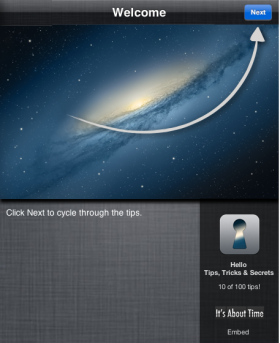
I've written about developer Saied Ghaffari and his company It's About Time before; well, they have another new Mac app that's pretty amazing, and the great thing is that TUAW readers can get a free sample of the app right here, right now.  The new app is called Hello Tips, Tricks & Secrets (US$1.99) and it's full of OS X tips that you might not know -- including a bunch of new tips especially for OS X Mountain Lion.  Saied made ten tips available in the sample web app that I've embedded below, but there are over a hundred tips in the Mac app, all presented in an easy-to-understand video format. Give the example below a try (click the Next button to start cycling through the tips), and then consider buying the app. It's a great way to learn some tips that you can show off to your friends and relatives, and they'll end up thinking you're an amazing Mac whiz!

[Source: Tuaw]

OS X Mountain Lion Launching Tomorrow, July 25

In Apple's earnings press release issued just moments ago, Apple CEO Tim Cook officially announced that OS X Mountain Lion will indeed be launching tomorrow, July 25.

“We’re thrilled with record sales of 17 million iPads in the June quarter,” said Tim Cook, Apple’s CEO. “We’ve also just updated the entire MacBook line, will release Mountain Lion tomorrow and will be launching iOS 6 this Fall. We are also really looking forward to the amazing new products we’ve got in the pipeline.”

OS X Mountain Lion will be priced at $19.99 and will be available via the Mac App Store. 

Apple followed a similar tactic last year, announcing at the start of its July earnings conference call that OS X Lion would launch the following day.

[Source: MacRumors]

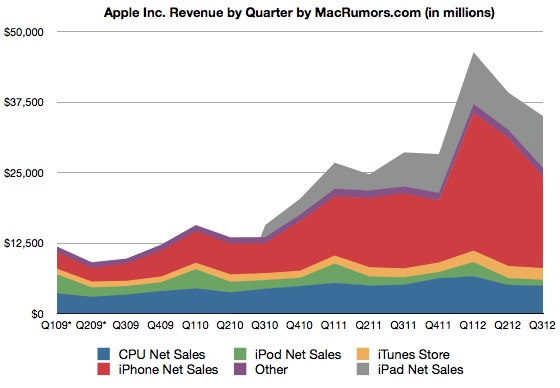
Apple Reports Results for Q3 2012: $8.8 Billion Profit on $35 Billion in Revenue

Apple today announced financial results for the second calendar quarter and third fiscal quarter of 2012. For the quarter, Apple posted revenue of $35.0 billion and net quarterly profit of $8.8 billion, or $9.32 per diluted share, compared to revenue of $28.57 billion and net quarterly profit of $7.31 billion, or $7.79 per diluted share, in the year-ago quarter.

This will be considered a big "miss" for Apple, as it is dramatically weaker than what analysts were expecting. The company did beat its own guidance, however. Last quarter, Apple said it would make $34 billion in revenue and earnings of $8.67 per share.

Gross margin was 42.8 percent, compared to 41.7 percent in the year-ago quarter, and international sales accounted for 62 percent of the quarter's revenue. Apple's quarterly profit and revenue were both company records for the June quarter. Apple also declared a new quarterly dividend of $2.65 per share payable on August 16 to shareholders as of the close of trading on August 13.


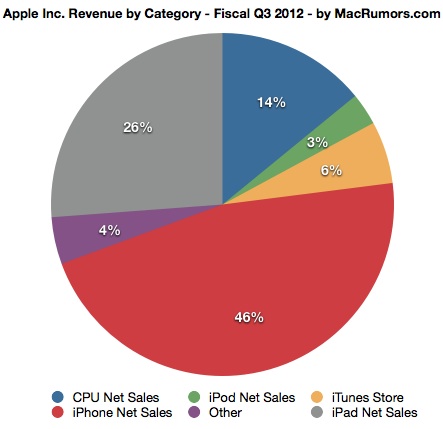
Quarterly iPhone unit sales reached 26.0 million, up 28 percent from the year-ago quarter, and the company sold 17.0 million iPads, up 84 percent year-over-year. Apple sold 4.0 million Macintosh computers, a unit increase of 2 percent over the year-ago quarter. The company also sold 6.8 million iPods, representing a 10 percent unit decline year-over-year.

“We’re thrilled with record sales of 17 million iPads in the June quarter,” said Tim Cook, Apple’s CEO. “We’ve also just updated the entire MacBook line, will release Mountain Lion tomorrow and will be launching iOS 6 this Fall. We are also really looking forward to the amazing new products we’ve got in the pipeline.”

Apple's guidance for the fourth quarter of fiscal 2012 includes expected revenue of $34 billion and earnings per diluted share of $7.65.


Apple will provide live streaming of its Q3 2012 financial results conference call at 2:00 PM Pacific, and MacRumors will update this story with coverage of the conference call highlights.

[Source: MacRumors]

Apple to Update iPod Touch with 4-Inch Display, A5 Chip, Buffed Aluminum Rear Shell?

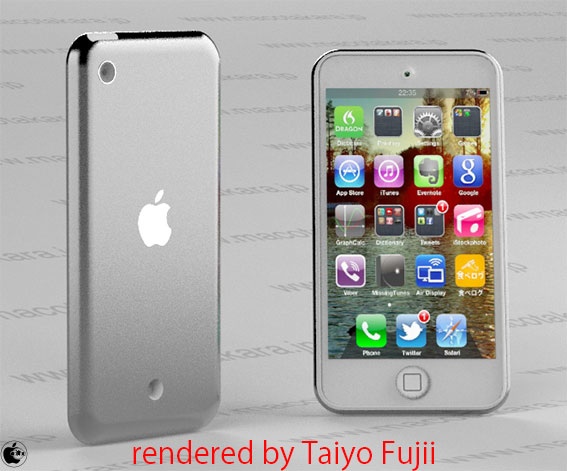
In line with a fresh report from KGI Securities analyst Ming-Chi Kuo claiming that Apple will be updating the iPod touch later this year with an "all-new" design using the same in-cell touch display technology rumored to be used in the next iPhone, Japanese blogMacotakara reports that Apple will also be moving the iPod touch to a 4-inch display from the current 3.5-inch display. Apple is otherwise said to be basing the iPod touch's internals on the iPhone 4S, although the case will include a "buffed aluminum" rear shell rather than the glass back of the iPhone 4S or the mirrored stainless steel of the current iPod touch.

According to asian source, new iPod touch (5th generation) will have 4 inch LCD which is the same size with coming iPhone 5.

CPU or other spec is considered to be same with iPhone 4S, and has different back-case design, which will be not mirror polished but buffed alminum one. And it seems to be prepared black and white color model.

The report's source also indicates that there is an additional hole in the lower portion of the rear shell, separate from the camera found on the current model. It is, however, currently unknown what the function of the hole will be.

[Source: MacRumors]

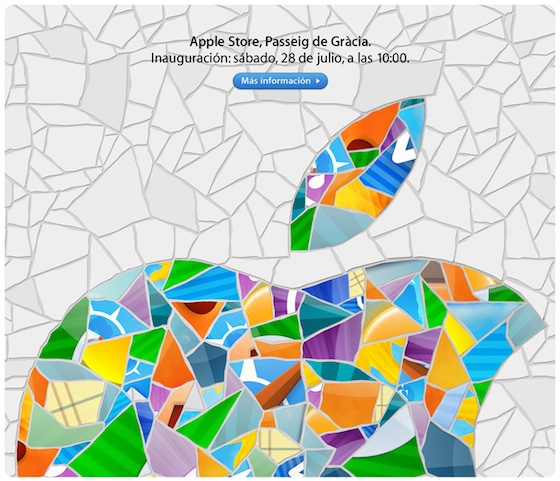
Apple's New Barcelona Retail Store Opens July 28


Apple today announced that its new Passeig de Gràcia retail store in Barcelona, Spain will officially open this Saturday, July 28 at 10:00 AM.

The store has gained some notice for Apple's use of mosaics in the store's logo and construction barriers honoring the style of Catalan architect Antoni Gaudí, with the mosaics being made up of pieces of icons from Apple's iOS apps.

[Source: MacRumors]