GeekanoidsTwitterInstagramFacebookBrotherUKAdvertAdvert

Sky swamped with complaints after Yahoo email switch

Sky customers have been complaining in their droves after being deluged with thousands of irrelevant messages after the company switched email providers.

Sky switched from Google to Yahoo, but it's been far from a smooth transition, the BBC reports. Sky customers have been receiving old and deleted messages again and again, meaning hours of wasted time clearing out inboxes. Now Sky has offered a solution, but you're not going to like it.

Sky promised to have a fix sorted by 5pm yesterday, but it missed that deadline. It has posted astep-by-step guide to fixing your inbox, but it basically consists of 'delete any emails you don't want'. Which is exactly what many customers have been doing, and what had them up in arms in the first place.

Over on the support forums, one customer complained of having to sift through 17,000 unwanted emails. Others are also grumbling about not being able to send email, aliases being deleted, filters being reset, and Outlook just plain not working since the switch. Some say they can't even access their email accounts through a browser or on their mobiles, which will impact business and well as personal use.

I think the entry under "Everyone's Tags" at the bottom of this page sums up customer feeling on the matter.

Sky, which has more than 4 million broadband customers, says the problem occurred during migration of all email addresses to Yahoo's servers. As soon as the servers synchronise, the issue should be solved, according to Sky. Though there's no word on when that will be.

Shame it's not as confident as it was the other week about possible network strain.

[Source: CNET]

Gmail for iOS Updated with Ability to Swipe Between Messages

Google has updated its Gmail app to version 2.1, adding swipe controls that allow users to navigate backwards and forwards through emails without returning to the inbox. 

Edit mode is now initiated when a message in the inbox is selected, allowing users to quickly organize emails into folders and add labels from the action bar at the top of the screen.

-Swipe left or right to move between messages without returning to the inbox. 

-Take action on multiple messages more quickly: Selecting a message in the inbox now enables edit mode. Once in edit mode, tap on messages to select them and then choose to archive, delete, or more, from the new actions bar. You may select Cancel at any time to leave edit mode. 

-And of course: performance improvements and bug fixes.

[Source: MacRumors]

Gmail's mobile web interface now looks just like the app

I use Gmail pretty much exclusively for my incoming email, with three or four different accounts that redirect to my always online, easily accessible, and seemingly bottomless inbox. I thought the app the company recently released with a brand-new look was pretty impressive, and apparently so did the web designers at Google: They have just switched the mobile website to make it look just like the official Gmail app.

Unfortunately, the changes haven't proliferated to my corner of the web, but the screenshots of the new design look great -- nice and clean, with just a few important bits of color to keep your incoming messages straight. This version is also available on Gmail Offline, says Google, though strangely enough it hasn't made its way to the official Android client yet. I find a certain irony in the fact that the web interface is catching up to the official app interface, especially considering how the iOS app environment started as a series of web apps.

And who knows -- maybe the desktop web interface will see some of these changes soon. I'm used to the way it works now, but I'd be up for some tweaks and twists if they help unify the platform.

[Source: TUAW]

Gmail 4.2.1 for Android adds easier resizing, swipe features and more

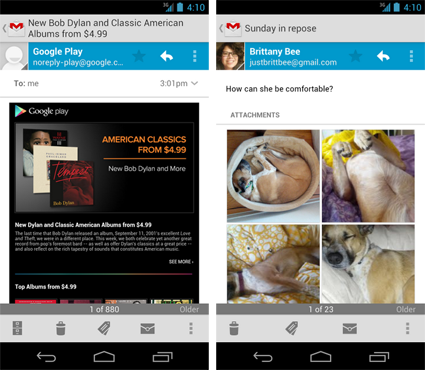
That leaked Gmail APK we peeked at a month or so ago turned out to be right on the money. Google has just released version 4.2.1 of the Gmail app for Android, which does indeed add pinch-to-zoom on individual messages and swipe (left or right) to delete or archive. There are a couple of features we didn't see in the initial leak though, which are the ability to "auto-fit" a message to your phone's screen and a new thumbnail view of attached images -- you can then tap a thumbnail for a swipeable gallery. If still pictures aren't your bag, it's finally possible to attach phone-captured videos to an email as well. This version of Gmail is only available for phones with Android 4.0 or higher however, so older devices might be out of luck. If your device qualifies, you can download the new version of Gmail right now from the Google Play store.

[Source: Engadget]

Gmail now searches attachment text, homework hoarders rejoice!

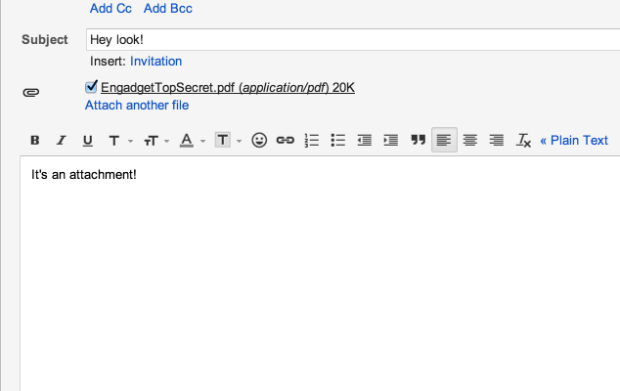
As Google continues to improve other areas of its broad ecosystem, it's always great to see that the company hasn't abandoned its search simplification roots. A spokesperson for the company told us, "we recently added the ability to search within Gmail attachments as part of our ongoing efforts to improve search." This potential time-saver plays nice with Word docs, PDFs, PPTs and many other file extensions. Currently in its infancy, some of your older attachments may not have been indexed yet, so you might not be able to "share" last year's term paper with your younger sibling until Google brings the feature up to speed. However, if you're just looking to locate that recently received Word doc filled with notes from your study buddy, then have at it.

[Source: Engadget]

Gmail results in Google Search now available to some field trial participants

One of Google's bigger announcements at its search-focused event earlier this week was the integration of personal Gmail content into Google Search — users will soon have the option to see Gmail results integrated right alongside other search results. The feature isn't publicly available yet, but Google began accepting sign-ups for a limited field trial along with the announcement, and now some Gmail members are receiving notifications that the feature has been activated for their account. Several tipster have written in to let us know that Gmail has begun popping up in their searches after receiving an email notification saying the feature was turned on; we've been able to confirm that with a few personal email accounts, as well.

It works just as Google explained a few days ago — search results from Gmail show up in the upper right of the screen, above Google Knowledge Graph content. They're hidden from view by default, but you can click to quickly see a snapshot of your Gmail conversations relevant to the search term. Upon clicking a conversation, it brings up a dedicated view of the whole relevant email thread rather than simply moving the user into Gmail, but there's an option to click and view the messages in the native Gmail interface as well. Strangely enough, this feature doesn't appear to be supported in Safari right now, though it works fine with Chrome and Firefox. If you want to participate in the trial, you can sign up right here.

[Source: The Verge]

Gmail video chat being upgraded to Google+ Hangouts

If we were ever in doubt that Google+ is becoming more of a focus for Google, today's Gmail announcement just reinforces it a little bit more. The video chat feature in Gmail is being replaced as of this morning. Taking its place, Google+ Hangouts. 

It isn't that surprising to see this integration eventually come around, but it is still a welcome upgrade. Google+ Hangouts is already a pretty powerful video conferencing tool, and without having to be in Google+ to use it just makes it that bit more useful day-to-day. It also means that you're able to reach your contacts for video chatting on their mobile devices too. 

The beauty is, every Gmail user will benefit from this upgrade, they don't have to be using Google+. But, if you're a user of both, then you can enjoy the full Hangouts experience such as watching YouTube videos together, collaborating on documents, or perhaps more importantly, dressing as a pirate.

[Source: Android Central]

Google Acquires Sparrow

The GMail app we all grew to love has now moved homes. Sparrow has been bought up by the powers-that-be at Google HQ. Things will continue, but will we see development halt on the Mac app as we know it? I think so.

The following quote is from the company website.

"We're excited to announce that Sparrow has been acquired by Google! We care a lot about how people communicate, and we did our best to provide you with the most intuitive and pleasurable mailing experience.

Now we're joining the Gmail team to accomplish a bigger vision — one that we think we can better achieve with Google. We’d like to extend a special thanks to all of our users who have supported us, advised us, given us priceless feedback and allowed us to build a better mail application. While we’ll be working on new things at Google, we will continue to make Sparrow available and provide support for our users.

We had an amazing ride and can't thank you enough.

Full speed ahead!" [Quote Dom Leca, CEO, Sparrow]