Flickr founder plans to kill company e-mails with Slack

When Flickr co-founder Stewart Butterfield and his team realized that their online game Game Neverending wasn't going to be a hit, they turned the game's photo-sharing tool into a stand alone product -- and got lucky...

Read the full story here... Source: CNET

NSA 'secret backdoor' paved way to U.S. phone, e-mail snooping

The National Security Agency created a "secret backdoor" so its massive databases could be searched for the contents of U.S. citizens' confidential phone calls and e-mail messages without a warrant, according to the latest classified documents leaked by Edward Snowden.

A report in the Guardian on Friday quoted Sen. Ron Wyden, an Oregon Democrat who serves on the Senate Intelligence Committee, as saying the secret rule offers a loophole allowing "warrantless searches for the phone calls or emails of law-abiding Americans..."

Read the full story here... Source: CNET

This Gmail 5 for Android Concept is Amazing

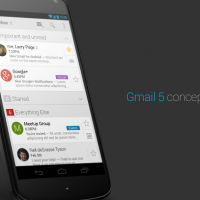
An Android developer and designer named Paul Burke recently published a set of photos to his Google+ page that re-imagines Gmail for Android. The photos show a stunning, simple and elegant user interface that incorporates all of your contacts and reorganizes your inbox so that it’s more intuitive and easier to use.

“I’ve been imagining what Gmail for Android could look like in a post-Google Now world,” Burke said. “After seeing the Gmail for iOS design, I was inspired to create a concept that adopts the best of both apps. The basic premise of this redesign is new navigation, and more focus on people and content. I’ve been working on this in tiny bursts for a while, and wanted to get more screens done, but at this rate, the actual app will come out first. I hope to, at least, get more done to show how the cards would work in the Conversation view.”

Burke warns, of course, that his concept won’t ever be created by Google and that these are sketches he developed in Photoshop. Google: take note.

[Source: TechnoBuffalo]

Sky swamped with complaints after Yahoo email switch

Sky customers have been complaining in their droves after being deluged with thousands of irrelevant messages after the company switched email providers.

Sky switched from Google to Yahoo, but it's been far from a smooth transition, the BBC reports. Sky customers have been receiving old and deleted messages again and again, meaning hours of wasted time clearing out inboxes. Now Sky has offered a solution, but you're not going to like it.

Sky promised to have a fix sorted by 5pm yesterday, but it missed that deadline. It has posted astep-by-step guide to fixing your inbox, but it basically consists of 'delete any emails you don't want'. Which is exactly what many customers have been doing, and what had them up in arms in the first place.

Over on the support forums, one customer complained of having to sift through 17,000 unwanted emails. Others are also grumbling about not being able to send email, aliases being deleted, filters being reset, and Outlook just plain not working since the switch. Some say they can't even access their email accounts through a browser or on their mobiles, which will impact business and well as personal use.

I think the entry under "Everyone's Tags" at the bottom of this page sums up customer feeling on the matter.

Sky, which has more than 4 million broadband customers, says the problem occurred during migration of all email addresses to Yahoo's servers. As soon as the servers synchronise, the issue should be solved, according to Sky. Though there's no word on when that will be.

Shame it's not as confident as it was the other week about possible network strain.

[Source: CNET]

Gmail for iOS Updated with Ability to Swipe Between Messages

Google has updated its Gmail app to version 2.1, adding swipe controls that allow users to navigate backwards and forwards through emails without returning to the inbox. 

Edit mode is now initiated when a message in the inbox is selected, allowing users to quickly organize emails into folders and add labels from the action bar at the top of the screen.

-Swipe left or right to move between messages without returning to the inbox. 

-Take action on multiple messages more quickly: Selecting a message in the inbox now enables edit mode. Once in edit mode, tap on messages to select them and then choose to archive, delete, or more, from the new actions bar. You may select Cancel at any time to leave edit mode. 

-And of course: performance improvements and bug fixes.

[Source: MacRumors]

Dropbox acquires Mailbox, teases an email and cloud collaboration

That was fast. It was just a month ago that Mailbox launched its unique (if queue-ridden) email client for iPhone users, and today we're hearing that it's been acquired by Dropbox. While the two aren't explicit about their plans, the Mailbox crew makes clear that a Dropbox union will help scale its client, including to non-Gmail providers and more devices. The team also isn't shy about speculating about what could happen if Dropbox's cloud storage was "connected" to Mailbox. We'll just have to give the new partners some time to produce what could be an alluring software hybrid.

[Source: Engadget]

Gmail's mobile web interface now looks just like the app

I use Gmail pretty much exclusively for my incoming email, with three or four different accounts that redirect to my always online, easily accessible, and seemingly bottomless inbox. I thought the app the company recently released with a brand-new look was pretty impressive, and apparently so did the web designers at Google: They have just switched the mobile website to make it look just like the official Gmail app.

Unfortunately, the changes haven't proliferated to my corner of the web, but the screenshots of the new design look great -- nice and clean, with just a few important bits of color to keep your incoming messages straight. This version is also available on Gmail Offline, says Google, though strangely enough it hasn't made its way to the official Android client yet. I find a certain irony in the fact that the web interface is catching up to the official app interface, especially considering how the iOS app environment started as a series of web apps.

And who knows -- maybe the desktop web interface will see some of these changes soon. I'm used to the way it works now, but I'd be up for some tweaks and twists if they help unify the platform.

[Source: TUAW]

Microsoft Offers Workarounds for iOS 6.1 Exchange Bug

iOS 6.1, which was released two weeks ago, brought with it a handful of serious bugs. The first bug, which affected 3G performance on the iPhone 4S was fixed yesterday, followingApple's release of 6.1.1 for the iPhone 4S. 

The second bug involved an error that caused iOS devices running 6.1 to continuously loop when synchronizing a recurring calendar meeting invitation on Microsoft Exchange. This error, which causes excessive memory consumption, was not fixed with yesterday's 6.1.1 update. 

As noted by 9to5Mac Microsoft has published an official support document offering workarounds for the error. 

Microsoft offers up several fixes, including the recommendation not to process Calendar items like meeting requests on iOS 6.1 devices. The company also recommends immediately restarting the devices and renewing the device partnership to halt the continuous looping access. 

Devices using iOS 6.1 should be blocked or throttled, says Microsoft, in order to reduce the effect on server resources. 

While none of these options are true fixes, Microsoft mentions that it is working with Apple to investigate the issue and suggests customers open an Enterprise Support case with Apple, via Enterprise agreement or a pay-per-incident case report.

[Source: MacRumors]

Yahoo launches Mail redesign, with eye on speed and simplicity

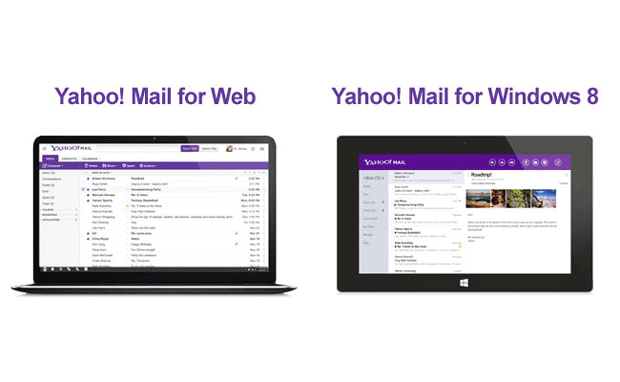
Yahoo CEO Marissa Mayer used her company's official blog to announced a Mail redesign. According to the exec, the company's shiny new inbox was revamped with speed in mind, letting users access their messages "faster than ever before." Mayer also promised fewer distractions for consumers, with messages at the center of the new design, as well as a "consistent look and feel across devices," including platforms like Windows 8, iOS, Android and the web. All of Mayer's comments can be found in the source link below.

[Source: Engadget]

Gmail 4.2.1 for Android adds easier resizing, swipe features and more

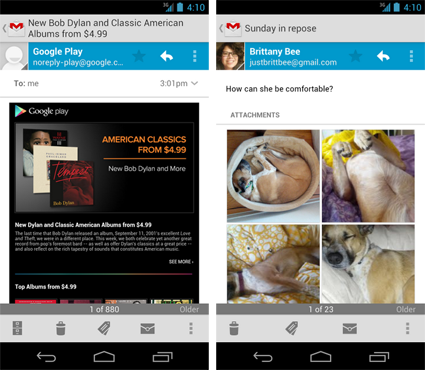
That leaked Gmail APK we peeked at a month or so ago turned out to be right on the money. Google has just released version 4.2.1 of the Gmail app for Android, which does indeed add pinch-to-zoom on individual messages and swipe (left or right) to delete or archive. There are a couple of features we didn't see in the initial leak though, which are the ability to "auto-fit" a message to your phone's screen and a new thumbnail view of attached images -- you can then tap a thumbnail for a swipeable gallery. If still pictures aren't your bag, it's finally possible to attach phone-captured videos to an email as well. This version of Gmail is only available for phones with Android 4.0 or higher however, so older devices might be out of luck. If your device qualifies, you can download the new version of Gmail right now from the Google Play store.

[Source: Engadget]

Apple notifies MobileMe members of iCloud.com email options

As one of the many people who purchased a MobileMe subscription in years past, you've probably already made the transition to iCloud and haven't looked back. In July of 2012, Apple noted during iOS 6 beta testing that new icloud.com addresses would be created for anyone using Apple's cloud computing solution as well as former MobileMe members. The transition to icloud.com email is apparently complete, as Apple is sending out a note to those MobileMe members telling them about their new email address option.

While Apple created a new icloud.com email address for anyone who had a mac.com or me.com address in the past, any one of those three domain prefixes can be used. An email sent to tuawblogger@icloud.com, for example, appears in any tuawblogger@me.com or tuawblogger@mac.com inbox as well. Here's the text of the Apple email:

All new iCloud Mail accounts now come with an @icloud.com email address. As an existing user, we'd like to offer you this new address as well. We have reserved [MobileMe user name]@icloud.com for you, and you can now use this address with your iOS devices and computers by following these simple instructions.

If you prefer, you can continue to use your current email address just as you always have.

No matter which address you use, you'll continue to receive all your mail, whether it's sent to your @me.com, @mac.com, or @icloud.com address.

[Source: TUAW]

Gmail now searches attachment text, homework hoarders rejoice!

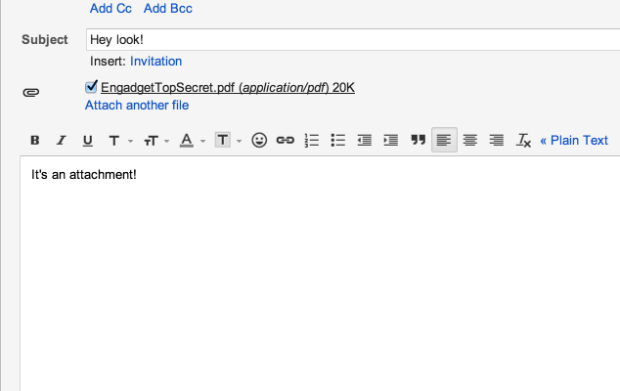
As Google continues to improve other areas of its broad ecosystem, it's always great to see that the company hasn't abandoned its search simplification roots. A spokesperson for the company told us, "we recently added the ability to search within Gmail attachments as part of our ongoing efforts to improve search." This potential time-saver plays nice with Word docs, PDFs, PPTs and many other file extensions. Currently in its infancy, some of your older attachments may not have been indexed yet, so you might not be able to "share" last year's term paper with your younger sibling until Google brings the feature up to speed. However, if you're just looking to locate that recently received Word doc filled with notes from your study buddy, then have at it.

[Source: Engadget]