
Sitting at your desk all day? Tapping away at your keyboard 'til your wrists hurt? If this sounds familiar you need to break away from your computer for a while and get some fresh air. With winter drawing nearer, now is a good time to get out early morning and go for a cycle. Or, perhaps you want to reduce your carbon footprint, so that short drive to work could be done in about the same time, whilst creating less pollution... oh, and did I mention you can get fitter at the same time!
Read MoreiPod touch Video Review - so thin!
 We waited for what seemed like an eternity for our iPod touch to be delivered. Now we have it in our little mitts, it brings great pleasure to bring you our video review of this wonderful device. Apple have packed some great technology and a fantastic screen into the ultra-thin iPod touch. The touch screen user interface is a joy to use, but does it still feel like an iPod? Check out our video review to find out.
Product: iPod touch
Price: £199 (8GB) : £269 (16GB as reviewed)
Supplied by: Apple UK
Contact: 0800 039 1010
Protect your iPod or iPhone with a GeekPouch
 Head on over to this new section is the Geekanoids Shop to take a look at our GeekPouches. Put simply, they are a cotton corduroy pouch to slip your iPod or iPhone into, protecting it from those nasty little scratches. The pouch is not going to break the technology barrier, but it makes a lot of sense to keep your Apple kit in good condition. Not only does it look good, but also increases resale value, should you choose to upgrade in the future.
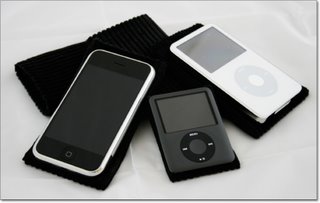 The GeekPouch is available for the iPod touch, 3rd gen iPod Nano, iPod Classic, 5th gen iPod Video and the iPhone. Prices across the board are £5.99 including UK delivery or £10.99 including international delivery.
Check out the video footage below.
iSkin Soho Laptop Sleeve Review
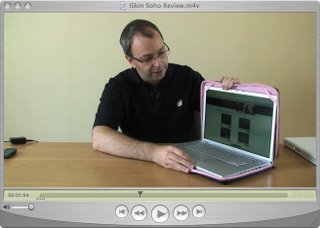 Want to keep your laptop safe? Then take a look at this video review of the rather stylish iSkin Soho laptop sleeve. Pretty in pink, but also available in other colours, the Solo feels very luxurious, but does it offer good protection? Watch the video to find out.
Product: iSkin Soho
Price: £49.99 (as reviewed)
Supplied by: iSkin
Contact via this online form.
Apple 3rd Gen iPod Nano Review + UK iPhone News
In our latest video installment we bring you more than just a review. We kick off with the news that Apple announced this morning, regarding the UK iPhone pricing, carrier and tariffs. Then onto the review of the 3rd generation iPod Nano. This tiny device arrived at Geekanoids on Monday and to say it is "impressive" is an understatement. How Apple pack so much technology into such a tiny device is amazing. Then squeezing the same number of pixels into the 2-inch screen as on the 5th gen iPod and iPod Classic makes for one of the best screens I have seen to date. Check out the video and enjoy!
Product: 8GB iPod Nano - 3rd generation
Price: £129.00
Note: 4GB model available for £99.00
Supplied by: Apple UK
Contact: 0800 039 1010
Apple iPod Classic First Look & Video Review
 The new iPod Classic from Apple landed in the Geekanoids office today, and being a big iPod fan I was eager to bring you this first look. We show you the 160GB silver version, including an unboxing to show exactly what you get for your money, the new user interface, and our overall impression of this new device. In case you are not quite up to speed, the new iPod Classic is available in black or silver, with 80GB and 160GB versions available.
Just imagine having 160GB to store all your music, movies, TV shows, podcasts and photos. Sit back and enjoy the video !
Product: Apple iPod Classic 160GB
Price: £229.00
Available from: AppleStore UK
Belkin PocketTop Review - Lap up the goodness
 Working around the home needn't be boring. The Belkin PocketTop gives you the chance to work in style and comfort. This product is available in some great colours and offers some really nice features that enhance the way you work. Check out the video review to see exactly what we thought. *Update* The PocketTop is currently available in Orange, Silver and Green. Since the video review was made three new colours have been announced, Chocolate with Tourmaline, Dove with Tarragon and Steel with Burnt Orange, keep an eye out on Geekanoids when we have some images for you.
Product: Belkin PocketTop
Model: F8N043eaORG
Price: £34.99
Supplied by: Belkin UK
Contact: +44 (0)1933 35 2000
Kodak EasyShare 5300 Review
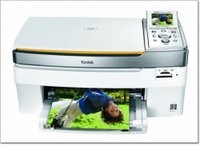 When it comes to choosing a new inkjet printer, you really are spoilt for choice. Add in the need for an all-in-one offering, for scanning as well, and things can become a little more complicated. Kodak plan to change this by introducing the EasyShare 5300 to the market. This is a really smart looking inkjet, in a nice white and silver finish that would not look out of place next to an iMac (though it will of course work with any Mac or PC). It offers the ability to scan, print from a selection of memory cards, and of course is a normal inkjet printer. It sports a 3-inch colour LCD screen, borderless printing, and claims of upto 32ppm in black and white, or 30ppm in full colour, which is pretty impressive.
Paper and inks are where the 5300 really excels. On the paper front you have two trays, one can be kept loaded with upto 100 A4 sheets, for regular documents and/or larger photo prints. The smaller tray sits just above this and is dedicated to 6x4 photo paper (capacity 20 sheets). You keep this loaded at all times and engage it by pushing it into the printer body a couple of inches. When engaged a green LED comes on to indicate that you are going to print from the 6x4 tray. This is a nice way of doing things, although I would prefer to select this in the printer driver on-screen rather than having to remember to engage the tray, but I guess this could just be a personal preference.
Inks and economy are taken to a whole new level. Up until now we have all been told to avoid printers that use all in one cartridges, and for good reason. Supposedly, if an ink cartridge consists of cyan, magenta, yellow and black, when just the black or cyan runs out, you have to replace the whole thing, even if the yellow is still full. With many other printers, this can be very costly. I have seen CMYK ink cartridges cost as much as £30 before, so why is the EasyShare 5300 different? Well, the 5300 has two ink cartridges, one for the black ink and the other holds the cyan, magenta,yellow, light cyan and light magenta. In a typical scenario the black would always run out first, so it is nice that this is separate. But what about that colour cartridge? Kodak have taken a different angle on this all-in-one cartridge business. Firstly, they say that the 5300 uses less ink than its competitors (see chart). You should expect to get around twice as much printing out of a cartridge when dealing with colour and almost three times as much for plain black text documents. Add this to the fact that the black cartridge has an RRP of £6.99 and the colour just £9.99 and you can start to see just how cheap the 5300 can be to run. You can pick up a black and colour cartridge together for as little as £14.99 if you shop around. This should equate to 2p per black A4 document, 5p per A4 colour document and 7p per 4x6 photo. Suddenly, this printer starts to make sense, if it performs well it could be a winner.
Getting the EasyShare 5300 up and running was pretty easy. There was a slight hiccup, where I had just upgraded to Mac OS X 10.4.10 and the Kodak software would not install. Upon contacting Kodak support I was advised that it was not seeing the last zero in my system software, so thought I was running 10.4.1. This was a problem because the 5300 only runs on OS X 10.4.9 or later. Although this was initially a problem I must really congratulate Kodak on the prompt response to the problem. With 48 hours the driver had been fixed and I was up and running.
In use scanning was a breeze, the 5300 is TWAIN compliant, so I used PhotoShop to scan some A4 magazine pages and photos. Colours were very accurate, whites neutral and blacks where quite dense. The level of detail and density was nothing to shout about, but definitely acceptable for the home market.
Printing was also a very good experience, with nice fast black and white printing. Not anywhere near the 32ppm claim, but I did get a ten page document out in one minute. Full colour business type documents were a little slower at around 6ppm, but the colours were bright and crisp, with no spidery text. Moving onto photos and the colour reproduction was fantastic. A borderless A4 full colour photo took almost to minutes, but the colours looked very accurate, the saturation was just right and the level of detail was as good as a lab print (to my eyes). Printing from the Mac, memory card, or via a PictBridge connected camera to the 4x6 paper yielded pretty much the same results. All around 40 seconds per print and all looked very nice.
So, does the EasyShare 5300 live up to its claims? Well, in the quality department I can give it a resounding yes. Prints were crisp, had great levels of detail, and seemed very colour accurate. My only complaint was when printing A4 borderless prints, that the first one of each batch had some feint lines at the top of the print. This did not repeat itself on successive prints. The scanner is also superb, more than good enough for the home market. Copying direct from the glass to the printer was also very easy and produced good results.
In the running cost arena, the 5300 did not quite meet expectations, but I should quickly draw your attention to just how cheap it is to run. I printed out A4 black and white text filled sheets, until the black ran out and got 332 prints, which equates to 2.1p per sheet, this is fantastic and almost matches Kodak’s 2p claim. Moving onto documents with a mix of colour diagrams, a photo and black text, resulted in 178 A4 prints, which equates to 9.5p per sheet. Kodak claim 5p per sheet, but this is at 5% coverage, whereas my documents were more like 10% coverage, so again pretty impressive. Last up were a batch of full coverage 6x4 photos. Again a new set of cartridges and I loaded up the 5300 and let it run, 142 photos later and the colour cartridge was out, so this worked out at 12p per photo. Again this is very good, not quite the 7p claim, but I would be more than happy paying 12p per photo and printing them from the comfort of my house, rather than going to to a photo lab.
As a complete home printing package the Kodak EasyShare 5300 represents really good value for money. It is cheap to run and produces very good results. You also get a very good scanner and convenient copier function too. If you need to send fax documents, then take a look at the EasyShare 5500 which shares all of the features and specification in this review, but add a fax machine into the equation for an extra £70.
Product: Kodak EasyShare 5300
Price: £139.99
Supplied by: Kodak UK
Contact: 0870 2430270
Waterfield Designs Racer-X Laptop Bag Review
 We are very pleased to bring you our video review of the Racer-X laptop bag from Waterfield Designs. This nicely designed bag is available in a variety of sizes, we take a look at the Apple MacBook version in a rather fetching black/red combo.
Update: In the video we mention not knowing what the zip on the rear of the bag is for. Oooops, this is our mistake, the exterior pocket on the back has a zippered bottom so it can be slipped over handles on wheeled carry-on bags, a very nice idea, sorry we missed it.
We liked the Racer-X, a lot, very high quality material and superb manufacturing quality. The Racer-X should be high on your list if you need to carry your laptop around.
Product: Racer-X Laptop Bag
Price: $169 to $189
Supplied by: SFBags
Contact: 877-546-1040
Outside the US: +1-415-546-1040
Harry Potter and the Order of the Phoenix Review
 I must admit to never really getting into the whole Harry Potter thing, yes, shame on me! For some strange reason, when EA released 'Harry Potter and the Order of the Phoenix' for the Sony PS3, I was drawn to it like a magnet and just had to take a look.
Previous incarnations of the Harry Potter games seemed to lack something in the magic department, they just seemed to try and do too much magic. In this latest offering EA have nailed it right on the head, the atmosphere of the whole game is spot on, you really feel like you are right there with Harry and the gang in Hogwarts. This feeling is mainly due to the superb graphics and textures that are very detailed and accurate.
 To keep the game moving along you have to complete over 30 tasks, learning spells along the way. You also unlock discovery points which in turn make your spells even more powerful. This allows you to unlock even more secrets and certainly kept my interest locked in. There are plenty of battles to be won, which have you twirling your wand, casting spells to defeat nasty kids and even the Dark Lord. During these spell casting battles, you will be impressed by the graphics, and the animation of Harry who reacts in some really cool ways to victory or defeat. Of course the main objective is to defeat your opponent, but paralyzing them is very effective.
The PS3 adds some six-axis controller features, and although they don't seem that accurate, being able to wave your controller to wave Harry's wand is a nice touch. I do not think Sony's six-axis will ever be that accurate, so it was nice to see EA at least implement it in some way.
In summary, Harry Potter and the Order of the Phoenix is a nice rounded game. Interesting game play, different on-screen battles (rather than awful cut scenes), a nice control method and good sound. Above all, what really stands out is the atmosphere of the game. It really makes you feel part of it, and has you coming back for more. This is certainly one you won't put down until you have finished it.
Product: Harry Potter and the Order of the Phoenix
Price: £49.99
Street Price: £34.96
Supplied by: Electronic Arts
Contact: 0870 2432435
Webtalker 5000 Video Review - Skype Goodness
 Skype is used by a lot of computer users, but if you use it a lot then you really shouldn't be crouched over your keyboard with a sweaty headset on. Why not add some class to your Skype experience and check out our video review of the Webt@lker 5000 from Topcom.
Update: I wanted to add something I forgot to mention in the video review (silly me), the most important part. The Webt@lker 5000 has a fantastic quality screen, probably the best I have seen on this type of product. It is very sharp and the colours are great. Call quality was equally superb, this probably had something to do with it being hard-wired (rather than a wireless device), but the voice clarity was very noticeable.
Product: Webt@lker 5000 with Skype
Price: £109.99 - £122.00
Supplied by: Topcom
Contact: info@topcom.net
Miglia TVMini Express Review
 You have never previously had so much choice for recording TV to your Mac, so when something is done well, it needs to be recognised. The TVMini Express from Miglia, really is a miniature package, from the moment you receive the tiny box, you will wonder just how it will all work.
In the box you get the TVMini Express tuner. A white USB stick, not much bigger than a flash drive, but designed in white to compliment most of the Mac range. You also get a portable antenna, USB 2 cable and a CD containing a PDF user guide and the included 'The Tube' software.
Hooking the kit up is really easy, just install the software, plug in the tuner to a USB 2 port (if this is hard to get to, you can use the included cable to extend your port to an accessible location). The antenna is a different matter, and in my case I could not get a Freeview signal with the tiny portable one that is included. This will vary depending on your area. Plugging into my main roof aerial sorted the problem.
Once everything was auto-tuned in, this little device simply works, and does things very well. You can record to your hard drive, move recordings across to your iTunes library to later sync with your iPod, iPhone or AppleTV. Of course watch recordings or live TV on your Mac. It is even possible to have TheTube software float the TV viewer on top of all other applications. So you can carry on working whilst watching TV. Another nice feature is the ability to see in a single window, what is on the other channels, without having to switch over, this is a real timesaver. To round things off, the EPG is superb, it allows you to easily find programmes and schedule recordings with ease. For this bargain price, you really can bring TV to your Mac with ease.
Product: TVMini Express
Price: £34.00
Supplied by: Miglia
Contact: +44 (0)1442 827222
Griffin California Roll iPod Case Review
Griffin Technology were kind enough to send us a California Roll iPod Case to review. This is not your normal hard case or rubbery silicone affair, so check out the video review to see exactly what we thought.
Product: Griffin Technology California Roll
Price: $19.99
UK Street Price: £8.99 to £12.99
Supplied by: Griffin Technology
Contact: +1 (615) 399-7000
Gear4 HouseParty Blu Review
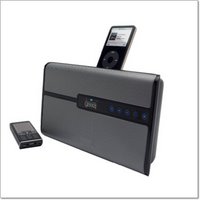 Gear4 have a nice range of iPod related products now, but with the HouseParty Blu they certainly seem to have upped the design ante. This sleek unit has a nice grill to the front, with some backlit touch sensitive controls. Yes, this is an iPod speaker system, with the mandatory dock, but it goes one step further by adding bluetooth.
OK, so the iPod does not have bluetooth as standard, although this can be added afterwards. Where the 'Blu' scores is that you can hook up any A2DP Bluetooth device, like your mobile phone and stream your tunes to it. In practice this work brilliantly. I am not a big mobile phone user, as I use my iPod all the time, but for the purposes of this review some of my fave tunes were transferred to my mobile. The quality was pretty darn good, not as good as docking my iPod, but certainly detailed and very usable.
The volume of this unit is pretty astounding too, with 30W of output it certainly goes loud and keeps the distortion in check too. There is also a line-in, so you can connect other audio devices to the HouseParty Blu. The supplied remote control is pretty much functional, as with most devices of this type, there is no need for an expensive remote.
On the iPod front, you can use the 'Blu' with any dock connecting iPod, as far back as the Mini. Docking adapters, which snap neatly into place, are supplied in the box.
Overall, this is a very nice package. It goes very loud, has a nice quality sound reproduction, and a very pleasing design. Add to this the flexibility of easily connecting a Bluetooth mobile phone, and you have a product that offers that little bit extra over the competition. Well done Gear4.
Product: HouseParty Blu
Price: £79.99
Supplied by: Gear4
Contact: support@gear4.com
Many thanks to Simms International Accessories for sponsoring the MacBook Pro used to create this review… Crumpler bags remain bold, fresh and super ergonomic, utilising durable high tech materials and offering the kind of unique features you won’t even know you need till you’ve tried them. And did I mention the ‘colourful’ names?
Brenthaven MetroLite Review
When you have a laptop of any brand, it is important to be able to take it with you whilst keeping it safe from knocks and scrapes. The MetroLite from Brenthaven offers a stylish choice, with a very nice quality feel to it. Check out the video review to see just what we thought of it.
Product: MetroLite Carry Case
Price: £49.95
Supplied by: Brenthaven
Contact: +44 (0)20 8400 1275
Untold Legends Dark Kingdom PS3 Review
 We covered the US launch of the Sony PS3 some time ago now, it seems like ages since we brought you any PS3 coverage, so it was nice of Electronic Arts to send us 'Untold Legends: Dark Kingdom (ULDK)' to review.
I have always wanted to get into Dungeons & Dragons (the board game) and really wanted to try World of Warcraft, but what stopped me was the dedication (and time) required to play. So, when this game touted itself as 'The Ultimate Next Gen Action RPG Experience' it caught my attention. Maybe, just maybe I could get my fix in a pick up and put down format. By that, I mean that I want to be able to grab a game, play it for half an hour, then be able to come back to it later.
 ULDK gets off to a good start with some stunning graphics. Even the player select screen is stunning, with some great level of detail on the characters. At this stage the game introduces you to the storyline, and I was thinking "Oh no, this is going to be boring", but then you are thrown into the action, quickly taught some awesome moves and the blood is (literally) flying.
 You work your way through battling various opponents, including some rather rabid creatures. Along your way, hacking and slashing through whatever gets in your way, you get items to pick up. Pieces of armor enhance your protection, as well as various spells and add-ons for your weapons. Your team that accompanies you help, but in what seems a very random way. Maybe, further in the game there are options to determine how you are helped in the harder battles, I certainly hope so.
Each stage is completed with the obligatory 'boss', but in a way that does not break the fluidity of the whole story. This is very well done, and eases you into the game, by not making the first few bosses overly difficult. You can also save your progress at various points, so this game definitely fulfills my need of having something I could play in short sittings.
As well as the single player, there are also co-op and internet modes. Each of these modes play perfectly and add superb value to the gameplay. In summary, the graphics are excellent, the sound is awesome and the gameplay (although a little repetitive) is a joy, the perfect balance in fact between difficulty and enjoyment. I would certainly recommend ULDK to any gamer who wants to experience a magical action packed RPG, without having to spend hours and hours on dedicated gaming.
Product: Untold Legends: Dark Kingdom
Price: £49.99
Street Price: £39.99
Supplied by: Electronic Arts
Contact: 0870 2432435
Belkin Compact Surge Protector Review
 You might ask when starting to read this review, "How can someone get excited about a surge protector?" Well, it goes without saying that many of us struggle with that spaghetti junction of wires tangled under our desks. Whenever I install a new set-up, things look neat for about five minutes. The moment I move something the cables seem to tangle themselves.
Belkin have offered a lot of variants of surge protector before, but this new 'Compact Surge Protector' certainly breaks from the norm and offers a design that should have been released years ago. The products gives you six surge protected sockets, plus three telephone sockets (on input, two outputs). What makes the unit stand out from the crowd is its design. The unit sits vertically, with three sockets on each side. Also, the sockets face downwards, so when you have equipment plugged in, the wires are pointing in the right direction. Fantastic solution this, as it means you can bundle all your excess cable behind your desk or the equipment itself and keep it hidden away.
You can also route your cables in the traditional way, along the floor. To keep things tidy there is a simple, but effective management clip that is connected to the two metre length power cable. The clip can be slid to any position and your equipment cables can be routed through it. This is a nice addition, just a shame there was not two provided for even more flexibility.
For your money you get a very useful and well thought out design. The unit provides 2,190 joules of surge protection, plus £100,000 of electrical insurance for connected equipment. Belkin also throw in a lifetime warranty, which shows how confident they are of their products. Everyone should protect their valuable computer and other electrical equipment with a surge protector. I strongly advise you to invest in one today, and you won't go far wrong with the Compact Surge Protector from Belkin.
Product: Compact Surge Protector
Price: £24.99
Supplied by: Belkin UK
Contact: +44 (0)1933 35 2000
Moixa USB Cell Review
Have you ever wanted to go on holiday and carry one less USB charger. Well, check out the Moixa USB Cells. These neat batteries come in a variety of sizes and I take a look at the AA variety here. They are NiMH batteries that charge from a USB port, how cool is that!?!
Product: Moixa AA USB Cell
Price: from £10.99
Supplied by: Moixa Energy Ltd
Fujitsu ScanSnap S500M Document Scanner Review
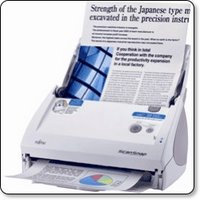 Scanning on the Mac platform has always been way ahead (or on par, some will argue) with the PC platform, except in one area - document scanning. It comes as no surprise that many manufacturers see Mac owners as designers, and when developing their scanners that handle medium to high volume scanning, they only ever release PC drivers. Document scanners can be great time and space savers. They are capable of automatically feeding invoices, brochures, and other paperwork and saving them as a file on your computer. For a long time now Fujitsu have made the ScanSnap for Mac, but it was lacking Intel support and was a little behind its PC equivalent. When they released the S500M I was very excited, even more so when BMI Solutions landed one on my desk to review.
The Fujitsu ScanSnap S500M is an all white affair, even the packaging gives that nice Apple unboxing feel. Set up is really really easy, install the Scansnap Manager software, plus the included Acrobat 7 software. The latter does not need to be installed unless you want to scan to PDF files. Of note, if you already have a later version of Acrobat installed on your Mac, then this also works a treat.
Once installed, the S500M connects to your Mac via USB. In its closed state, the feeder support that holds up to 50 sheets of A4 paper (to be scanned) folds upwards. The action of lifting the feeder also switches the scanner on. The front paper tray (for catching the scanned pages) folds down to reveal the scanner buttons. When you have finished scanning, you either fold the trays closed, to both turn the unit off and keep the dust out, or press the power button. This is a very nice design and lets the S500M take up very little desk space.
 In use, things couldn't be much simpler. You fire up the Scansnap Manager and set how you want your documents scanned. You can choose if colour, black and white or auto colour detection, the latter does an excellent job, but it is of course nice to force things into black and white if you so wish. the 'scanning mode' is selected with phrases like normal, better, best and slowest. Whilst this is OK and after playing with the settings you learn what is best, it would have been more helpful to have the dpi displayed in brackets. I hope Fujitsu do this in a software upgrade. The last of the main settings is to choose simplex or duplex scanning. This is a powerful feature of the S500M, the fact that it contains an upper and lower scanning element, so it is able to scan both sides of a document in one pass.
Other options in the software allow you to choose an external application to scan to, like Adobe Acrobat (for PDF) or Preview (for JPEG). You can also set how files are names and where they are saved to. Paper size can also be set, but in my tests I found the automatic detection very accurate. As well as the scanning mode you can also set the image quality, with one slider determining the amount of compression and file size. This confuses matters even further. Don't get me wrong, the end results are fine, but if you want to make specific settings, there has to be an easier way.
All these settings is as hard as it gets. Once you have made them all it is a simple matter of load your paper into the automatic feeder and pressing the scan button.
The S500M draws the pages through very accurately and at a fast 18ppm (pages per minute), so when in duplex mode, this equates to 36 sides per minute. If you are scanning at the highest 600dpi optical resolution on a slowish Mac, then you have to allow some additional time for the computer to process the files. When a batch of 50 sheets have been scanned, you can then load more into the feeder and either start a new file or add them to the one in progress. During my tests, I scanned a mixture of computer printouts, old invoices, brochure and magazine pages. Out of 250 pages, I had just two misfeeds, and these were very thin and crumpled NCR invoices. So the S500M can fall over, but with no major effect. Any misfeeds can be re-scanned and popped back into the relevant position within the file you are creating.
Scanning to PDF is great and with the aide of Acrobat you can process your files into searchable documents. This feature makes the S500M invaluable. You can scan your whole filing cabinet of any type of document, and then search it by keyword. This makes the S500M a great timesaver, as well as freeing up all that paperwork space. I can highly recommend the Fujitsu ScanSnap S500M to you for getting your paperwork and filing organised. The price from BMI Solutions makes it even better value for money.
Product: Fujitsu ScanSnap S500M
Price: £244.39
Supplied by: BMI Solutions
Contact: 0845 838 1694
Link to product page
Alien Skin Eye Candy 5 : Impact - Review
 Over the past week I have had the chance to take a look at Alien Skin Software's Eye Candy 5 'Impact', which is a collection of ten filters for Adobe Photoshop. The latest version of the software is a universal application and as such works very nicely with the latest CS3 incarnation of Photoshop. There are other collections available in this range of software, including Nature and Texture filters, which I will be looking at over the coming weeks.
Installation of the software is very straightforward, with an Alien Skin folder installed within the plugins folder where Photoshop resides. You can then gain access to the various filters and effects through the drop-down 'Filter' menu with your Photoshop application.
I can personally remember years ago using other Alien Skin products and loved the effects I could achieve with text and the like, so I was keen to delve in to see what was on offer.
Within the Alien Skin Impact menu, you have the choice of ten filter, including chrome, bevel, gradient glow, and glass effects, plus the ability to add bevels, reflections and shadows. Impact has three new filters called Backlight, Brushed Metal and Extrude. 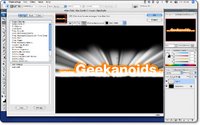 Backlight produces exactly what you would expect, but with a very dramatic effect. You can choose from factory presets in the left panel of the filter window (I chose Forward Fog Streaks) or you can create your own custom settings and save them to the User Settings panel (bottom left). You can control the angle and the intensity of the effect within the preview window, as well as zooming in, panning around an image and altering the preview background before you commit to a filter. When you do click OK, the effect is rendered onto a new layer within your Photoshop document.
What amazed me was the ease of creating great effects, and with just the Backlight filter alone, I could have spent hours trying out new effects. The speed of applying the filters were impressive too.
 The Extrude filter (shown here) was almost instant with my PhotoShop running on a 2GHz MacBook Core2Duo, imagine what it would be like on a good desktop machine. Again, Extrude offers a lot of presets, and is great for adding depth to text or any graphic element. I can certainly see it being a great tool for web designers and graphic artists alike.
The last of the three new filters is Brushed Metal, which as the name suggests makes your graphic element look like metal. On offer are various types of brushed effect; handbrushed, circular, and linear, all available in different colours and intensities. Even a Vinyl Record effect has crept into this section, hardly metal, but I loved it and will definitely be using that one in the future.
Of the filters I have note yet mentioned, Super Star adds some freaky and funky star effects, Motion Trail adds some very effective swishes and sweeps to your artwork, and Glass is pretty self explanatory (and very effective). Perspective Shadow does a lot of what Photoshop can do anyway, but within this filter the various Reflect presets allow for some great effects. My last image shows 'Reflect in Front - Sharp' and I must say, this alone impressed me. It is not just the end result that is impressive, but the speed in which Alien Skin allows you to be creative.
 So, who should this product appeal to? Well, if you are a graphic artist, creative professional, or web designer, then Alien Skin Eye Candy 5 Impact is a must. It offers up some great filters that will save you a great deal of time, whilst giving you clients that wow factor with ease… and that is before we even look at the pricing. If you are an everyday Photoshop user, then again, this collection of filters will allow you to experiment and create some great artwork, that may well have been difficult to achieve without it. The pricing makes this a must buy product; just buying impact by itself will only set you back £49, which in my mind is a bargain. If you would like to save some money, then take a look at the bundles. You can pick up the Eye Candy 5 Bundle, which contains the Impact filters reviewed here, plus the Textures and Nature collections for just £79, this is a fantastic bargain, but things don't stop there. The Eye Candy Effects Collection contains all of the above, plus Snap Art and Xenofex 2 (which retail separately for over £70 each) for the paltry sum of £239 (currently on special offer for £199 at XChange International), at this price, I know which package I would buy.
If you need to increase your creativity and productivity then look no further. Adding some or all of these Alien Skin filter collections to Photoshop will be money VERY wisely spent.
Note: check back soon for reviews of Alien Skin Eye Candy 5 Textures and Nature, plus Snap Art and Xenofex 2.
Product: Alien Skin Eye Candy 5 : Impact
Price: £49
Collection Price: £239 ($399) as part of the Eye Candy Effects Collection
Supplied by: Alien Skin Software
Telephone XChange International: +44 (0)20 7490 4455
Email: info@xchangeuk.com